使用效果
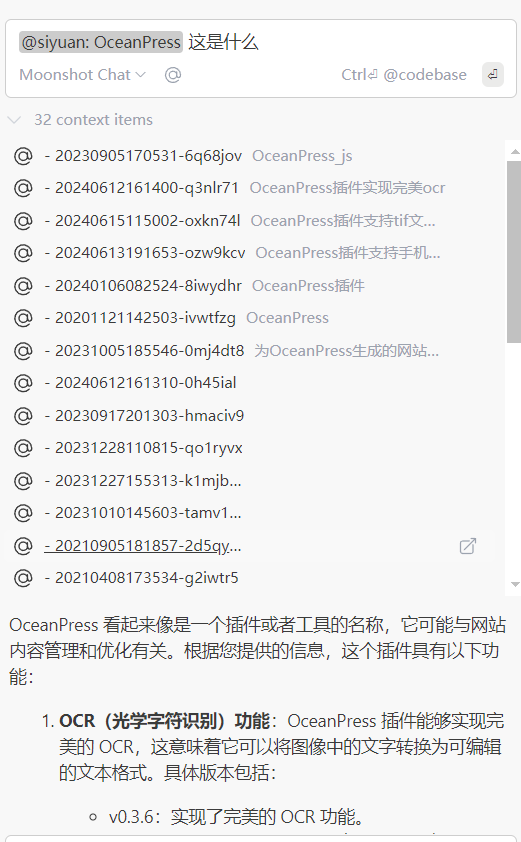
支持点击上方的 item 跳转到思源
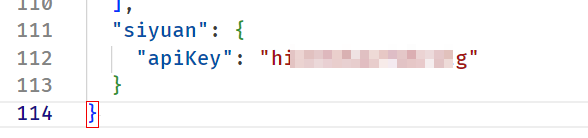
1. 在 config.json 中配置 apiKey
直接点击插件的齿轮图标->Open configuration file 就能打开 config.json
添加如下这样的配置即可
2. 在 config.ts 中编写自定义的 contextProviders
config.ts 和 上面的 config.json 在同一个目录下
代码如下
export function modifyConfig(config: Config): Config {
  // 自定义上下文提供者
  config.contextProviders?.push({
    title: "siyuan",
    type: "query",
    async getContextItems(query, extras) {
      const apiKey = (config as any).siyuan.apiKey;
      console.log("[query, extras]", query, extras);
      const data = {
        query: query,
        method: 0,
        types: {
          audioBlock: true,
          blockquote: true,
          codeBlock: true,
          databaseBlock: true,
          document: true,
          embedBlock: true,
          heading: true,
          htmlBlock: true,
          iframeBlock: true,
          list: false,
          listItem: false,
          mathBlock: true,
          paragraph: true,
          superBlock: true,
          table: false,
          videoBlock: true,
          widgetBlock: true,
        },
        paths: [],
        groupBy: 0,
        orderBy: 0,
        page: 1,
        reqId: Date.now(),
      };
      console.log("[data]", data);
      return await fetch("http://127.0.0.1:6806/api/search/fullTextSearchBlock", {
        headers: {
          accept: "*/*",
          "accept-language": "zh-CN",
          "content-type": "text/plain;charset=UTF-8",
          Authorization: `Token ${apiKey}`,
        },
        referrerPolicy: "strict-origin-when-cross-origin",
        body: JSON.stringify(data),
        method: "POST",
        mode: "cors",
        credentials: "include",
      })
        .then((r) => r.json())
        .then((r) => {
          const blocks = r.data.blocks as {
            id: "20210521144338-li21s3u";
            fcontent: "ai测试";
            content: "ai<mark>测试</mark>";
            name: "";
          }[];
          console.log("[blocks]", blocks);
          return blocks.map((block) => {
            return {
              name: `${block.name} - ${block.id}`,
              description: block.fcontent.slice(0, 20),
              content: block.fcontent,
              uri: {
                type: "url" as const,
                value: `siyuan://blocks/${block.id}`,
              },
            };
          });
        })
        .catch((e: Error) => {
          return [
            {
              name: `request error`,
              description: "请求出错",
              content: String(e),
            },
          ];
        });
    },
  });
  return config;
}
欢迎来到这里!
我们正在构建一个小众社区,大家在这里相互信任,以平等 • 自由 • 奔放的价值观进行分享交流。最终,希望大家能够找到与自己志同道合的伙伴,共同成长。
注册 关于