字段都处于同一个数据库
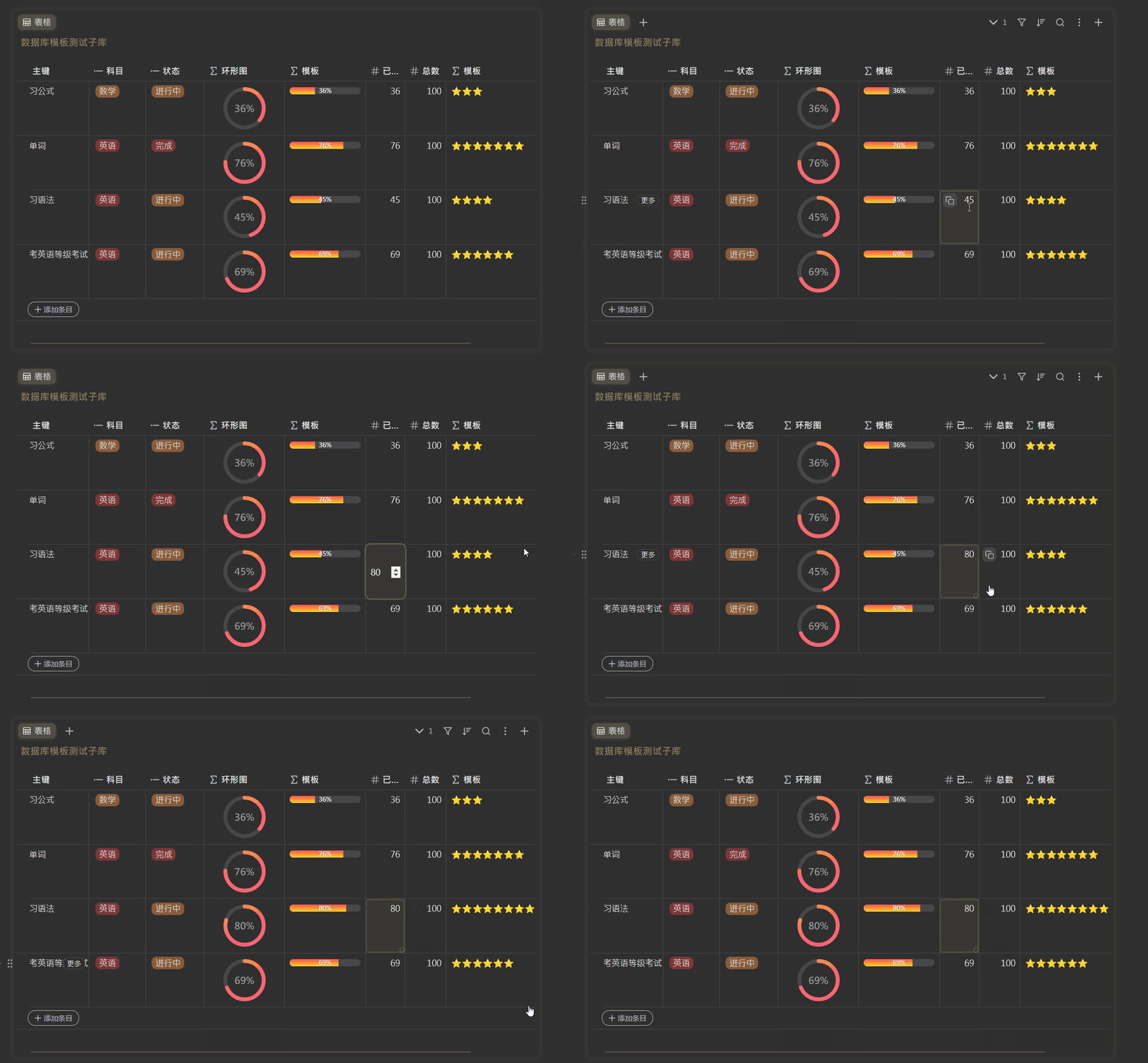
线性进度条
渐变色
.action{$a:= index . "已完成" }
.action{$b:= index . "总数" }
.action{$c:= mul $a 100}
.action{$d:= div $c $b}

<span style="background-color: rgba(175,184,193,0.2); width: 100%; display: inline-block; height: 12px; border-radius: 6px; position: relative; overflow: hidden;">
    <!-- 渐变背景层 -->
    <span style="
        width: .action{$d}%;
        height: 100%;
        background-image:linear-gradient(0deg,#f9d423 0%, #ff4e50 100%); /*替换成你想要的渐变色*/
        display: block;
    "></span>

    <!-- 数字层(仅加粗数字,保留%正常粗细) -->
    <span style="
        position: absolute;
        top: 0;
        left: 0;
        width: 100%;
        text-align: center;
        font-size: 10px;
        line-height: 12px;
        color: white;
        text-shadow: 0 0 2px rgba(0,0,0,0.5);
    ">
        <span style="font-weight: bold;">.action{floor $d}</span>%
    </span>
</span>
百分比颜色和主题背景颜色冲突就换一个字体颜色。
纯色
.action{$a:= index . "已完成" }
.action{$b:= index . "总数" }
.action{$c:= mul $a 100}
.action{$d:= div $c $b}

<span style="background-color: rgba(175,184,193,0.2); width: 100%; display: inline-block; height: 12px; border-radius: 6px; align-self: center; overflow: hidden;">
    <!-- 进度条的已完成部分 -->
    <span style="text-align: right; font-size: 12px; width: .action{$d}%; background-color: rgb(45,164,78); display: inline-block; height: inherit; vertical-align: top; color: white; line-height: 12px;">
        .action{$d}%
    </span>
</span>
圆环图
渐变色
.action{$a:= index . "已完成" }
.action{$b:= index . "总数" }
.action{$c:= mul $a 100}
.action{$d:= div $c $b}

<div style="
    position: relative;
    width: 80px;
    height: 80px;
    margin: 0 auto;
">
    <!-- 1. 背景轨道(静态) -->
    <svg width="100%" height="100%" viewBox="0 0 100 100" style="position: absolute;">
        <circle cx="50" cy="50" r="40" fill="none"
                stroke="rgba(175,184,193,0.2)" stroke-width="8"/>
    </svg>

    <!-- 2. 动态进度环(渐变色核心) -->
    <svg width="100%" height="100%" viewBox="0 0 100 100" style="position: absolute;">
        <defs>
            <linearGradient id="gradient" x1="0%" y1="0%" x2="100%" y2="0%" gradientTransform="rotate(-20)">
                <stop offset="0%" stop-color="#fc6076" />
                <stop offset="100%" stop-color="#ff9a44" />
            </linearGradient>
        </defs>
        <circle cx="50" cy="50" r="40" fill="none"
                stroke="url(#gradient)" stroke-width="8" stroke-linecap="round"
                stroke-dasharray="calc(.action{$d} * 2.5) 1000"
                transform="rotate(-90 50 50)"/>
    </svg>

    <!-- 3. 中心文字 -->
    <div style="
        position: absolute;
        top: 50%;
        left: 50%;
        transform: translate(-50%, -50%);
        font-size: 16px;
        font-weight: bold;
        color: #999;
    ">
        .action{floor $d}%
    </div>
</div>
纯色
.action{$a:= index . "已完成" }
.action{$b:= index . "总数" }
.action{$c:= mul $a 100}
.action{$d:= div $c $b}

<div style="
    position: relative;
    width: 80px;
    height: 80px;
    margin: 0 auto;
">
    <!-- 1. 背景轨道(静态) -->
    <svg width="100%" height="100%" viewBox="0 0 100 100" style="position: absolute;">
        <circle cx="50" cy="50" r="40" fill="none"
                stroke="rgba(175,184,193,0.2)" stroke-width="8"/>
    </svg>

    <!-- 2. 动态进度环(核心) -->
    <svg width="100%" height="100%" viewBox="0 0 100 100" style="position: absolute;">
        <circle cx="50" cy="50" r="40" fill="none"
                stroke="rgb(45,164,78)" stroke-width="8" stroke-linecap="round"
                stroke-dasharray="calc(.action{$d} * 2.5) 1000" <!-- 动态计算 -->
                transform="rotate(-90 50 50)"/>
    </svg>

    <!-- 3. 中心文字 -->
    <div style="
        position: absolute;
        top: 50%;
        left: 50%;
        transform: translate(-50%, -50%);
        font-size: 16px;
        font-weight: bold;
    ">
        .action{floor $d}%
    </div>
</div>
表情图案
这里我拿 ⭐ 做演示,实际中可以改成 🔥❤ 之类的
.action{/*
  计算星标数量:每完成20个单位值增加1颗星
  参数说明:
    .字段名 - 需要统计的数值字段(如完成量)
    20 - 每颗星代表的单位阈值
*/}
.action{ $scale := (div .字段名 20) }
.action{ repeat (int $scale) "⭐" }
汇总字段。字段处于另一个数据库

线性进度条
.action{$total := 0}
.action{$ok := 0}
.action{if empty .关联}
.action{"0%"}
.action{else}
.action{/* 获取任务总数 */}
.action{range $index, $value := .关联}
.action{$total = add $total 1}
.action{end}
.action{/* 获取已完成数 */}
.action{range $index, $value := .任务进度汇总}
.action{if eq $value "完成"}
.action{$ok = add $ok 1}
.action{end}
.action{end}
.action{$ok_100:= mul $ok 100}
.action{$result:= div $ok_100 $total}

<div style="width: 90%; margin: 0 auto;">
  <!-- 修复后的单层进度条结构 -->
  <div style="
    background-color: rgba(175,184,193,0.2);
    width: 100%;
    height: 12px;
    border-radius: 6px;
    position: relative;
    overflow: hidden;
  ">
    <!-- 动态渐变进度(完整高度) -->
    <div style="
      width: .action{$result}%;
      height: 100%;
      background-image: linear-gradient(to right, #fc6076 0%, #ff9a44 100%);
      position: relative;
    ">
      <!-- 跟随数字(绝对定位在进度条末端) -->
      <span style="
        position: absolute;
        right: 2px;
        top: 50%;
        transform: translateY(-50%);
        font-size: 10px;
        color: #dfe9f3;
        font-weight: bold;
        text-shadow: 0 0 2px rgba(0,0,0,0.3);
        line-height: 1;
      ">
        .action{floor $result}%
      </span>
    </div>
  </div>
</div>
.action{end}
圆环图
.action{$total := 0}
.action{$ok := 0}
.action{if empty .关联}
.action{"0%"}
.action{else}
.action{/* 获取任务总数 */}
.action{range $index, $value := .关联}
.action{$total = add $total 1}
.action{end}
.action{/* 获取已完成数 */}
.action{range $index, $value := .任务进度汇总}
.action{if eq $value "完成"}
.action{$ok = add $ok 1}
.action{end}
.action{end}
.action{$ok_100:= mul $ok 100}
.action{$result:= div $ok_100 $total}

<div style="
    position: relative;
    width: 80px;
    height: 80px;
    margin: 0 auto;
">
    <!-- 1. 背景轨道(静态灰色) -->
    <svg width="100%" height="100%" viewBox="0 0 100 100" style="position: absolute;">
        <circle cx="50" cy="50" r="40" fill="none"
                stroke="rgba(175,184,193,0.2)" stroke-width="8"/>
    </svg>

    <!-- 2. 动态渐变色进度环(核心) -->
    <svg width="100%" height="100%" viewBox="0 0 100 100" style="position: absolute;">
        <defs>
            <linearGradient id="gradient" x1="0%" y1="0%" x2="100%" y2="0%" gradientTransform="rotate(-20)">
                <stop offset="0%" stop-color="#fc6076" />
                <stop offset="100%" stop-color="#ff9a44" />
            </linearGradient>
        </defs>
        <circle cx="50" cy="50" r="40" fill="none"
                stroke="url(#gradient)" stroke-width="8" stroke-linecap="round"
                stroke-dasharray="calc(.action{$result} * 2.5) 1000"
                transform="rotate(-90 50 50)"/>
    </svg>

    <!-- 3. 中心文字 -->
    <div style="
        position: absolute;
        top: 50%;
        left: 50%;
        transform: translate(-50%, -50%);
        font-size: 16px;
        font-weight: bold;
        color: #999;
    ">
        .action{floor $result}%
    </div>
</div>
.action{end}
表情图案
.action{/*
  计算星标数量:每完成1个单位值增加1颗星
  参数说明:
    .字段名 - 需要统计的数值字段(如完成量)
    1 - 每颗星代表的单位阈值
*/}
.action{$completed := 0}
.action{range $index, $value := .任务进度汇总}
.action{if eq $value "完成"}
.action{$completed = add $completed 1}
.action{end}
.action{end}

<!-- 星标评分系统 -->
<div style="
    font-size: 14px;
    font-weight: bold;
    text-align: center;
    padding: 8px;
    border-radius: 4px;
">
    .action{repeat (int $completed) "⭐"}
</div>
模板文件
上面改成你本地数据库的字段名就能用了。或者也可以参考已经实习的模板样式模板.sy.zip
欢迎来到这里!
我们正在构建一个小众社区,大家在这里相互信任,以平等 • 自由 • 奔放的价值观进行分享交流。最终,希望大家能够找到与自己志同道合的伙伴,共同成长。
注册 关于