本文参考文章:
300 积分悬赏,将数据库内容渲染为 Char(图表) - 链滴
效果图
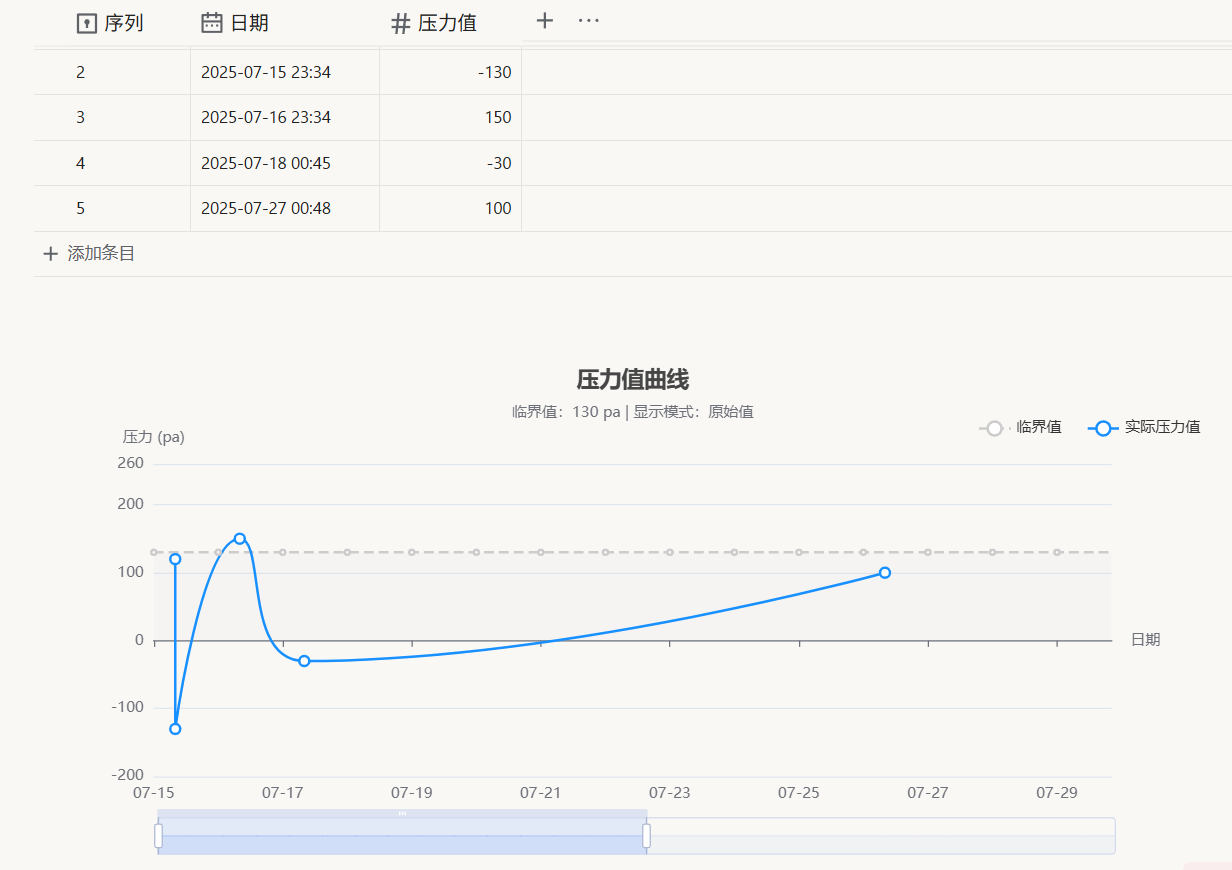
效果视频
具体功能(自定义)
- 关联数据库自定义
- 图标 X 轴、Y 轴、固定虚线、计算方法选择等自定义
代码
(async () => {

//1.关联数据库配置区域
    // 关联的数据库块id
    const avBlockId = '20250715013326-ab0y38s';

    // 关联的图表块id
    const chartBlockId = '20250715020010-95gpkrh';

    //数据库数据同步到图表的列名,注意名称需对应
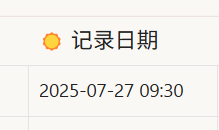
    const mydata = '记录日期';
    const number = '压力值';

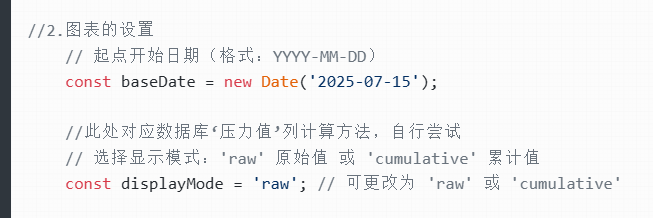
//2.图表的设置
    // 起点开始日期(格式:YYYY-MM-DD HH:mm)
    const baseDate = new Date('2025-07-25 00:00');

    //此处对应数据库‘压力值’列计算方法,自行尝试
    // 选择显示模式:'raw' 原始值 或 'cumulative' 累计值
    const displayMode = 'cumulative'; // 可更改为 'raw' 或 'cumulative'

    //固定虚线的数值设置
    const guding = 400;

   //Y轴的最大值和最小值设置
    const ymin = -100;
    const ymax = 800;

    //X轴的时间单位选择,跨度数量选择
    // 时间单位选择:'hour'(小时)、'day'(日)、'month'(月)、'year'(年)
    const timeUnit = 'day'; // 可更改为 'hour', 'day', 'month', 'year'

    // 时间跨度数量
    const timeSpan = 8; // 时间跨度数量(若小时单位下建议48小时)

//3.X轴标签格式配置
    // X轴标签格式
    const timeUnitFormat = {
        hour: '{MM}月{dd}日{HH}时',    // 小时单位格式:月/日 时:00  {yyyy}-{MM}-{dd} {HH}:{mm}
        day: '{MM}-{dd}',             // 天单位格式:月-日
        month: '{yyyy}-{MM}',         // 月单位格式:年-月
        year: '{yyyy}'                // 年单位格式:年
    };

    // 点-悬浮提示日期格式:
    const tooltipDateFormat = {
        hour: '{yyyy}-{MM}-{dd} {HH}:{mm}',  // 小时单位提示格式:年-月-日 时:分
        day: '{yyyy}-{MM}-{dd} {HH}:{mm}',   // 天单位提示格式:年-月-日
        month: '{yyyy}-{MM}',                 // 月单位提示格式:年-月
        year: '{yyyy}'                        // 年单位提示格式:年
    };

//4.X轴标签显示设置
    // X轴标签旋转角度(单位:度)
    // 0: 水平显示, 45: 斜角显示, 90: 垂直显示
    const xAxisLabelRotate = 0; // 可更改为 0, 45, 90 等

//================================================================

    // X轴标签显示间隔(0表示全部显示,1表示隔一个显示一个,以此类推)
    const xAxisLabelInterval = 0; // 可更改为 0, 1, 2 等

    // 轴指针标签格式(暂时不知道有什么用,可能与时间精度有关,删了也不影响,留着先)
    const axisPointerFormat = {
        hour: '{yyyy}-{MM}-{dd} {HH}:{mm}',  // 小时单位指针格式:年-月-日 时:分
        day: '{yyyy}-{MM}-{dd}',              // 天单位指针格式:年-月-日
        month: '{yyyy}-{MM}',                 // 月单位指针格式:年-月
        year: '{yyyy}'                        // 年单位指针格式:年
    };

    // 根据时间单位计算结束日期
    const endDate = new Date(baseDate);
    if (timeUnit === 'hour') {
        endDate.setHours(baseDate.getHours() + timeSpan);
    } else if (timeUnit === 'day') {
        endDate.setDate(baseDate.getDate() + timeSpan);
    } else if (timeUnit === 'month') {
        endDate.setMonth(baseDate.getMonth() + timeSpan);
    } else if (timeUnit === 'year') {
        endDate.setFullYear(baseDate.getFullYear() + timeSpan);
    }

    // 自动刷新延迟
    const autoFreshDelay = 1000;

    // 实际测量数据
    let actualMeasurements = [];

    // 根据时间单位生成基准日期
    let baseDates = [];
    for (let i = 0; i < timeSpan; i++) {
        const date = new Date(baseDate);
        if (timeUnit === 'hour') {
            date.setHours(baseDate.getHours() + i);
        } else if (timeUnit === 'day') {
            date.setDate(baseDate.getDate() + i);
        } else if (timeUnit === 'month') {
            date.setMonth(baseDate.getMonth() + i);
        } else if (timeUnit === 'year') {
            date.setFullYear(baseDate.getFullYear() + i);
        }
        // 分钟和秒归零
        date.setMinutes(0, 0, 0);
        baseDates.push(date);
    }

    // 生成临界值数据(固定guding)
    const standardData = baseDates.map((date, index) => ({
        date: date.getTime(),
        height: guding,
        index: index + 1
    }));

    // 生成时间轴数据
    const xAxisData = baseDates.map(date => date.getTime());

    // 转换临界值数据为时间戳格式
    const standardSeriesData = standardData.map(item => ({
        name: `${timeUnit === 'hour' ? '第' : ''}${item.index}${timeUnit === 'hour' ? '小时' : timeUnit === 'day' ? '天' : timeUnit === 'month' ? '月' : '年'}`,
        value: [item.date, item.height],
        index: item.index,
        height: item.height,
        date: item.date
    }));

    // 获取时间单位中文名称
    const timeUnitName = {
        hour: '小时',
        day: '日',
        month: '月',
        year: '年'
    }[timeUnit] || '单位';

    let option = {
        title: {
            text: `压力值变化曲线 (${timeSpan}${timeUnitName})`,
            subtext: `临界值:${guding} pa | 显示模式:${displayMode === 'raw' ? '原始值' : '累计值'}`,
            left: 'center',
            top: 20,
            textStyle: {
                fontSize: 18
            },
            subtextStyle: {
                fontSize: 12
            }
        },
        tooltip: {
            trigger: 'item',
            formatter: function(params) {
                if (params.seriesName === '临界值') {
                    const index = params.data?.index;
                    let unitLabel;
                    if (timeUnit === 'hour') unitLabel = '小时';
                    else if (timeUnit === 'day') unitLabel = '天';
                    else if (timeUnit === 'month') unitLabel = '月';
                    else if (timeUnit === 'year') unitLabel = '年';

                    return `第${index}${unitLabel}<br/>临界值:${guding} pa`;
                }
                try {
                    if (Array.isArray(params.value)) {
                        const timestamp = params.value[0];
                        const height = params.value[1];
                        // 使用配置的日期格式
                        const dateFormat = tooltipDateFormat[timeUnit] || '{yyyy}-{MM}-{dd}';
                        const dateStr = echarts.time.format(timestamp, dateFormat, false);

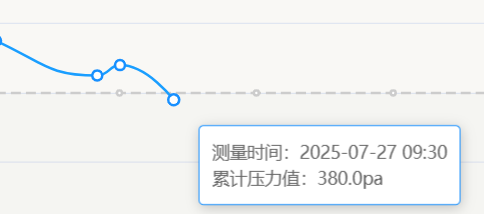
                        if (displayMode === 'cumulative') {
                            return `测量时间:${dateStr}<br/>累计压力值:${height.toFixed(1)}pa`;
                        } else {
                            return `测量时间:${dateStr}<br/>实际压力值:${height.toFixed(1)}pa`;
                        }
                    }
                } catch (e) {
                    console.error('工具提示处理失败:', e);
                    return `数据解析错误:${e.message}`;
                }
                return '数据格式异常';
            }
        },
        legend: {
            data: ['临界值', displayMode === 'raw' ? '实际压力值' : '累计压力值'],
            top: 60,
            right: 20,
            itemGap: 20
        },
        grid: {
            top: 100
        },
        xAxis: {
            type: 'time',
            name: '日期',
            min: baseDates[0].getTime(),
            max: baseDates[baseDates.length - 1].getTime(),
            axisLabel: {
                formatter: function(value) {
                    // 使用配置的日期格式
                    const format = timeUnitFormat[timeUnit] || '{yyyy}';
                    return echarts.time.format(value, format, false);
                },
                interval: xAxisLabelInterval, // 使用配置的显示间隔
                rotate: xAxisLabelRotate // 使用配置的旋转角度
            },
            axisPointer: {
                label: {
                    formatter: function(params) {
                        // 使用配置的日期格式
                        const format = axisPointerFormat[timeUnit] || '{yyyy}-{MM}-{dd}';
                        return echarts.time.format(params.value, format, false);
                    }
                }
            }
        },
        dataZoom: [
            {
                type: 'slider',
                show: true,
                xAxisIndex: 0,
                start: 0,
                end: 100,
                minSpan: 10,
                maxSpan: 100,
                filterMode: 'none'
            },
            {
                type: 'inside',
                xAxisIndex: 0,
                zoomLock: false,
                zoomOnMouseWheel: 'shift',
                moveOnMouseMove: true,
                moveOnMouseWheel: true
            }
        ],
        yAxis: {
            type: 'value',
            name: '压力 (pa)',
            min: ymin,
            max: ymax
        },
        series: [
            {
                name: '临界值',
                data: standardSeriesData,
                type: 'line',
                smooth: true,
                encode: {
                    x: 'value[0]',
                    y: 'value[1]',
                    tooltip: ['index', 'height']
                },
                itemStyle: { color: '#ccc' },
                lineStyle: { type: 'dashed' },
                areaStyle: { color: 'rgba(200, 200, 200, 0.1)' }
            },
            {
                name: displayMode === 'raw' ? '实际压力值' : '累计压力值',
                data: [],
                type: 'line',
                smooth: true,
                itemStyle: { color: '#1890ff' },
                lineStyle: { width: 2 },
                symbolSize: 8,
                encode: {
                    x: 0,
                    y: 1
                },
                dimensions: [
                    { name: 'timestamp', type: 'time' },
                    { name: 'height', type: 'number' }
                ]
            }
        ]
    }

    // 获取数据库信息并格式化数据
    async function getAVDataByBlockId(blockId, callback) {
        // 获取块信息
        const block = await fetchSyncPost('/api/query/sql', {"stmt": `SELECT * FROM blocks WHERE id = '${blockId}'`})
        const markdown = block.data[0]?.markdown;
        // 获取数据库信息
        if(markdown){
            // 获取数据库文件地址
            const avId = getDataAvIdFromHtml(markdown);

            // 通过sy文件获取表格数据
            const av = await fetchSyncPost('/api/file/getFile', {"path":`/data/storage/av/${avId}.json`});

            if(av){
                if(typeof callback === 'function') callback(av);
            } else {
                option = "未找到av-id=" + avId + "的数据库文件";
            }
        } else {
            option = "未找到id=" + blockId + "的数据库块";
        }
    }

    // 请求api
    async function fetchSyncPost (url, data) {
        const init = {
            method: "POST",
        };
        if (data) {
            if (data instanceof FormData) {
                init.body = data;
            } else {
                init.body = JSON.stringify(data);
            }
        }
        const res = await fetch(url, init);
        return await res.json();
    }

    // 获取avid
    function getDataAvIdFromHtml(htmlString) {
        const match = htmlString.match(/data-av-id="([^"]+)"/);
        return match && match[1] ? match[1] : "";
    }

    // 现在调用函数
    await getAVDataByBlockId(avBlockId, (av) => {
        // 动态生成实际测量数据
        const rawValues = av.keyValues
            .find(kv => kv.key.name === mydata).values
            .map((dateValue, index) => {
                const heightValue = av.keyValues
                    .find(kv => kv.key.name === number).values[index].number.content;

                let finalDate;
                if (typeof dateValue.date.content === 'number') {
                    finalDate = new Date(dateValue.date.content);
                } else {
                    finalDate = new Date(dateValue.date.content);
                }

                return {
                    date: finalDate,
                    height: parseFloat(heightValue) || 0 // 确保是数字
                };
            });

        // 按日期排序
        rawValues.sort((a, b) => a.date - b.date);

        // 转换实际测量数据为时间戳格式
        let actualSeriesData;

        if (displayMode === 'cumulative') {
            // 累计模式:每个点是前面所有点的和
            let cumulativeSum = 0;
            actualSeriesData = rawValues.map(({date, height}) => {
                if (isNaN(date.getTime())) {
                    console.error('无效日期格式:', date);
                    return null;
                }

                cumulativeSum += height;
                return [date.getTime(), cumulativeSum];
            });
        } else {
            // 原始模式:直接使用每个点的值
            actualSeriesData = rawValues.map(({date, height}) => {
                if (isNaN(date.getTime())) {
                    console.error('无效日期格式:', date);
                    return null;
                }

                return [date.getTime(), height];
            });
        }

        // 过滤无效数据
        actualSeriesData = actualSeriesData.filter(item => item !== null);

        // 更新图表数据和标题
        option.series[1].data = actualSeriesData;
        option.title.text = av.name;
    });

    return option;
})()
欢迎来到这里!
我们正在构建一个小众社区,大家在这里相互信任,以平等 • 自由 • 奔放的价值观进行分享交流。最终,希望大家能够找到与自己志同道合的伙伴,共同成长。
注册 关于