前提条件:
- 安装 Query & View 插件。
- 安装番茄工具箱插件。
效果展示:
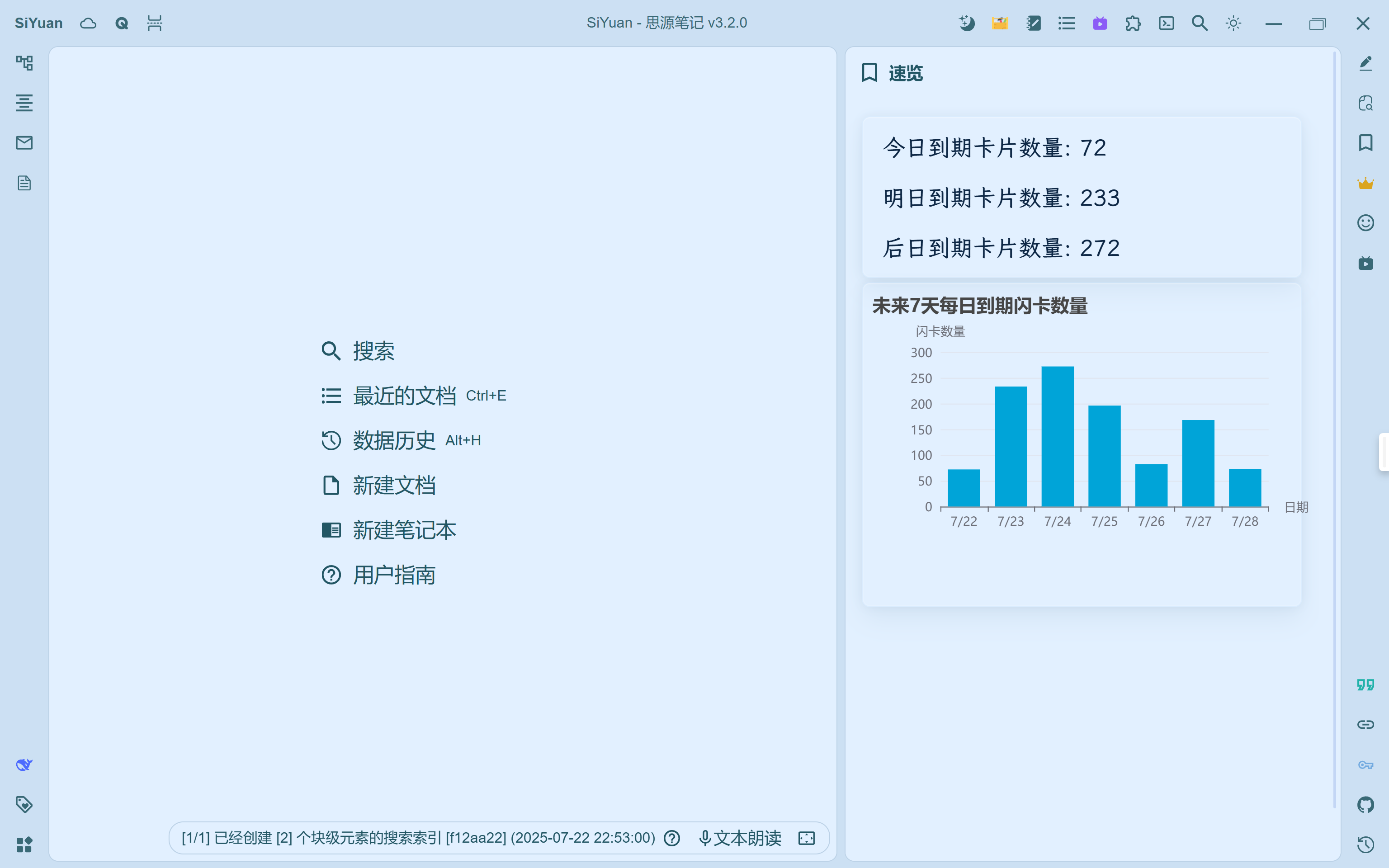
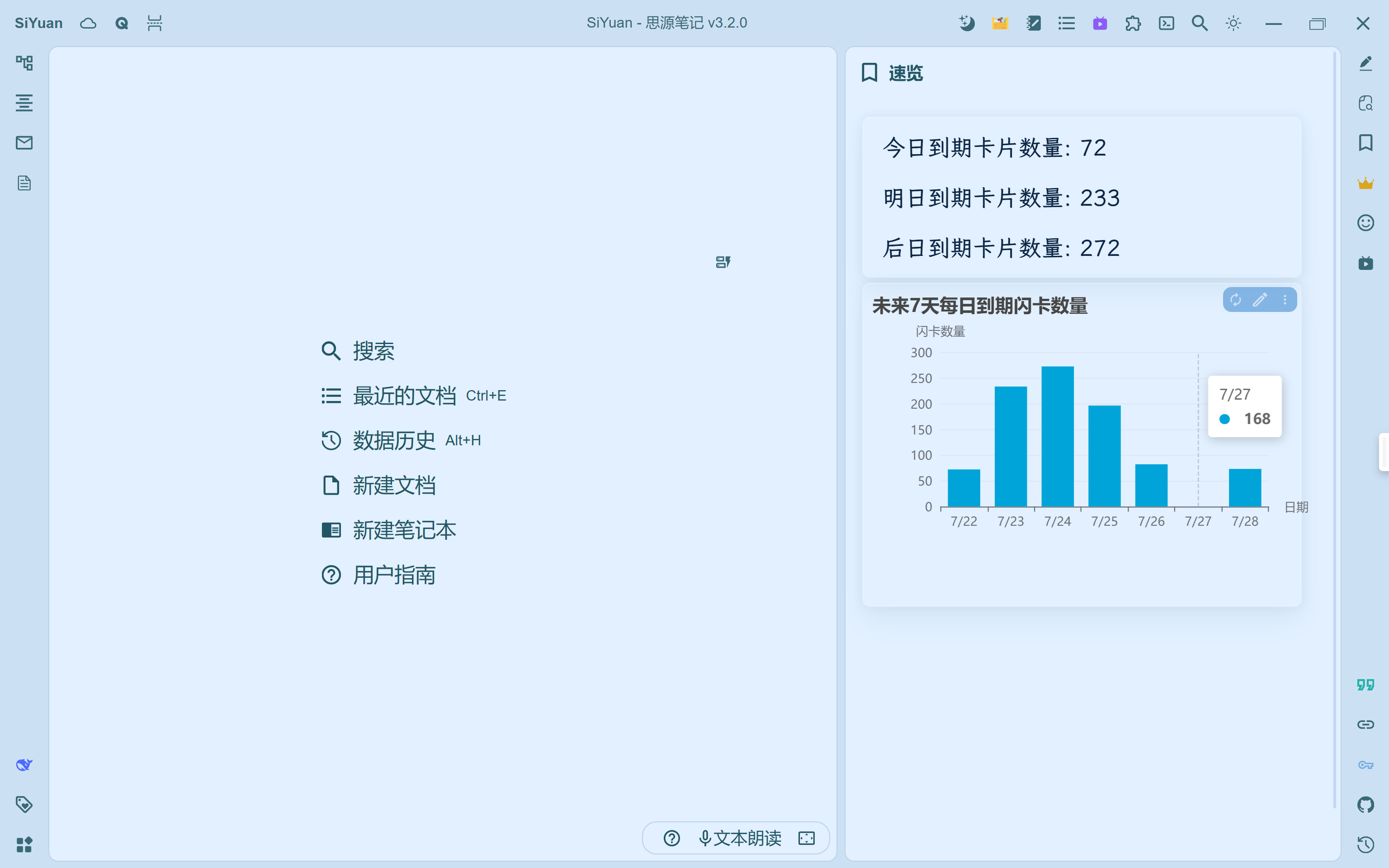
附件点击下载:
闪卡数量查看.sy.zip,导入思源笔记。
今明后日到期数量展示的代码(放在嵌入块中):
//!js
const query = async () => {
  let dv = Query.DataView(protyle, item, top);

  // 获取所有卡片数据
  const allCards = await tomato_zZmqus5PtYRi.siyuan.getRiffCardsAllFlat();

  // 获取当前日期并设置时间部分为0点(本地时区)
  const today = new Date();
  today.setHours(0, 0, 0, 0);

  // 计算明日0点
  const tomorrow = new Date(today);
  tomorrow.setDate(today.getDate() + 1);

  // 计算后日0点
  const dayAfterTomorrow = new Date(tomorrow);
  dayAfterTomorrow.setDate(tomorrow.getDate() + 1);

  // 计算大后天0点(用于后日范围上限)
  const nextDay = new Date(dayAfterTomorrow);
  nextDay.setDate(dayAfterTomorrow.getDate() + 1);

  // 初始化计数器
  let todayCount = 0;
  let tomorrowCount = 0;
  let dayAfterTomorrowCount = 0;

  // 遍历所有卡片
  for (const card of allCards) {
    if (!card.riffCard || !card.riffCard.due) continue;

    try {
      const dueDate = new Date(card.riffCard.due);

      // 检查今日到期(今天0点 <= 到期时间 < 明天0点)
      if (dueDate >= today && dueDate < tomorrow) {
        todayCount++;
      }
      // 检查明日到期(明天0点 <= 到期时间 < 后天0点)
      else if (dueDate >= tomorrow && dueDate < dayAfterTomorrow) {
        tomorrowCount++;
      }
      // 检查后日到期(后天0点 <= 到期时间 < 大后天0点)
      else if (dueDate >= dayAfterTomorrow && dueDate < nextDay) {
        dayAfterTomorrowCount++;
      }
    } catch (e) {
      console.error("日期解析错误:", card.riffCard.due, e);
    }
  }

  // 输出结果
  dv.addmd(`今日到期卡片数量: ${todayCount}`);
  dv.addmd(`明日到期卡片数量: ${tomorrowCount}`);
  dv.addmd(`后日到期卡片数量: ${dayAfterTomorrowCount}`);

  dv.render();
}
return query();
未来 7 天每日到期闪卡数量的代码(放入嵌入块中):
//!js
const query = async () => {
  let dv = Query.DataView(protyle, item, top);

  // 获取所有卡片数据
  const allCards = await tomato_zZmqus5PtYRi.siyuan.getRiffCardsAllFlat();

  // 初始化7天计数数组(索引0=今天)
  const dailyCounts = new Array(7).fill(0);  // 改为7天

  // 获取今日0点(本地时区)
  const today = new Date();
  today.setHours(0, 0, 0, 0);

  // 遍历所有卡片
  for (const card of allCards) {
    if (!card.riffCard || !card.riffCard.due) continue;

    try {
      const dueDate = new Date(card.riffCard.due);
      // 计算到期日与今天的天数差
      const timeDiff = dueDate - today;
      const daysDiff = Math.floor(timeDiff / (1000 * 60 * 60 * 24));

      // 只统计0-6天范围内的卡片(7天内)
      if (daysDiff >= 0 && daysDiff < 7) {  // 修改判断条件
        dailyCounts[daysDiff]++;
      }
    } catch (e) {
      console.error("日期解析错误:", card.riffCard.due, e);
    }
  }

  // 创建日期标签(更直观的显示)
  const dateLabels = Array.from({length: 7}, (_, i) => {
    const date = new Date(today);
    date.setDate(today.getDate() + i);
    return `${date.getMonth()+1}/${date.getDate()}`;  // 格式为"月/日"
  });

  // 2. 创建图表
  dv.addebar(
    dateLabels,          // x轴使用日期标签
    dailyCounts,      // y轴数据
    {
      title: '未来7天每日到期闪卡数量',  // 更新标题
      xlabel: '日期',
      ylabel: '闪卡数量',
      // 添加数据标签显示具体数量
      dataLabels: {
        display: true,
        align: 'center',
        anchor: 'center'
      },
      // 添加网格线提高可读性
      grid: {
        display: true,
        borderWidth: 1
      }
    }
  );

  dv.render();
}
return query();
感谢:
@Frostime 佬提供 querw&view 插件、超详细的使用说明及丰富的示例。
@player 番茄佬书写并提供获取闪卡数据的代码。
@deepseekR1 老师提供标准的数据书写、繁琐的日期定义及处理、日期的快速变换与调整。
欢迎来到这里!
我们正在构建一个小众社区,大家在这里相互信任,以平等 • 自由 • 奔放的价值观进行分享交流。最终,希望大家能够找到与自己志同道合的伙伴,共同成长。
注册 关于