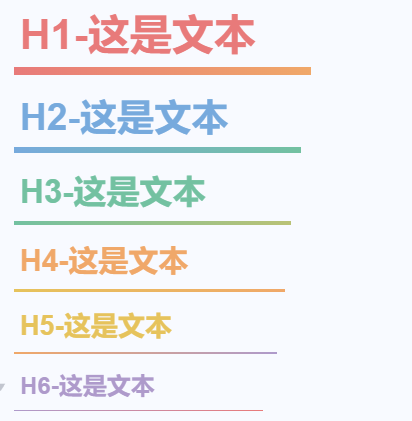
最近弄了一套自用标题方案,感觉不错分享给大家,下划线会适配文字长度,并且随着级别越低变得越长越细,然后配色是双色渐变
[data-type="NodeHeading"].h1 { color: #e87a7a !important; } /* 柔和红 */
[data-type="NodeHeading"].h2 { color: #77aadd !important; } /* 柔和蓝 */
[data-type="NodeHeading"].h3 { color: #73c1a1 !important; } /* 柔和绿 */
[data-type="NodeHeading"].h5 { color: #e6c35c !important; } /* 柔和黄 */
[data-type="NodeHeading"].h4 { color: #f0a869 !important; } /* 柔和橙 */
[data-type="NodeHeading"].h6 { color: #ae9acb !important; } /* 柔和紫 */

/* 标题容器通用样式 */
div[data-subtype^="h"] {
  width: -moz-fit-content;
  width: fit-content;
  position: relative;
  padding-bottom: 5px;
}

/* H1 下划线 */
div[data-subtype="h1"]::after {
  content: "";
  position: absolute;
  left: 0;
  bottom: 0;
  width: 120%;
  height: 5px;
  background: linear-gradient(to right, #e87a7a, #f0a869);
}

/* H2 下划线 */
div[data-subtype="h2"]::after {
  content: "";
  position: absolute;
  left: 0;
  bottom: 0;
  width: 130%;
  height: 4px;
  background: linear-gradient(to right, #77aadd, #73c1a1);
}

/* H3 下划线 */
div[data-subtype="h3"]::after {
  content: "";
  position: absolute;
  left: 0;
  bottom: 0;
  width: 140%;
  height: 3px;
  background: linear-gradient(to right, #73c1a1, #BAC276);
}

/* H4 下划线 */
div[data-subtype="h4"]::after {
  content: "";
  position: absolute;
  left: 0;
  bottom: 0;
  width: 150%;
  height: 2px;
  background: linear-gradient(to right, #e6c35c, #f0a869);
}

/* H5 下划线 */
div[data-subtype="h5"]::after {
  content: "";
  position: absolute;
  left: 0;
  bottom: 0;
  width: 160%;
  height: 1px;
  background: linear-gradient(to right, #f0a869, #ae9acb);
}

/* H6 下划线 */
div[data-subtype="h6"]::after {
  content: "";
  position: absolute;
  left: 0;
  bottom: 0;
  width: 170%;
  height: 0.5px;
  background: linear-gradient(to right, #ae9acb, #e87a7a);
}
欢迎来到这里!
我们正在构建一个小众社区,大家在这里相互信任,以平等 • 自由 • 奔放的价值观进行分享交流。最终,希望大家能够找到与自己志同道合的伙伴,共同成长。
注册 关于