总述
- 通过 qv 插件,siyuan 能够实现以下功能
- 打开 daily note 形成自动生成激励
- 在笔记页面进行 ai 聊天
- 根据近一个月的文档名进行聊天
- 根据添加的 sql 内容进行聊天
- 这个功能可以拓展
- 根据当前文档进行聊天
- 根据所有.........思源笔记进行聊天
- 潜力无限
最近 F 佬的 QV 插件进行了史诗级更新,现在能够将 AI chat 嵌入并且静态存储到你的笔记中了,首先放效果图
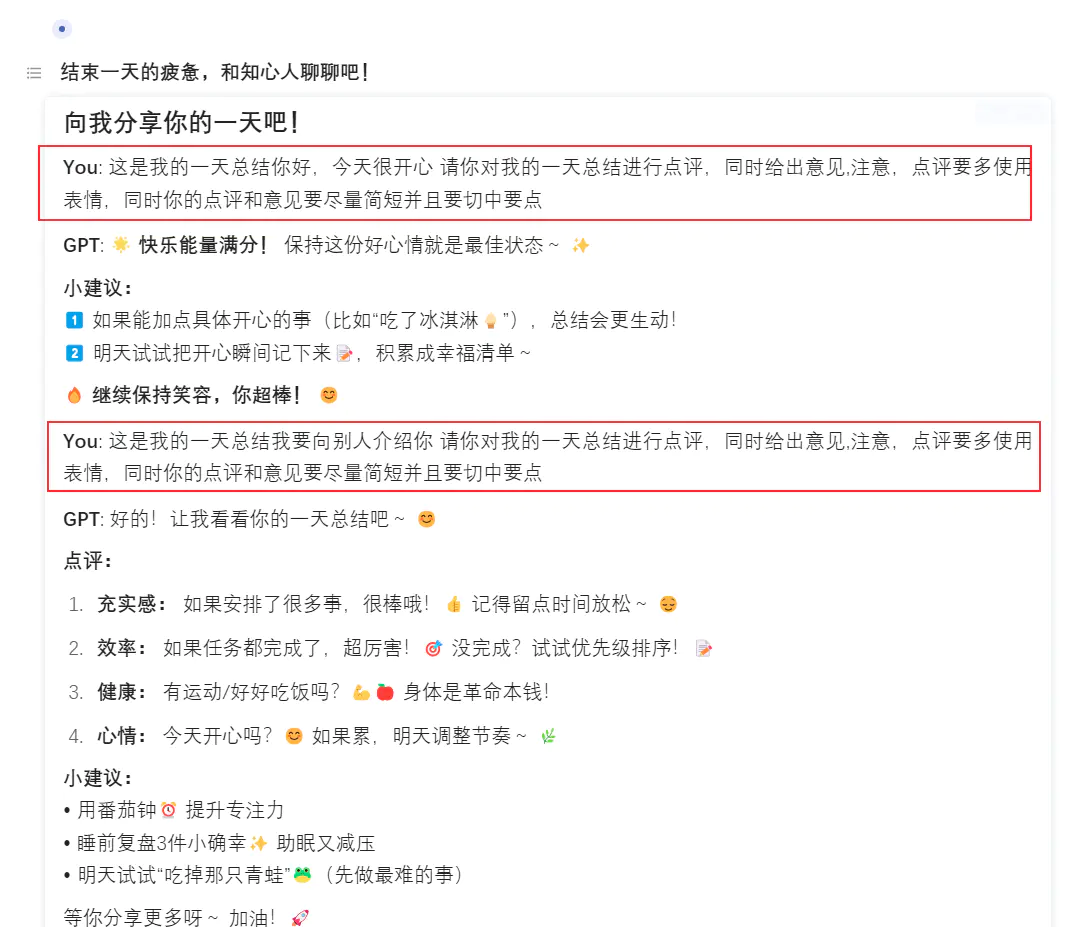
这样就实现了文档内的 ai 对话,很方便的!
并且还可以设置定时 ai 根据文档内容进行总结,可玩性大大增强!
这里是教程
前提
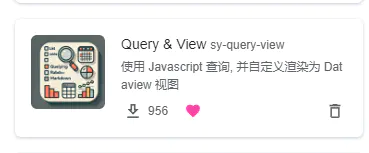
下载 QV 插件
使用方法
下载插件后,在思源笔记内部使用
{{}}
然后把下面需要的代码复制进去即可
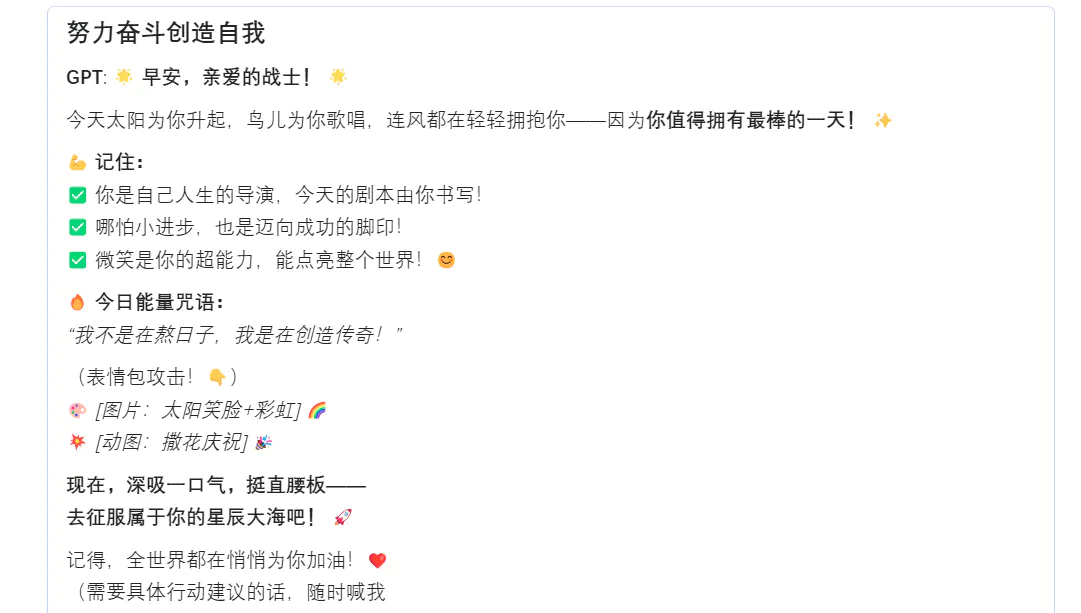
使用方法一:每日语录
//!js

// ui() function is removed as it is not needed for direct sending.

const chat = async () => {
 // Initialize DataView
 let dv = Query.DataView(protyle, item, top);
 // Use state to store messages (optional, but good for potential future history)
 const messages = dv.useState('messages', []);

 // Add a title
 dv.addmd(`#### 努力奋斗创造自我`);

 // --- Optional: Display previous messages if needed ---
 // messages().forEach(msg => {
 // dv.addmd(`**${msg.role === 'user' ? 'You' : 'GPT'}**: ${msg.content}`);
 // });
 // dv.addmd('---');
 // --- End Optional Section ---

 // Define the specific message to send
 const predefinedPrompt = "今天真是美好的一天,请你激励我度过美好的一天吧!请你用满满的正能量激励我,要图文并茂哦(让我看到你的表情)!";

 // Add the predefined user message to the state and display it immediately
 messages([...messages(), { role: 'user', content: predefinedPrompt }]);// Display the message being sent

 // Add a placeholder for the GPT response
 let respond = dv.addmd(`**GPT**: Thinking...`); // Initial placeholder text
 let id = respond.dataset.id;

 // Call the GPT function directly with the predefined prompt
 try {
 const response = await Query.gpt(predefinedPrompt, { // Use the predefined prompt here
 stream: true,
 streamInterval: 3,
 streamMsg: (content) => {
 // Update the placeholder content as the response streams in
 dv.replaceView(id, dv.md(`**GPT**: ${content}`));
 }
 });
 // Add the final assistant response to the state
 messages([...messages(), { role: 'assistant', content: response }]);
 // The view is already updated by the last streamMsg call
 } catch (error) {
 // Display any error encountered during the API call
 dv.replaceView(id, dv.md(`**GPT**: Error: ${error.message}`));
 // Optionally add error to state if needed for history
 // messages([...messages(), { role: 'assistant', content: `Error: ${error.message}` }]);
 }

 // Render the initial elements added (title, prompt, placeholder)
 dv.render();
}

// Execute the chat function immediately
return chat();
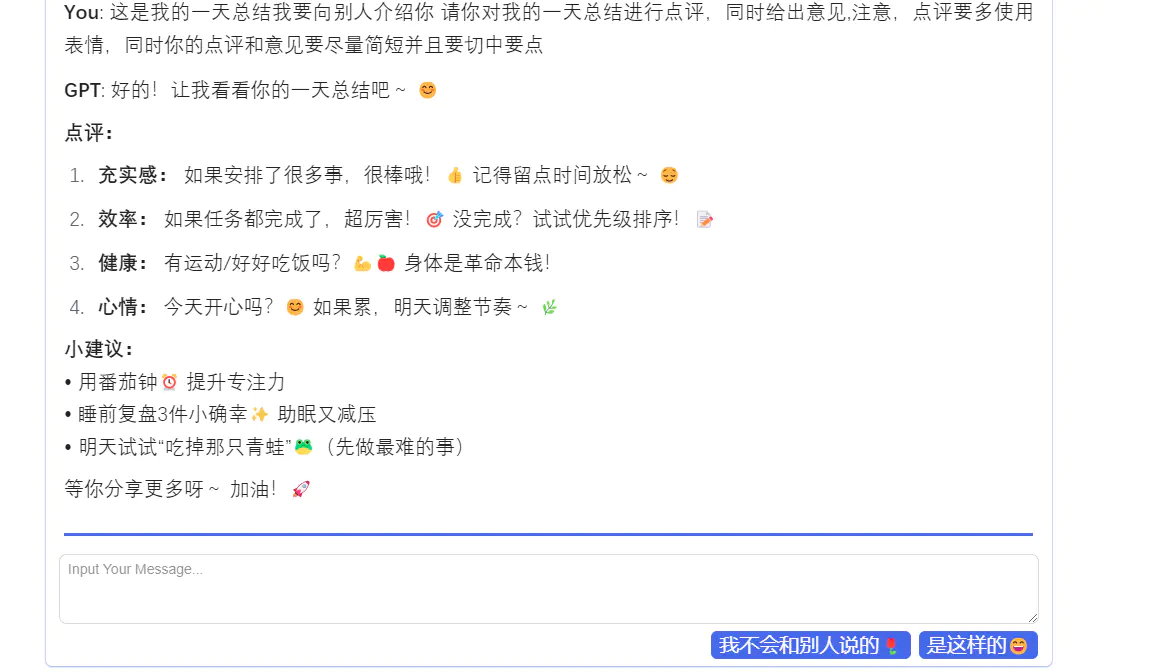
使用方法二:ai 聊天
//!js

const ui = () => {
 const textarea = document.createElement('textarea');
 textarea.className = "fn__block b3-text-field";
 textarea.rows = 3;
 textarea.placeholder = "Input Your Message...";

 // 创建按钮容器,使用 flex 布局
 const buttonContainer = document.createElement('div');
 buttonContainer.style.display = 'flex';
 buttonContainer.style.justifyContent = 'flex-end';
 buttonContainer.style.gap = '8px';
 buttonContainer.style.marginTop = '8px';

 const removeLastButton = document.createElement('button');
 removeLastButton.className = "b3-button";
 removeLastButton.textContent = "我不会和别人说的🌹";
 buttonContainer.appendChild(removeLastButton);

 // Send 按钮
 const sendButton = document.createElement('button');
 sendButton.className = "b3-button";
 sendButton.textContent = "是这样的😄";

 // 将按钮添加到容器
 buttonContainer.appendChild(removeLastButton);
 buttonContainer.appendChild(sendButton);

 return { textarea, buttonContainer, sendButton, removeLastButton };

}


const chat = async () => {
 let dv = Query.DataView(protyle, item, top);
 const messages = dv.useState('messages', []);

 dv.addmd(`#### 向我分享你的一天吧!`);
 const msgIds = [];
 messages().forEach(msg => {
 let el = dv.addmd(`**${msg.role === 'user' ? 'You' : 'GPT'}**: ${msg.content}`);
 msgIds.push(el.dataset.id);
 });

 dv.addmd('---');

 const { textarea, buttonContainer, sendButton, removeLastButton } = ui();

 dv.addele(textarea);

 dv.addele(buttonContainer);

 sendButton.onclick = async () => {
 const initialprompt = textarea.value.trim();
 const prefixText = "这是我的一天总结";
 const suffixText = " 请你对我的一天总结进行点评,同时给出意见,注意,点评要多使用表情,同时你的点评和意见要尽量简短并且要切中要点";
 const prompt = `${prefixText}${initialprompt}${suffixText}`;

 if (!prompt) return;

 messages([...messages(), { role: 'user', content: prompt }]);
 textarea.value = '';
 sendButton.disabled = true;
 removeLastButton.disabled = true;
 let respond = dv.addmd(`**数人**: `);
 let id = respond.dataset.id;

 try {
 const response = await Query.gpt(prompt, {
 stream: true,
 streamInterval: 3,
 streamMsg: (content) => {
 dv.replaceView(id, dv.md(`**GPT**: ${content}`));
 }
 });
 messages([...messages(), { role: 'assistant', content: response }]);
 } catch (error) {
 dv.addmd(`Error: ${error.message}`);
 }

 sendButton.disabled = false;
 removeLastButton.disabled = false;
 dv.repaint();
 };

 removeLastButton.onclick = () => {
 if (msgIds.length < 2) return;

 // 删除最后两条消息
 messages(messages().slice(0, -2));

 // 删除最后两个消息的 DOM 元素
 dv.removeView(msgIds.pop());
 dv.removeView(msgIds.pop());
 };

 dv.render();
}

return chat();
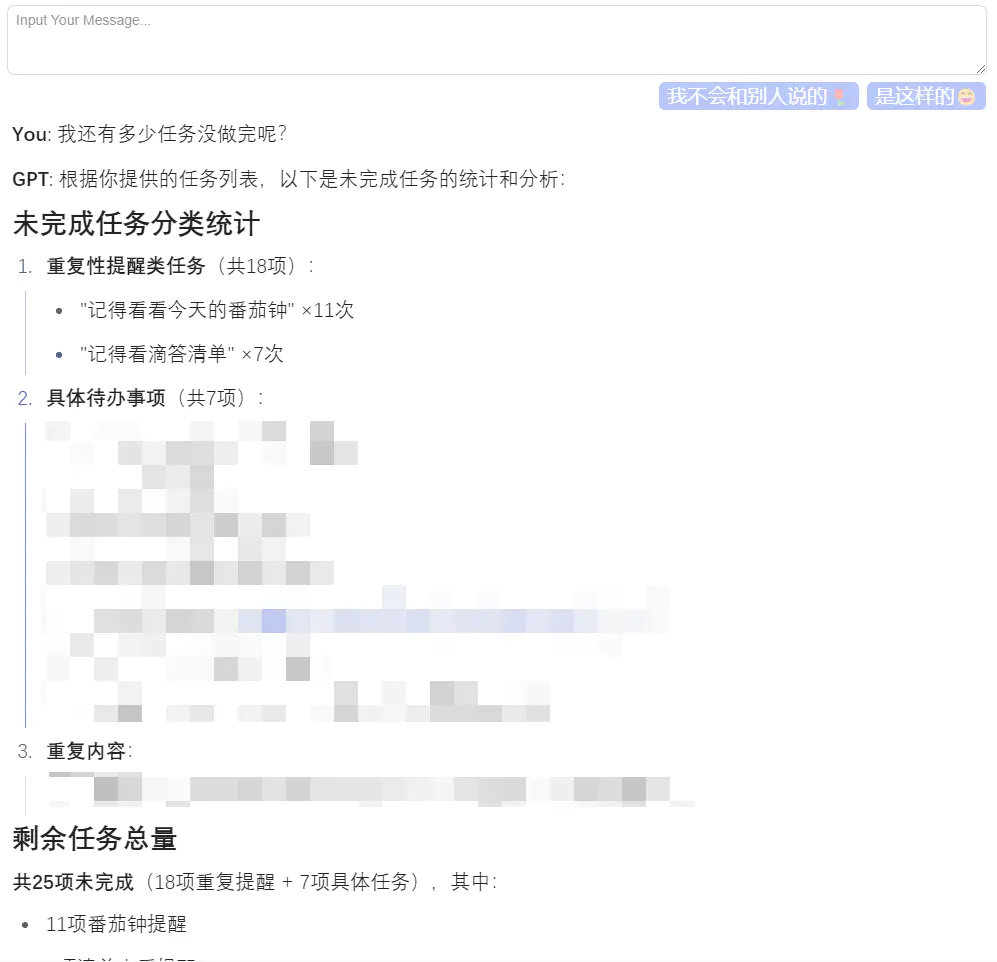
使用方法三:查询近一个月的未完成任务,根据任务进行聊天
//!js

// 函数:获取本月完成的任务内容作为上下文
async function getTaskContext() {
    try {
        // 查询本月完成的任务,最多 32 条
        let blocks = await Query.task(Query.utils.thisMonth(), 32);
        // 提取每个任务块的 markdown 内容
        let contents = blocks.map(block => block.markdown || block.content || ''); // 优先使用 markdown,其次 content,最后空字符串
        // 将所有任务内容用分隔符连接成一个字符串
        if (contents.length > 0) {
            return "以下是你本月完成的部分任务内容,请参考:\n----------\n" + contents.join('\n---\n') + "\n----------\n";
        } else {
            return "本月似乎还没有完成的任务记录可供参考。\n";
        }
    } catch (error) {
        console.error("查询任务时出错:", error);
        return "查询参考任务时出现错误。\n"; // 返回错误提示,避免中断流程
    }
}

// 函数:创建用户界面元素
const ui = () => {
    const textarea = document.createElement('textarea');
    textarea.className = "fn__block b3-text-field";
    textarea.rows = 3;
    textarea.placeholder = "Input Your Message...";

    // 创建按钮容器
    const buttonContainer = document.createElement('div');
    buttonContainer.style.display = 'flex';
    buttonContainer.style.justifyContent = 'flex-end';
    buttonContainer.style.gap = '8px';
    buttonContainer.style.marginTop = '8px';

    // “我不会和别人说的🌹” 按钮 (移除最后消息)
    const removeLastButton = document.createElement('button');
    removeLastButton.className = "b3-button";
    removeLastButton.textContent = "我不会和别人说的🌹";
    buttonContainer.appendChild(removeLastButton);

    // “是这样的😄” 按钮 (发送消息)
    const sendButton = document.createElement('button');
    sendButton.className = "b3-button";
    sendButton.textContent = "是这样的😄";
    buttonContainer.appendChild(sendButton); // 添加发送按钮

    return { textarea, buttonContainer, sendButton, removeLastButton };
}

// 主函数:处理聊天逻辑
const chat = async () => {
    // 初始化 DataView
    let dv = Query.DataView(protyle, item, top);
    // 使用 useState 管理消息列表
    const messages = dv.useState('messages', []);
    // 用于追踪消息 DOM 元素的 ID
    const msgIds = dv.useState('msgIds', []);

    // 添加标题
    dv.addmd(`#### 让我看看你有多少任务没做!`);

    // 渲染已有的消息
    messages().forEach(msg => {
        let el = dv.addmd(`**${msg.role === 'user' ? 'You' : 'GPT'}**: ${msg.content}`);
        // 将新消息的 ID 添加到 msgIds 状态中
        msgIds([...msgIds(), el.dataset.id]);
    });

    // 添加分隔线
    dv.addmd('---');

    // 创建并添加 UI 元素
    const { textarea, buttonContainer, sendButton, removeLastButton } = ui();
    dv.addele(textarea);
    dv.addele(buttonContainer);

    // 发送按钮点击事件
    sendButton.onclick = async () => {
        const userInput = textarea.value.trim(); // 获取用户输入的总结
        if (!userInput) return; // 如果输入为空,则不执行任何操作

        // 禁用按钮,防止重复点击
        sendButton.disabled = true;
        removeLastButton.disabled = true;

        // 1. 将用户消息添加到状态并显示
        const userMessage = { role: 'user', content: userInput };
        messages([...messages(), userMessage]); // 更新消息状态
        let userEl = dv.addmd(`**You**: ${userInput}`); // 在界面上显示用户消息
        msgIds([...msgIds(), userEl.dataset.id]); // 记录用户消息的 ID

        textarea.value = ''; // 清空输入框

        // 2. 添加 AI 回复的占位符
        let respondPlaceholder = dv.addmd(`**GPT**: 正在思考中... 🤔`);
        let gptMsgId = respondPlaceholder.dataset.id;

        try {
            // 3. 获取本月任务作为参考资料 (调用 getTaskContext)
            const taskReference = await getTaskContext();

            // 4. 构建最终发送给 GPT 的完整提示
            const prefixText = taskReference + "基于以上参考信息以及我的以下总结:\n";
            const suffixText = "。";
            const fullPrompt = `${prefixText}${userInput}${suffixText}`;

            // 5. 调用 GPT API
            const response = await Query.gpt(fullPrompt, {
                stream: true,
                streamInterval: 3,
                streamMsg: (content) => {
                    // 流式更新 AI 回复占位符的内容
                    dv.replaceView(gptMsgId, dv.md(`**GPT**: ${content}`));
                }
            });

            // 6. GPT 回复完成后,更新消息状态
            const gptMessage = { role: 'assistant', content: response };
            messages([...messages(), gptMessage]); // 更新消息状态
            // AI 消息的 ID 已经在创建占位符时获得了,无需再次添加
            // 但我们需要确保 msgIds 状态也包含这个最终消息的 ID
            // 由于占位符和最终消息使用同一个 ID,所以 msgIds 状态在第 2 步添加占位符时就已经包含了它

        } catch (error) {
            // 如果出错,显示错误信息
            dv.replaceView(gptMsgId, dv.md(`**GPT**: 抱歉,出错啦: ${error.message}`));
            // 可以在这里决定是否将错误信息也存入 messages 状态
            // messages([...messages(), { role: 'assistant', content: `Error: ${error.message}` }]);
            console.error("GPT 调用失败:", error);
        } finally {
            // 无论成功或失败,都重新启用按钮
            sendButton.disabled = false;
            removeLastButton.disabled = false;
            // 可以考虑调用 dv.repaint() 来强制刷新视图,虽然通常状态更新会自动触发
            // dv.repaint();
        }
    };

    // 移除最后一条消息按钮点击事件
    removeLastButton.onclick = () => {
        const currentMessages = messages();
        const currentMsgIds = msgIds();

        // 至少要有两条消息(用户+AI)才能移除
        if (currentMessages.length < 2 || currentMsgIds.length < 2) return;

        // 从状态中移除最后两条消息 (用户 + AI)
        messages(currentMessages.slice(0, -2));

        // 从 DOM 中移除最后两个消息元素
        const lastGptId = currentMsgIds[currentMsgIds.length - 1];
        const lastUserId = currentMsgIds[currentMsgIds.length - 2];
        dv.removeView(lastGptId);
        dv.removeView(lastUserId);

        // 从 msgIds 状态中移除最后两个 ID
        msgIds(currentMsgIds.slice(0, -2));
    };

    // 渲染 DataView
    dv.render();
}

// 执行 chat 函数
return chat();
使用方法四:大杀器,SQL 与 aichat
为什么是==大杀器==呢???????
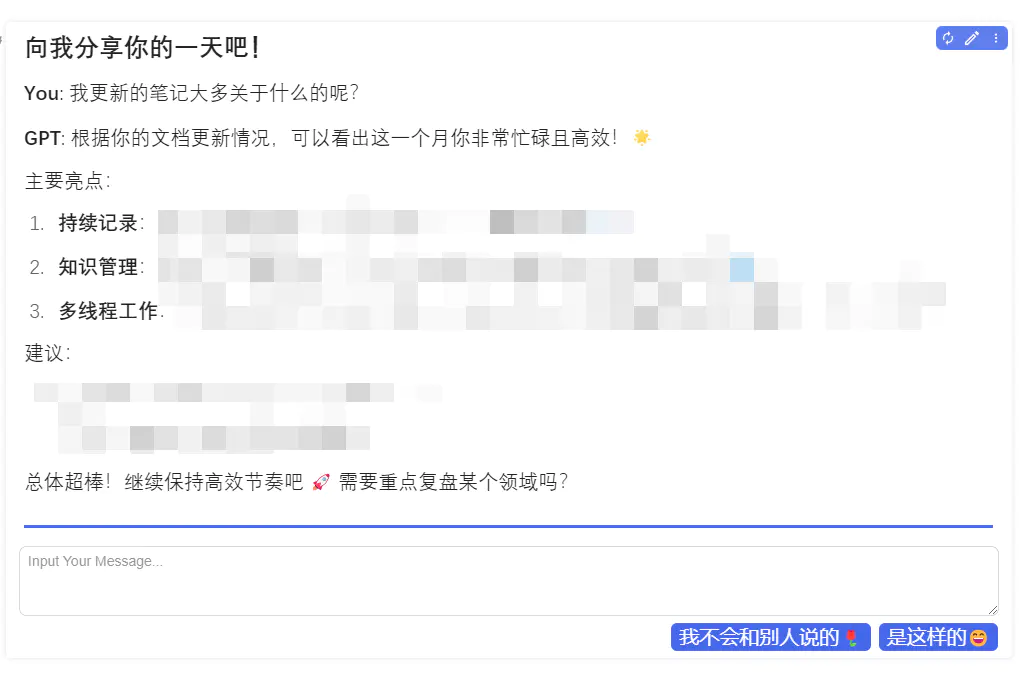
问题就在==SQL==,ai 的数据库管理是根据 sql 来的,==这说明你所有的笔记都能通过 sql 发送给 ai==,所以!!!!!这是一个潜力无限的功能!!!!!!!
使用近一个月的笔记名称与 ai 进行交流
//!js

// Function to get context from recently updated documents
async function getDocumentContext() {
    try {
        // SQL query to get the 32 most recently updated document blocks
        const sqlQuery = `
          select id, hpath, markdown, content from blocks
          where type='d'
          order by updated desc limit 32;
        `;
        let blocks = await Query.sql(sqlQuery);

        if (blocks && blocks.length > 0) {
            // Extract relevant information (path and content) and format it
            let contextEntries = blocks.map(block => {
                const content = block.markdown || block.content || '[No Content]'; // Prefer markdown, fallback to content
                return `Document Path: ${block.hpath}\nContent:\n---\n${content}\n---`;
            });
            // Join the entries into a single string
            return "以下是一些最近更新的文档内容,请参考:\n==========\n" + contextEntries.join('\n\n') + "\n==========\n";
        } else {
            return "没有找到最近更新的文档可供参考。\n";
        }
    } catch (error) {
        console.error("查询文档时出错:", error);
        return "查询参考文档时出现错误。\n"; // Return error message as context
    }
}


// Function to create the UI elements
const ui = () => {
    const textarea = document.createElement('textarea');
    textarea.className = "fn__block b3-text-field";
    textarea.rows = 3;
    textarea.placeholder = "Input Your Message...";

    // Button container with flex layout
    const buttonContainer = document.createElement('div');
    buttonContainer.style.display = 'flex';
    buttonContainer.style.justifyContent = 'flex-end';
    buttonContainer.style.gap = '8px';
    buttonContainer.style.marginTop = '8px';

    // Remove Last button
    const removeLastButton = document.createElement('button');
    removeLastButton.className = "b3-button";
    removeLastButton.textContent = "我不会和别人说的🌹";
    buttonContainer.appendChild(removeLastButton);

    // Send button
    const sendButton = document.createElement('button');
    sendButton.className = "b3-button";
    sendButton.textContent = "是这样的😄";
    buttonContainer.appendChild(sendButton); // Append Send button

    return { textarea, buttonContainer, sendButton, removeLastButton };
}

// Main chat function
const chat = async () => {
    // Initialize DataView
    let dv = Query.DataView(protyle, item, top);
    // Use state for messages and their corresponding DOM element IDs
    const messages = dv.useState('messages', []);
    const msgIds = dv.useState('msgIds', []); // State for tracking message IDs

    // Add chat title
    dv.addmd(`#### 向我分享你的一天吧!`);

    // Render existing messages and store their IDs
    const initialMsgIds = [];
    messages().forEach(msg => {
        let el = dv.addmd(`**${msg.role === 'user' ? 'You' : 'GPT'}**: ${msg.content}`);
        initialMsgIds.push(el.dataset.id);
    });
    // Initialize msgIds state only if it's currently empty
    if (msgIds().length === 0 && initialMsgIds.length > 0) {
       msgIds(initialMsgIds);
    }


    // Add separator
    dv.addmd('---');

    // Create and add UI elements
    const { textarea, buttonContainer, sendButton, removeLastButton } = ui();
    dv.addele(textarea);
    dv.addele(buttonContainer);

    // Send button click handler
    sendButton.onclick = async () => {
        const userInput = textarea.value.trim();
        if (!userInput) return; // Do nothing if input is empty

        // Disable buttons during processing
        sendButton.disabled = true;
        removeLastButton.disabled = true;

        // 1. Add user message to state and UI
        const userMessage = { role: 'user', content: userInput };
        messages([...messages(), userMessage]); // Update message state
        let userEl = dv.addmd(`**You**: ${userInput}`); // Add user message to view
        msgIds([...msgIds(), userEl.dataset.id]); // Add user message ID to state
        textarea.value = ''; // Clear the input area

        // 2. Add placeholder for GPT response
        let respondPlaceholder = dv.addmd(`**GPT**: 正在检索参考资料并思考... 🤔`);
        let gptMsgId = respondPlaceholder.dataset.id;
        // Add the placeholder ID immediately, it will be the final ID for the GPT response
        msgIds([...msgIds(), gptMsgId]);


        try {
            // 3. Get document context using the SQL query
            const docReference = await getDocumentContext();

            // 4. Construct the full prompt for the AI
            const prefixText = `${docReference}\n这是我一个月更新的内容:`;
            const suffixText = "\n请基于以上参考信息,回复我的问题。注意:多用表情,尽量简短且切中要点。";
            const fullPrompt = `${prefixText}\n${userInput}\n${suffixText}`;

            // 5. Call the GPT API with the full prompt and stream the response
            const response = await Query.gpt(fullPrompt, {
                stream: true,
                streamInterval: 3, // Adjust interval as needed
                streamMsg: (content) => {
                    // Update the placeholder content as the response streams in
                    dv.replaceView(gptMsgId, dv.md(`**GPT**: ${content}`));
                }
            });

            // 6. Once streaming is complete, update the messages state with the final GPT response
            // Find the last message added (which should be the placeholder) and update its content,
            // or just add the final one (simpler if state updates trigger repaint anyway)
            const gptMessage = { role: 'assistant', content: response };
            // Replace the last (placeholder) message state with the final one
            const currentMessages = messages();
            messages([...currentMessages.slice(0, -1), gptMessage]); // Assumes user message was added just before

        } catch (error) {
            console.error("GPT 调用或处理失败:", error);
            // Display error message in the GPT response area
             dv.replaceView(gptMsgId, dv.md(`**GPT**: 抱歉,处理时遇到问题: ${error.message}`));
            // Update state with error message
            const errorMessage = { role: 'assistant', content: `Error: ${error.message}` };
            const currentMessages = messages();
             messages([...currentMessages.slice(0, -1), errorMessage]);
        } finally {
            // Re-enable buttons regardless of success or failure
            sendButton.disabled = false;
            removeLastButton.disabled = false;
            // Optionally force repaint if needed, though state updates should trigger it
            // dv.repaint();
        }
    };

    // Remove last button click handler
    removeLastButton.onclick = () => {
        const currentMessages = messages();
        const currentMsgIds = msgIds();

        // Need at least one user message and one GPT message to remove
        if (currentMessages.length < 2 || currentMsgIds.length < 2) return;

        // Remove the last two messages (user + GPT) from the state
        messages(currentMessages.slice(0, -2));

        // Get the IDs of the last two DOM elements to remove
        const lastGptId = currentMsgIds[currentMsgIds.length - 1];
        const lastUserId = currentMsgIds[currentMsgIds.length - 2];

        // Remove the corresponding DOM elements
        dv.removeView(lastGptId);
        dv.removeView(lastUserId);

        // Remove the last two IDs from the msgIds state
        msgIds(currentMsgIds.slice(0, -2));
    };

    // Initial render of the DataView
    dv.render();
}

// Execute the chat function
return chat();
欢迎来到这里!
我们正在构建一个小众社区,大家在这里相互信任,以平等 • 自由 • 奔放的价值观进行分享交流。最终,希望大家能够找到与自己志同道合的伙伴,共同成长。
注册 关于