HTML 块脚本可以调用 JS 片段中的函数吗

本贴最后更新于 205 天前,其中的信息可能已经天翻地覆

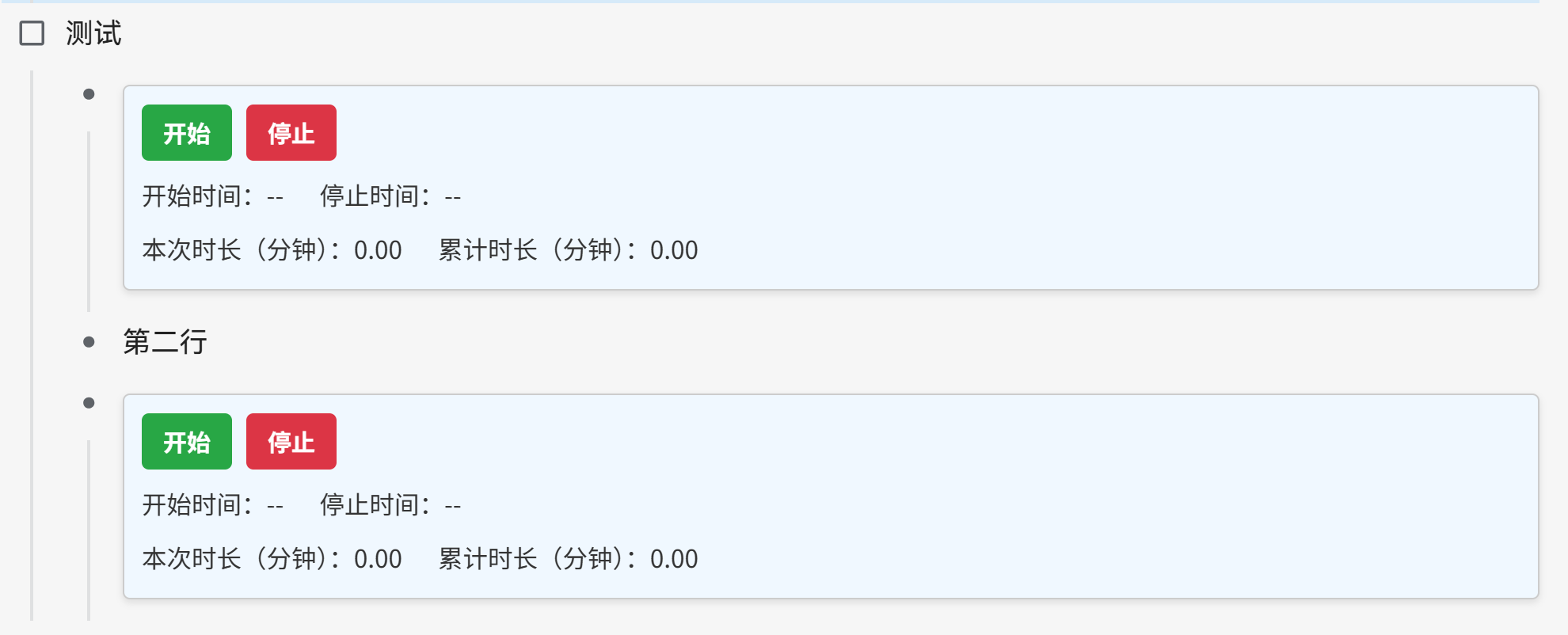
我想在列表中创建多个计时器,效果如下

timer1.png

html 块脚本如下

<div>
<style>
  .scoped-timer {
    padding: 10px;
    border: 1px solid #ccc;
    border-radius: 4px;
    margin: 8px 0;
    background: #f0f8ff;
    box-shadow: 0 2px 4px rgba(0, 0, 0, 0.1);
    font-family: sans-serif;
    font-size: 14px;
    color: #333;
  }
  .scoped-timer .timer-controls {
    display: flex;
    gap: 8px;
    margin-bottom: 6px;
  }
  .scoped-timer button {
    padding: 6px 12px;
    border: none;
    border-radius: 4px;
    cursor: pointer;
    font-weight: bold;
  }
  .scoped-timer .start-btn {
    background-color: #28a745; /* Green */
    color: white;
  }
  .scoped-timer .stop-btn {
    background-color: #dc3545; /* Red */
    color: white;
  }
  .scoped-timer button:disabled {
    background-color: #ccc;
    cursor: not-allowed;
  }
  .scoped-timer .row {
    display: flex;
    gap: 20px;
    margin-top: 4px;
  }
</style>
<div class="scoped-timer">
  <div class="timer-controls">
    <button class="start-btn" onclick="handleStart(this)">开始</button>
    <button class="stop-btn" onclick="handleStop(this)">停止</button>
  </div>
  <div class="row">
    <div>开始时间:<span class="start-time">--</span></div>
    <div>停止时间:<span class="stop-time">--</span></div>
  </div>
  <div class="row">
    <div>本次时长(分钟):<span class="current-duration">0.00</span></div>
    <div>累计时长(分钟):<span class="total-duration">0.00</span></div>
  </div>
</div>
</div>

并且已经开启了** 设置 - 编辑器 - 允许执行 HTML 块内脚本**

HTML 块内脚本主要就是两个按钮,如下

<div class="timer-controls">
    <button class="start-btn" onclick="handleStart(this)">开始</button>
    <button class="stop-btn" onclick="handleStop(this)">停止</button>
  </div>

分别调用了两个函数 handleStart(this)handleStop(this)。而这两个函数我是写在自定义的代码片段,JS 中,如下

(() => {
  window.timerStates = window.timerStates || new Map();
  function handleStart(button) {
    const container = button.closest('.scoped-timer');
    const stopBtn = container.querySelector(".stop-btn");
    const startTimeSpan = container.querySelector(".start-time");
    const currentSpan = container.querySelector(".current-duration");

    const containerId = container.closest('[data-type="NodeList"]').dataset.nodeId + '_' + Array.from(container.closest('[data-type="NodeList"]').children).indexOf(container.closest('.li'));

    if (!timerStates.has(containerId)) {

      const start = Date.now();
      if (startTimeSpan.textContent === "--") {
        startTimeSpan.textContent = new Date().toLocaleString();
      }
      const state = {
        startTime: start,
        elapsed: 0,
        interval: setInterval(() => {
          const now = (Date.now() - state.startTime) / 60000 + state.elapsed;
          currentSpan.textContent = now.toFixed(2);
        }, 60000)
      };
      timerStates.set(containerId, state);
      button.textContent = "暂停";
    } else {
      const state = timerStates.get(containerId);
      state.elapsed += (Date.now() - state.startTime) / 60000;
      clearInterval(state.interval);
      timerStates.delete(containerId);
      button.textContent = "开始";
    }
  }

  function handleStop(button) {
    const container = button.closest('.scoped-timer');
    const startBtn = container.querySelector(".start-btn");
    const stopTimeSpan = container.querySelector(".stop-time");
    const currentSpan = container.querySelector(".current-duration");
    const totalSpan = container.querySelector(".total-duration");

    const containerId = container.closest('[data-type="NodeList"]').dataset.nodeId + '_' + Array.from(container.closest('[data-type="NodeList"]').children).indexOf(container.closest('.li'));

    const state = timerStates.get(containerId);
    if (state) {
      state.elapsed += (Date.now() - state.startTime) / 60000;
      clearInterval(state.interval);
      currentSpan.textContent = state.elapsed.toFixed(2);
      timerStates.delete(containerId);
    }

    stopTimeSpan.textContent = new Date().toLocaleString();
    startBtn.disabled = true;
    button.disabled = true;

    const listRoot = container.closest('[data-type="NodeList"]');
    let total = 0;
    listRoot.querySelectorAll('.current-duration').forEach(span => {
      total += parseFloat(span.textContent || '0');
    });
    totalSpan.textContent = total.toFixed(2);
  }
})();

handleStart(this)handleStop(this) 这两个函数是存在的,且 JS 片段也打开了,为什么我在文档中点击按钮,报错说方法不存在

timer2.png

为什么会这样呢?我可以怎么修改,使计时器生效


我这个定时器最后效果如图:

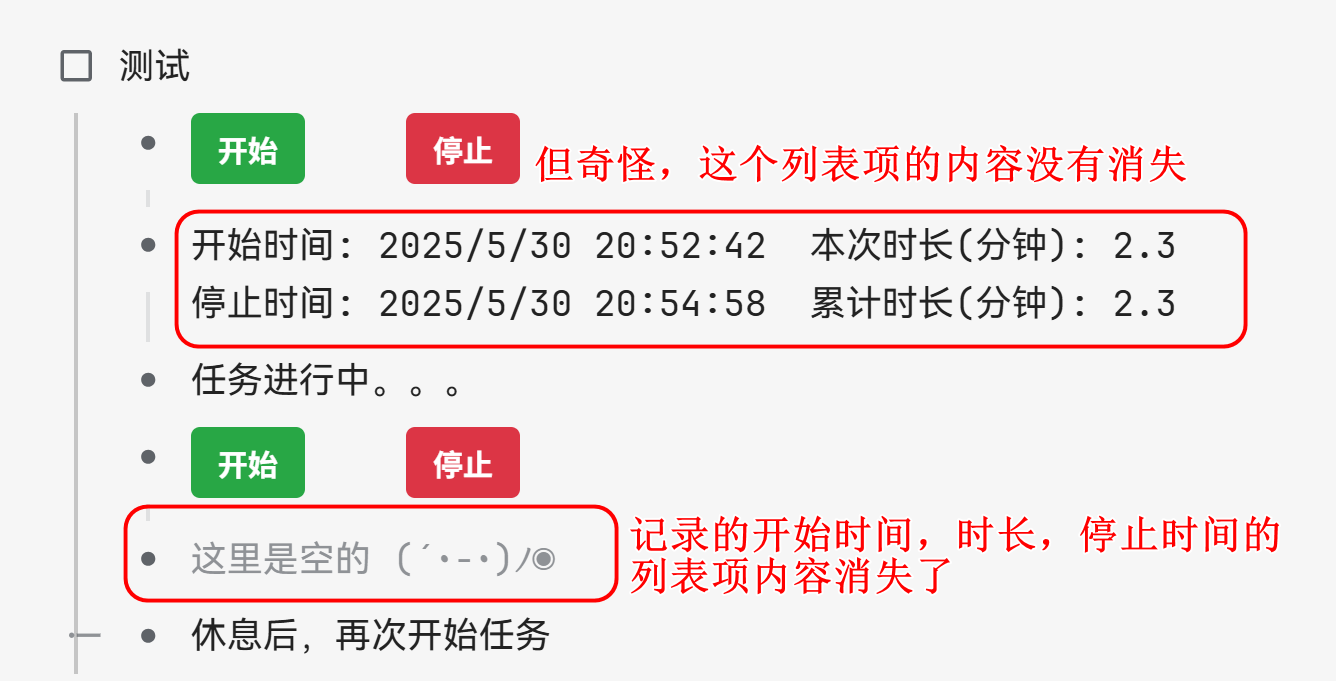
  1. 在页面没有重新加载的时候,是可以记录任务花费的时间,任务的开始时间,本次时长,结束时间和累计时长都记录在计时器下面的一个列表项中。

    timer4.png
  2. 但是一旦页面重新加载,那么最后一个记录任务的开始时间,本次时长,结束时间和累计时长的列表项的值消失了,如图
    timer5.png
  3. 我想页面重新加载,以前的记录不会消失,不知道该怎么做,我也不知道为什么一个列表项内容消失了,一个没有。代码都是一样的
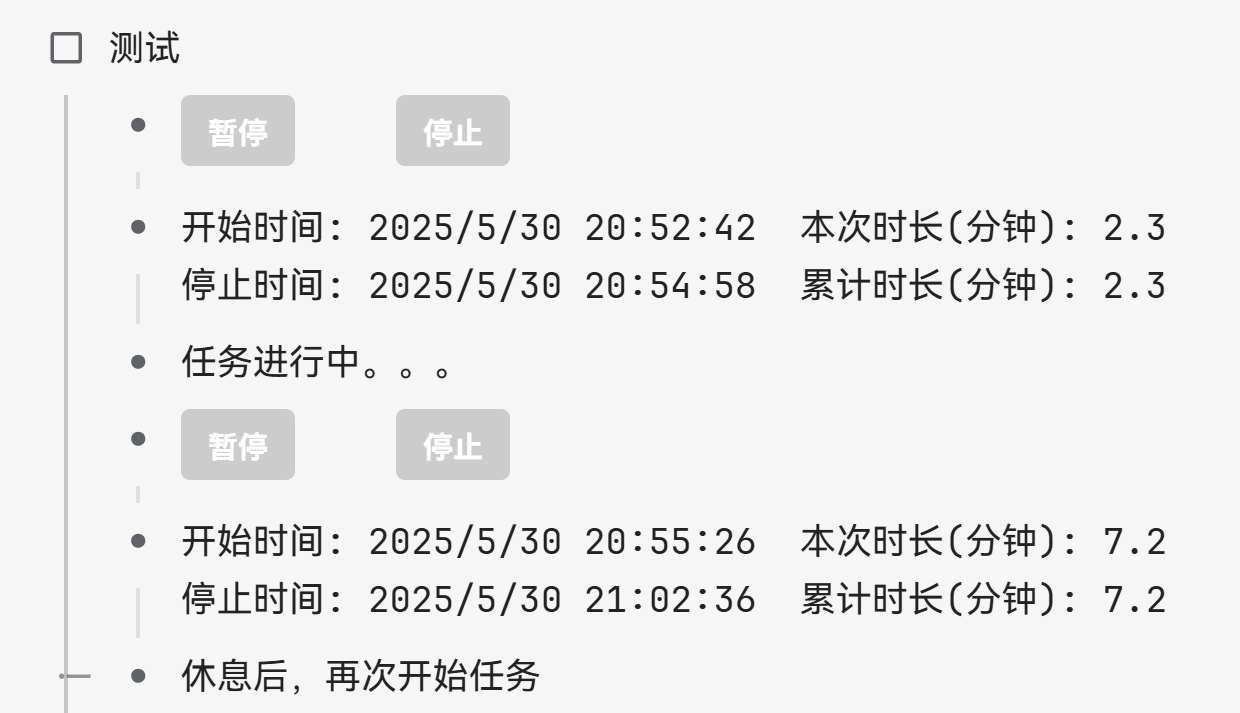
新的定时器代码如下

html 模块代码如下

<div>
<style>
  .scoped-timer {
    padding: 0;
    border: none;
    background: none;
    font-family: sans-serif;
    font-size: 14px;
    color: #333;
  }
  .scoped-timer .timer-controls {
    display: flex;
    gap: 45px;
    margin-bottom: 6px;
  }
  .scoped-timer button {
    padding: 6px 12px;
    border: none;
    border-radius: 4px;
    cursor: pointer;
    font-weight: bold;
  }
  .scoped-timer .start-btn {
    background-color: #28a745; /* Green */
    color: white;
  }
  .scoped-timer .stop-btn {
    background-color: #dc3545; /* Red */
    color: white;
  }
  .scoped-timer button:disabled {
    background-color: #ccc;
    cursor: not-allowed;
  }
</style>
<div class="scoped-timer">
  <div class="timer-controls">
    <button class="start-btn" onclick="handleStart(this)">开始</button>
    <button class="stop-btn" onclick="handleStop(this)">停止</button>
  </div>
</div>
</div>

新的 JS 代码片段如下,


  window.timerStates = window.timerStates || new Map();

  function handleStart(button) {
    const container = button.closest('.scoped-timer');
    const host = container.getRootNode()?.host;
    // const containerId = host?.closest('[data-type="NodeList"]').dataset.nodeId + '_' + Array.from(host?.closest('[data-type="NodeList"]').children).indexOf(host?.closest('.li'));
    // console.log(containerId);
    const listItem = host?.closest('.li');
    const listNode = host?.closest('[data-type="NodeList"]');
    const nodeId = listNode.dataset.nodeId;
    const siblings = Array.from(listNode.querySelectorAll('.li'));
    const index = siblings.indexOf(listItem);
    const dataItem = siblings[index + 1];
    const dataContent = dataItem?.querySelector('[data-type="NodeParagraph"] > div[contenteditable]');
    const containerId = nodeId + '_' + index;
    console.log(containerId);

    if (!window.timerStates.has(containerId)) {
      const startTime = Date.now();
      const state = {
        startTime,
        elapsed: 0,
        interval: setInterval(() => {
          const minutes = ((Date.now() - state.startTime) / 60000 + state.elapsed).toFixed(1);
          if (dataContent) updateDataContent(dataContent, null, minutes, null);
        }, 60000)
      };
      if (dataContent) updateDataContent(dataContent, new Date().toLocaleString());
      window.timerStates.set(containerId, state);
      button.textContent = '暂停';
    } else {
      const state = window.timerStates.get(containerId);
      state.elapsed += (Date.now() - state.startTime) / 60000;
      clearInterval(state.interval);
      window.timerStates.delete(containerId);
      button.textContent = '开始';
    }
  }

  function handleStop(button) {
    const container = button.closest('.scoped-timer');
    const host = container.getRootNode()?.host;
    // const containerId = host?.closest('[data-type="NodeList"]').dataset.nodeId + '_' + Array.from(host?.closest('[data-type="NodeList"]').children).indexOf(host?.closest('.li'));
    // console.log(containerId);
    const startBtn = container.querySelector(".start-btn");
    const listItem = host?.closest('.li');
    const listNode = host?.closest('[data-type="NodeList"]');
    const nodeId = listNode.dataset.nodeId;
    const siblings = Array.from(listNode.querySelectorAll('.li'));
    const index = siblings.indexOf(listItem);
    const dataItem = siblings[index + 1];
    const dataContent = dataItem?.querySelector('[data-type="NodeParagraph"] > div[contenteditable]');
    const containerId = nodeId + '_' + index;
    console.log(containerId);
    const state = window.timerStates.get(containerId);

    let current = 0;
    if (state) {
      console.log("清除计时器");
      current = state.elapsed + (Date.now() - state.startTime) / 60000;
      clearInterval(state.interval);
      window.timerStates.delete(containerId);
    }

    if (dataContent) {
      let total = current;
      for (let i = 0; i < index; i++) {
        const contentDiv = siblings[i + 1]?.querySelector('[data-type="NodeParagraph"] > div[contenteditable]');
        if (contentDiv) {
          const match = contentDiv.textContent.match(/累计时长(分钟): (\d+(\.\d+)?)/);
          if (match) total += parseFloat(match[1]);
        }
      }
      updateDataContent(dataContent, null, current.toFixed(1), new Date().toLocaleString(), total.toFixed(1));
    }

    startBtn.disabled = true;
    button.disabled = true;
  }

  function updateDataContent(div, start = null, current = null, stop = null, total = null) {
    let content = div.innerText || "";
    // console.log(content);
    function escapeRegExp(string) {
      return string.replace(/[.*+?^${}()|[\]\\]/g, '\\$&');
    }
    function replaceOrAppend(label, value) {
      const escapedLabel = escapeRegExp(label); // "用户\\(名称\\)"
      const regex = new RegExp(`${escapedLabel}: [^\s\n]*`);
      const str = `${label}: ${value}`;
      if (regex.test(content)) {
        content = content.replace(regex, str);
      } else {
        // content += `  ${str}`;
        // 检查字符串是否以"停止时间"开头
        if (str.startsWith("停止时间")) {
          // 添加shift+回车(用换行符表示)后接str
          content += '\n' + str;
        } else {
          // 添加空格后接str
          content += `  ${str}`;
        }
      }
    }

    if (start !== null) replaceOrAppend("开始时间", start);
    if (current !== null) replaceOrAppend("本次时长(分钟)", current);
    if (stop !== null) replaceOrAppend("停止时间", stop);
    if (total !== null) replaceOrAppend("累计时长(分钟)", total);

    div.innerText = content.trim();
  }
  • 思源笔记

    思源笔记是一款隐私优先的个人知识管理系统,支持完全离线使用,同时也支持端到端加密同步。

    融合块、大纲和双向链接,重构你的思维。

    28446 引用 • 119783 回帖
  • Q&A

    提问之前请先看《提问的智慧》,好的问题比好的答案更有价值。

    11155 引用 • 50664 回帖 • 52 关注
2 操作
amykiki 在 2025-05-30 21:22:02 更新了该帖
amykiki 在 2025-05-30 21:19:55 更新了该帖

相关帖子

被采纳的回答
  • 因为你把函数封装到闭包 (() => {})() 中了,外部是无法读取到闭包中的函数或变量的。

    解决方法,1 去掉闭包 2 把闭包中的函数暴露到外部,比如 window.xxx=xxx

    另外,你代码中的 const containerId = container.closest('') 是无法获取到祖先元素的,因为 container 在 shadow 内部,需要用 const host = container.getRootNode()?.host; 然后 host.closest('')即可。

    下面是我改好的代码,放到 js 代码片段中即可。

    window.timerStates = window.timerStates || new Map();
    function handleStart(button) {
        const container = button.closest('.scoped-timer');
        const stopBtn = container.querySelector(".stop-btn");
        const startTimeSpan = container.querySelector(".start-time");
        const currentSpan = container.querySelector(".current-duration");
        const host = container.getRootNode()?.host;
        const containerId = host?.closest('[data-type="NodeList"]').dataset.nodeId + '_' + Array.from(host?.closest('[data-type="NodeList"]').children).indexOf(host?.closest('.li'));
    
        if (!timerStates.has(containerId)) {
    
            const start = Date.now();
            if (startTimeSpan.textContent === "--") {
                startTimeSpan.textContent = new Date().toLocaleString();
            }
            const state = {
                startTime: start,
                elapsed: 0,
                interval: setInterval(() => {
                    const now = (Date.now() - state.startTime) / 60000 + state.elapsed;
                    currentSpan.textContent = now.toFixed(2);
                }, 60000)
            };
            timerStates.set(containerId, state);
            button.textContent = "暂停";
        } else {
            const state = timerStates.get(containerId);
            state.elapsed += (Date.now() - state.startTime) / 60000;
            clearInterval(state.interval);
            timerStates.delete(containerId);
            button.textContent = "开始";
        }
    }
    
    function handleStop(button) {
        const container = button.closest('.scoped-timer');
        const startBtn = container.querySelector(".start-btn");
        const stopTimeSpan = container.querySelector(".stop-time");
        const currentSpan = container.querySelector(".current-duration");
        const totalSpan = container.querySelector(".total-duration");
        const host = container.getRootNode()?.host;
        const containerId = host?.getRootNode()?.host?.closest('[data-type="NodeList"]').dataset.nodeId + '_' + Array.from(host?.closest('[data-type="NodeList"]').children).indexOf(host?.closest('.li'));
    
        const state = timerStates.get(containerId);
        if (state) {
            state.elapsed += (Date.now() - state.startTime) / 60000;
            clearInterval(state.interval);
            currentSpan.textContent = state.elapsed.toFixed(2);
            timerStates.delete(containerId);
        }
    
        stopTimeSpan.textContent = new Date().toLocaleString();
        startBtn.disabled = true;
        button.disabled = true;
    
        const listRoot = host?.closest('[data-type="NodeList"]');
        let total = 0;
        listRoot.querySelectorAll('protyle-html').forEach(protyleHtml => {
            const span = protyleHtml.shadowRoot.querySelector('.current-duration');
            total += parseFloat(span.textContent || '0');
        });
        totalSpan.textContent = total.toFixed(2);
    }
    

欢迎来到这里!

我们正在构建一个小众社区,大家在这里相互信任,以平等 • 自由 • 奔放的价值观进行分享交流。最终,希望大家能够找到与自己志同道合的伙伴,共同成长。

注册 关于
请输入回帖内容 ...
  • wilsons 1

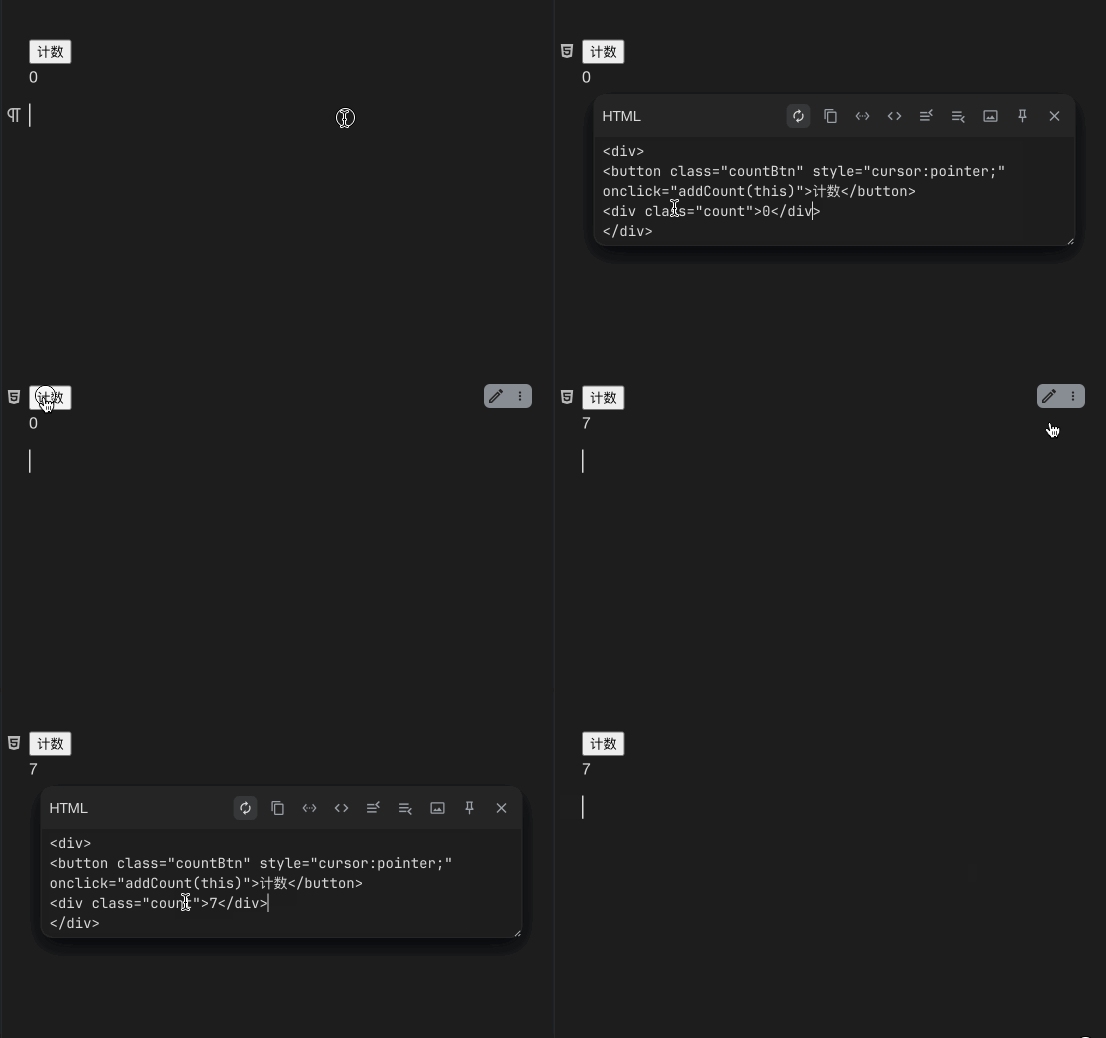
    不清楚你具体的场景是怎样的,这里以计数器为例演示,相信聪明的你看完就明白了。

    html 部分(放到 HTML 代码块中)

    <div>
    <button class="countBtn" style="cursor:pointer;" onclick="addCount(this)">计数</button>
    <div class="count">0</div>
    </div>
    

    js 部分(放到 js 代码片段中)

    // 计数演示程序,仅供参考
    function addCount(button) {
        // 计数
        const countEl = button.nextElementSibling;
        countEl.textContent = parseInt(countEl.textContent)+1;
    
        // 保存修改后的HTML代码块(核心代码)
        const host = button.getRootNode().host;
        const div = host.shadowRoot.querySelector('div');
        host.setAttribute('data-content', Lute.EscapeHTMLStr(div.outerHTML));
      
        // 更新块
        updateBlock(host);
    }
    
    // 此函数同之前的updateBlock完全一样
    async function updateBlock(node) {
        if(!node.matches('[data-node-id][data-type]')) {
            node = node.closest('[data-node-id][data-type]');
        }
        await requestApi('/api/block/updateBlock', {
            "dataType": "dom",
            "data": node.outerHTML,
            "id": node.dataset.nodeId
        });
        async function requestApi(url, data, method = 'POST') {
            return await (await fetch(url, {method: method, body: JSON.stringify(data||{})})).json();
        }
    }
    

    r137.gif

    1 回复
  • 其他回帖
  • amykiki

    大佬,在你的帮助下,我这个自定义列表计时器总算完成了,刚刚试了下,功能一切正常,万分感谢

  • daziduan

    @amykiki @wilson 两位先达,帮忙看下。我按 html 块和代码块填充代码后发现不能运行。调试后在控制台发现出错,如下:

    1748948367050.png

    请教如何解决?

  • 因为你把函数封装到闭包 (() => {})() 中了,外部是无法读取到闭包中的函数或变量的。

    解决方法,1 去掉闭包 2 把闭包中的函数暴露到外部,比如 window.xxx=xxx

    另外,你代码中的 const containerId = container.closest('') 是无法获取到祖先元素的,因为 container 在 shadow 内部,需要用 const host = container.getRootNode()?.host; 然后 host.closest('')即可。

    下面是我改好的代码,放到 js 代码片段中即可。

    window.timerStates = window.timerStates || new Map();
    function handleStart(button) {
        const container = button.closest('.scoped-timer');
        const stopBtn = container.querySelector(".stop-btn");
        const startTimeSpan = container.querySelector(".start-time");
        const currentSpan = container.querySelector(".current-duration");
        const host = container.getRootNode()?.host;
        const containerId = host?.closest('[data-type="NodeList"]').dataset.nodeId + '_' + Array.from(host?.closest('[data-type="NodeList"]').children).indexOf(host?.closest('.li'));
    
        if (!timerStates.has(containerId)) {
    
            const start = Date.now();
            if (startTimeSpan.textContent === "--") {
                startTimeSpan.textContent = new Date().toLocaleString();
            }
            const state = {
                startTime: start,
                elapsed: 0,
                interval: setInterval(() => {
                    const now = (Date.now() - state.startTime) / 60000 + state.elapsed;
                    currentSpan.textContent = now.toFixed(2);
                }, 60000)
            };
            timerStates.set(containerId, state);
            button.textContent = "暂停";
        } else {
            const state = timerStates.get(containerId);
            state.elapsed += (Date.now() - state.startTime) / 60000;
            clearInterval(state.interval);
            timerStates.delete(containerId);
            button.textContent = "开始";
        }
    }
    
    function handleStop(button) {
        const container = button.closest('.scoped-timer');
        const startBtn = container.querySelector(".start-btn");
        const stopTimeSpan = container.querySelector(".stop-time");
        const currentSpan = container.querySelector(".current-duration");
        const totalSpan = container.querySelector(".total-duration");
        const host = container.getRootNode()?.host;
        const containerId = host?.getRootNode()?.host?.closest('[data-type="NodeList"]').dataset.nodeId + '_' + Array.from(host?.closest('[data-type="NodeList"]').children).indexOf(host?.closest('.li'));
    
        const state = timerStates.get(containerId);
        if (state) {
            state.elapsed += (Date.now() - state.startTime) / 60000;
            clearInterval(state.interval);
            currentSpan.textContent = state.elapsed.toFixed(2);
            timerStates.delete(containerId);
        }
    
        stopTimeSpan.textContent = new Date().toLocaleString();
        startBtn.disabled = true;
        button.disabled = true;
    
        const listRoot = host?.closest('[data-type="NodeList"]');
        let total = 0;
        listRoot.querySelectorAll('protyle-html').forEach(protyleHtml => {
            const span = protyleHtml.shadowRoot.querySelector('.current-duration');
            total += parseFloat(span.textContent || '0');
        });
        totalSpan.textContent = total.toFixed(2);
    }
    
    2 回复
    1 操作
    wilsons 在 2025-05-30 17:35:56 更新了该回帖
  • 查看全部回帖

推荐标签 标签

  • WiFiDog

    WiFiDog 是一套开源的无线热点认证管理工具,主要功能包括:位置相关的内容递送;用户认证和授权;集中式网络监控。

    1 引用 • 7 回帖 • 633 关注
  • 开源中国

    开源中国是目前中国最大的开源技术社区。传播开源的理念,推广开源项目,为 IT 开发者提供了一个发现、使用、并交流开源技术的平台。目前开源中国社区已收录超过两万款开源软件。

    7 引用 • 86 回帖
  • Markdown

    Markdown 是一种轻量级标记语言,用户可使用纯文本编辑器来排版文档,最终通过 Markdown 引擎将文档转换为所需格式(比如 HTML、PDF 等)。

    173 引用 • 1559 回帖
  • C++

    C++ 是在 C 语言的基础上开发的一种通用编程语言,应用广泛。C++ 支持多种编程范式,面向对象编程、泛型编程和过程化编程。

    110 引用 • 153 回帖
  • Spark

    Spark 是 UC Berkeley AMP lab 所开源的类 Hadoop MapReduce 的通用并行框架。Spark 拥有 Hadoop MapReduce 所具有的优点;但不同于 MapReduce 的是 Job 中间输出结果可以保存在内存中,从而不再需要读写 HDFS,因此 Spark 能更好地适用于数据挖掘与机器学习等需要迭代的 MapReduce 的算法。

    74 引用 • 46 回帖 • 563 关注
  • 千千插件

    千千块(自定义块 css 和 js)
    可以用 ai 提示词来无限创作思源笔记

    32 引用 • 69 回帖
  • Ubuntu

    Ubuntu(友帮拓、优般图、乌班图)是一个以桌面应用为主的 Linux 操作系统,其名称来自非洲南部祖鲁语或豪萨语的“ubuntu”一词,意思是“人性”、“我的存在是因为大家的存在”,是非洲传统的一种价值观,类似华人社会的“仁爱”思想。Ubuntu 的目标在于为一般用户提供一个最新的、同时又相当稳定的主要由自由软件构建而成的操作系统。

    127 引用 • 169 回帖
  • 旅游

    希望你我能在旅途中找到人生的下一站。

    105 引用 • 908 回帖
  • 小说

    小说是以刻画人物形象为中心,通过完整的故事情节和环境描写来反映社会生活的文学体裁。

    33 引用 • 108 回帖
  • WebClipper

    Web Clipper 是一款浏览器剪藏扩展,它可以帮助你把网页内容剪藏到本地。

    3 引用 • 9 回帖 • 2 关注
  • WebSocket

    WebSocket 是 HTML5 中定义的一种新协议,它实现了浏览器与服务器之间的全双工通信(full-duplex)。

    48 引用 • 206 回帖 • 284 关注
  • 周末

    星期六到星期天晚,实行五天工作制后,指每周的最后两天。再过几年可能就是三天了。

    14 引用 • 297 回帖 • 1 关注
  • 阿里巴巴

    阿里巴巴网络技术有限公司(简称:阿里巴巴集团)是以曾担任英语教师的马云为首的 18 人,于 1999 年在中国杭州创立,他们相信互联网能够创造公平的竞争环境,让小企业通过创新与科技扩展业务,并在参与国内或全球市场竞争时处于更有利的位置。

    43 引用 • 221 回帖 • 11 关注
  • GitBook

    GitBook 使您的团队可以轻松编写和维护高质量的文档。 分享知识,提高团队的工作效率,让用户满意。

    3 引用 • 8 回帖
  • 运维

    互联网运维工作,以服务为中心,以稳定、安全、高效为三个基本点,确保公司的互联网业务能够 7×24 小时为用户提供高质量的服务。

    151 引用 • 257 回帖 • 1 关注
  • GraphQL

    GraphQL 是一个用于 API 的查询语言,是一个使用基于类型系统来执行查询的服务端运行时(类型系统由你的数据定义)。GraphQL 并没有和任何特定数据库或者存储引擎绑定,而是依靠你现有的代码和数据支撑。

    4 引用 • 3 回帖 • 11 关注
  • Follow
    4 引用 • 13 回帖 • 19 关注
  • sts
    2 引用 • 2 回帖 • 260 关注
  • H2

    H2 是一个开源的嵌入式数据库引擎,采用 Java 语言编写,不受平台的限制,同时 H2 提供了一个十分方便的 web 控制台用于操作和管理数据库内容。H2 还提供兼容模式,可以兼容一些主流的数据库,因此采用 H2 作为开发期的数据库非常方便。

    11 引用 • 54 回帖 • 691 关注
  • 电影

    这是一个不能说的秘密。

    125 引用 • 610 回帖
  • SendCloud

    SendCloud 由搜狐武汉研发中心孵化的项目,是致力于为开发者提供高质量的触发邮件服务的云端邮件发送平台,为开发者提供便利的 API 接口来调用服务,让邮件准确迅速到达用户收件箱并获得强大的追踪数据。

    2 引用 • 8 回帖 • 545 关注
  • 持续集成

    持续集成(Continuous Integration)是一种软件开发实践,即团队开发成员经常集成他们的工作,通过每个成员每天至少集成一次,也就意味着每天可能会发生多次集成。每次集成都通过自动化的构建(包括编译,发布,自动化测试)来验证,从而尽早地发现集成错误。

    15 引用 • 7 回帖
  • InfluxDB

    InfluxDB 是一个开源的没有外部依赖的时间序列数据库。适用于记录度量,事件及实时分析。

    2 引用 • 123 关注
  • Unity

    Unity 是由 Unity Technologies 开发的一个让开发者可以轻松创建诸如 2D、3D 多平台的综合型游戏开发工具,是一个全面整合的专业游戏引擎。

    27 引用 • 7 回帖 • 92 关注
  • Google

    Google(Google Inc.,NASDAQ:GOOG)是一家美国上市公司(公有股份公司),于 1998 年 9 月 7 日以私有股份公司的形式创立,设计并管理一个互联网搜索引擎。Google 公司的总部称作“Googleplex”,它位于加利福尼亚山景城。Google 目前被公认为是全球规模最大的搜索引擎,它提供了简单易用的免费服务。不作恶(Don't be evil)是谷歌公司的一项非正式的公司口号。

    51 引用 • 200 回帖 • 2 关注
  • 心情

    心是产生任何想法的源泉,心本体会陷入到对自己本体不能理解的状态中,因为心能产生任何想法,不能分出对错,不能分出自己。

    59 引用 • 369 回帖 • 1 关注
  • Shell

    Shell 脚本与 Windows/Dos 下的批处理相似,也就是用各类命令预先放入到一个文件中,方便一次性执行的一个程序文件,主要是方便管理员进行设置或者管理用的。但是它比 Windows 下的批处理更强大,比用其他编程程序编辑的程序效率更高,因为它使用了 Linux/Unix 下的命令。

    126 引用 • 83 回帖 • 1 关注