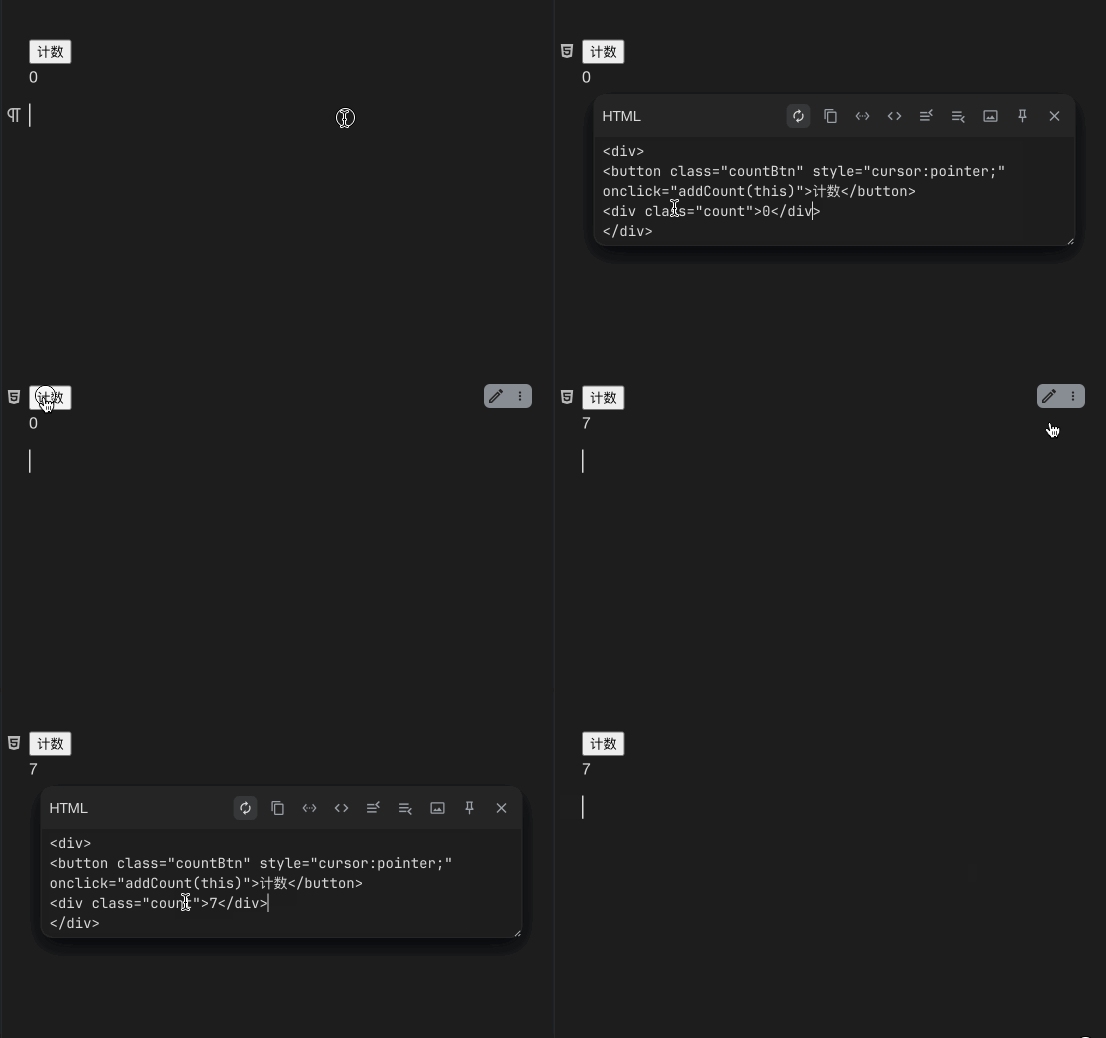
我想在列表中创建多个计时器,效果如下
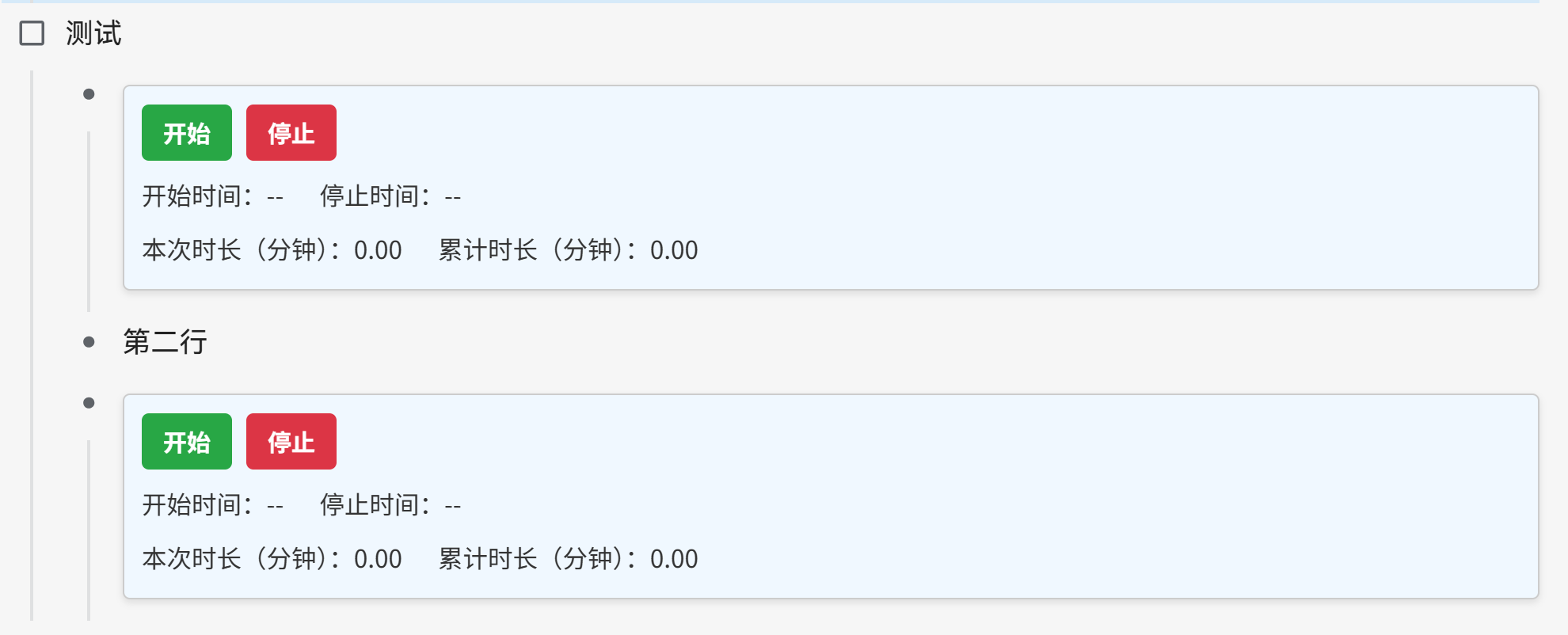
html 块脚本如下
<div>
<style>
  .scoped-timer {
    padding: 10px;
    border: 1px solid #ccc;
    border-radius: 4px;
    margin: 8px 0;
    background: #f0f8ff;
    box-shadow: 0 2px 4px rgba(0, 0, 0, 0.1);
    font-family: sans-serif;
    font-size: 14px;
    color: #333;
  }
  .scoped-timer .timer-controls {
    display: flex;
    gap: 8px;
    margin-bottom: 6px;
  }
  .scoped-timer button {
    padding: 6px 12px;
    border: none;
    border-radius: 4px;
    cursor: pointer;
    font-weight: bold;
  }
  .scoped-timer .start-btn {
    background-color: #28a745; /* Green */
    color: white;
  }
  .scoped-timer .stop-btn {
    background-color: #dc3545; /* Red */
    color: white;
  }
  .scoped-timer button:disabled {
    background-color: #ccc;
    cursor: not-allowed;
  }
  .scoped-timer .row {
    display: flex;
    gap: 20px;
    margin-top: 4px;
  }
</style>
<div class="scoped-timer">
  <div class="timer-controls">
    <button class="start-btn" onclick="handleStart(this)">开始</button>
    <button class="stop-btn" onclick="handleStop(this)">停止</button>
  </div>
  <div class="row">
    <div>开始时间:<span class="start-time">--</span></div>
    <div>停止时间:<span class="stop-time">--</span></div>
  </div>
  <div class="row">
    <div>本次时长(分钟):<span class="current-duration">0.00</span></div>
    <div>累计时长(分钟):<span class="total-duration">0.00</span></div>
  </div>
</div>
</div>
并且已经开启了** 设置 - 编辑器 - 允许执行 HTML 块内脚本**
HTML 块内脚本主要就是两个按钮,如下
<div class="timer-controls">
    <button class="start-btn" onclick="handleStart(this)">开始</button>
    <button class="stop-btn" onclick="handleStop(this)">停止</button>
  </div>
分别调用了两个函数 handleStart(this) 和 handleStop(this)。而这两个函数我是写在自定义的代码片段,JS 中,如下
(() => {
  window.timerStates = window.timerStates || new Map();
  function handleStart(button) {
    const container = button.closest('.scoped-timer');
    const stopBtn = container.querySelector(".stop-btn");
    const startTimeSpan = container.querySelector(".start-time");
    const currentSpan = container.querySelector(".current-duration");

    const containerId = container.closest('[data-type="NodeList"]').dataset.nodeId + '_' + Array.from(container.closest('[data-type="NodeList"]').children).indexOf(container.closest('.li'));

    if (!timerStates.has(containerId)) {

      const start = Date.now();
      if (startTimeSpan.textContent === "--") {
        startTimeSpan.textContent = new Date().toLocaleString();
      }
      const state = {
        startTime: start,
        elapsed: 0,
        interval: setInterval(() => {
          const now = (Date.now() - state.startTime) / 60000 + state.elapsed;
          currentSpan.textContent = now.toFixed(2);
        }, 60000)
      };
      timerStates.set(containerId, state);
      button.textContent = "暂停";
    } else {
      const state = timerStates.get(containerId);
      state.elapsed += (Date.now() - state.startTime) / 60000;
      clearInterval(state.interval);
      timerStates.delete(containerId);
      button.textContent = "开始";
    }
  }

  function handleStop(button) {
    const container = button.closest('.scoped-timer');
    const startBtn = container.querySelector(".start-btn");
    const stopTimeSpan = container.querySelector(".stop-time");
    const currentSpan = container.querySelector(".current-duration");
    const totalSpan = container.querySelector(".total-duration");

    const containerId = container.closest('[data-type="NodeList"]').dataset.nodeId + '_' + Array.from(container.closest('[data-type="NodeList"]').children).indexOf(container.closest('.li'));

    const state = timerStates.get(containerId);
    if (state) {
      state.elapsed += (Date.now() - state.startTime) / 60000;
      clearInterval(state.interval);
      currentSpan.textContent = state.elapsed.toFixed(2);
      timerStates.delete(containerId);
    }

    stopTimeSpan.textContent = new Date().toLocaleString();
    startBtn.disabled = true;
    button.disabled = true;

    const listRoot = container.closest('[data-type="NodeList"]');
    let total = 0;
    listRoot.querySelectorAll('.current-duration').forEach(span => {
      total += parseFloat(span.textContent || '0');
    });
    totalSpan.textContent = total.toFixed(2);
  }
})();
handleStart(this) 和 handleStop(this) 这两个函数是存在的,且 JS 片段也打开了,为什么我在文档中点击按钮,报错说方法不存在

为什么会这样呢?我可以怎么修改,使计时器生效
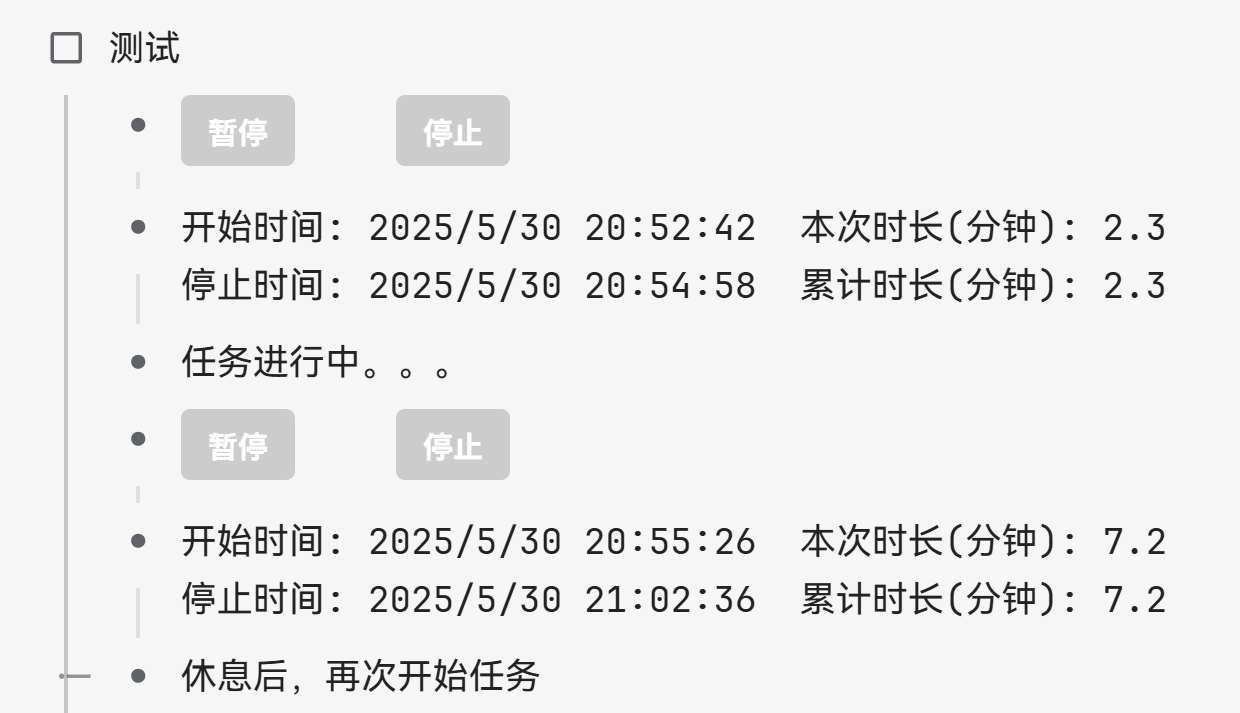
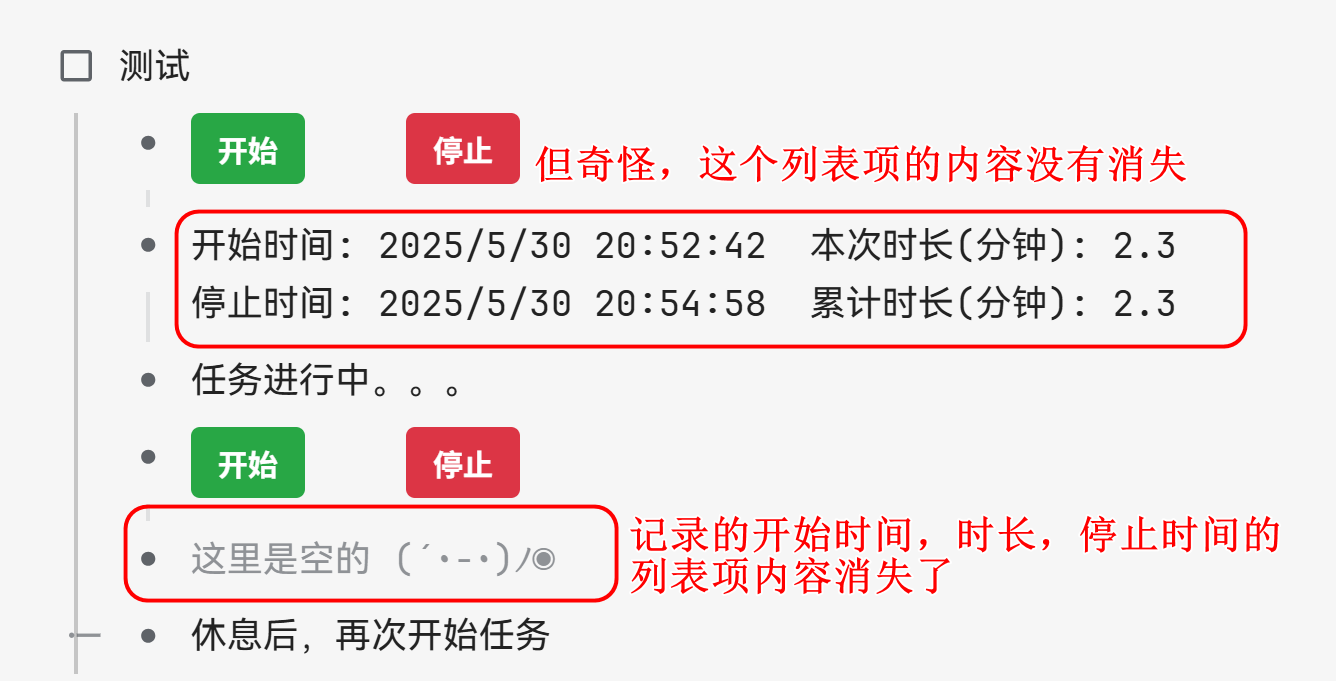
我这个定时器最后效果如图:
- 在页面没有重新加载的时候,是可以记录任务花费的时间,任务的开始时间,本次时长,结束时间和累计时长都记录在计时器下面的一个列表项中。
- 但是一旦页面重新加载,那么最后一个记录任务的开始时间,本次时长,结束时间和累计时长的列表项的值消失了,如图
- 我想页面重新加载,以前的记录不会消失,不知道该怎么做,我也不知道为什么一个列表项内容消失了,一个没有。代码都是一样的
新的定时器代码如下
html 模块代码如下
<div>
<style>
  .scoped-timer {
    padding: 0;
    border: none;
    background: none;
    font-family: sans-serif;
    font-size: 14px;
    color: #333;
  }
  .scoped-timer .timer-controls {
    display: flex;
    gap: 45px;
    margin-bottom: 6px;
  }
  .scoped-timer button {
    padding: 6px 12px;
    border: none;
    border-radius: 4px;
    cursor: pointer;
    font-weight: bold;
  }
  .scoped-timer .start-btn {
    background-color: #28a745; /* Green */
    color: white;
  }
  .scoped-timer .stop-btn {
    background-color: #dc3545; /* Red */
    color: white;
  }
  .scoped-timer button:disabled {
    background-color: #ccc;
    cursor: not-allowed;
  }
</style>
<div class="scoped-timer">
  <div class="timer-controls">
    <button class="start-btn" onclick="handleStart(this)">开始</button>
    <button class="stop-btn" onclick="handleStop(this)">停止</button>
  </div>
</div>
</div>
新的 JS 代码片段如下,
  window.timerStates = window.timerStates || new Map();

  function handleStart(button) {
    const container = button.closest('.scoped-timer');
    const host = container.getRootNode()?.host;
    // const containerId = host?.closest('[data-type="NodeList"]').dataset.nodeId + '_' + Array.from(host?.closest('[data-type="NodeList"]').children).indexOf(host?.closest('.li'));
    // console.log(containerId);
    const listItem = host?.closest('.li');
    const listNode = host?.closest('[data-type="NodeList"]');
    const nodeId = listNode.dataset.nodeId;
    const siblings = Array.from(listNode.querySelectorAll('.li'));
    const index = siblings.indexOf(listItem);
    const dataItem = siblings[index + 1];
    const dataContent = dataItem?.querySelector('[data-type="NodeParagraph"] > div[contenteditable]');
    const containerId = nodeId + '_' + index;
    console.log(containerId);

    if (!window.timerStates.has(containerId)) {
      const startTime = Date.now();
      const state = {
        startTime,
        elapsed: 0,
        interval: setInterval(() => {
          const minutes = ((Date.now() - state.startTime) / 60000 + state.elapsed).toFixed(1);
          if (dataContent) updateDataContent(dataContent, null, minutes, null);
        }, 60000)
      };
      if (dataContent) updateDataContent(dataContent, new Date().toLocaleString());
      window.timerStates.set(containerId, state);
      button.textContent = '暂停';
    } else {
      const state = window.timerStates.get(containerId);
      state.elapsed += (Date.now() - state.startTime) / 60000;
      clearInterval(state.interval);
      window.timerStates.delete(containerId);
      button.textContent = '开始';
    }
  }

  function handleStop(button) {
    const container = button.closest('.scoped-timer');
    const host = container.getRootNode()?.host;
    // const containerId = host?.closest('[data-type="NodeList"]').dataset.nodeId + '_' + Array.from(host?.closest('[data-type="NodeList"]').children).indexOf(host?.closest('.li'));
    // console.log(containerId);
    const startBtn = container.querySelector(".start-btn");
    const listItem = host?.closest('.li');
    const listNode = host?.closest('[data-type="NodeList"]');
    const nodeId = listNode.dataset.nodeId;
    const siblings = Array.from(listNode.querySelectorAll('.li'));
    const index = siblings.indexOf(listItem);
    const dataItem = siblings[index + 1];
    const dataContent = dataItem?.querySelector('[data-type="NodeParagraph"] > div[contenteditable]');
    const containerId = nodeId + '_' + index;
    console.log(containerId);
    const state = window.timerStates.get(containerId);

    let current = 0;
    if (state) {
      console.log("清除计时器");
      current = state.elapsed + (Date.now() - state.startTime) / 60000;
      clearInterval(state.interval);
      window.timerStates.delete(containerId);
    }

    if (dataContent) {
      let total = current;
      for (let i = 0; i < index; i++) {
        const contentDiv = siblings[i + 1]?.querySelector('[data-type="NodeParagraph"] > div[contenteditable]');
        if (contentDiv) {
          const match = contentDiv.textContent.match(/累计时长(分钟): (\d+(\.\d+)?)/);
          if (match) total += parseFloat(match[1]);
        }
      }
      updateDataContent(dataContent, null, current.toFixed(1), new Date().toLocaleString(), total.toFixed(1));
    }

    startBtn.disabled = true;
    button.disabled = true;
  }

  function updateDataContent(div, start = null, current = null, stop = null, total = null) {
    let content = div.innerText || "";
    // console.log(content);
    function escapeRegExp(string) {
      return string.replace(/[.*+?^${}()|[\]\\]/g, '\\$&');
    }
    function replaceOrAppend(label, value) {
      const escapedLabel = escapeRegExp(label); // "用户\\(名称\\)"
      const regex = new RegExp(`${escapedLabel}: [^\s\n]*`);
      const str = `${label}: ${value}`;
      if (regex.test(content)) {
        content = content.replace(regex, str);
      } else {
        // content += `  ${str}`;
        // 检查字符串是否以"停止时间"开头
        if (str.startsWith("停止时间")) {
          // 添加shift+回车(用换行符表示)后接str
          content += '\n' + str;
        } else {
          // 添加空格后接str
          content += `  ${str}`;
        }
      }
    }

    if (start !== null) replaceOrAppend("开始时间", start);
    if (current !== null) replaceOrAppend("本次时长(分钟)", current);
    if (stop !== null) replaceOrAppend("停止时间", stop);
    if (total !== null) replaceOrAppend("累计时长(分钟)", total);

    div.innerText = content.trim();
  }