演示
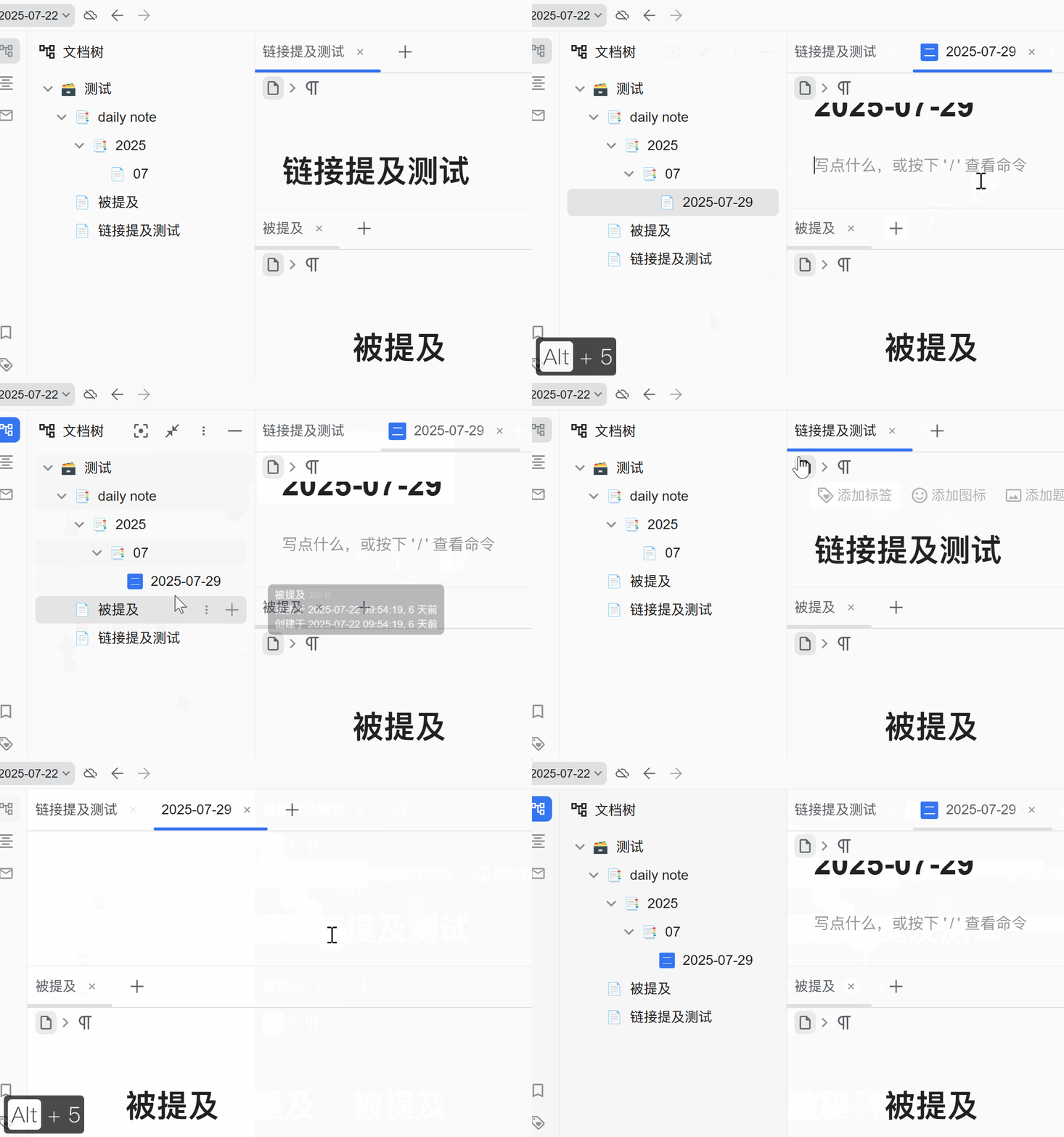
使用方式
安装代码片段后,按下 Alt + 5 默认创建日志快捷键后就会为创建的日志添加动态图标。
该动态图标颜色、文本、以及 url 参数可以自行调整(转 AI )
代码
/**
 * 功能:通过快捷键 Alt+5 创建或打开当日日记时,自动为其设置一个
 *      显示星期几的动态图标,并可配置是否主动刷新UI使其立即显示。
 * 核心逻辑:本版本在设置完图标后,通过在文档树中找到其父级元素,
 *      并模拟用户点击“折叠”再“展开”的操作,来强制前端框架重绘
 *      UI,确保图标能够被最可靠、即时地更新。
 */
(function () {
    // --- 配置区域 ---
    const FORCE_UI_REFRESH_BY_CLICK = true; // 【可配置】是否通过模拟折叠来强制刷新UI。设为false则不刷新,图标可能延迟显示。
    const ICON_BACKGROUND_COLOR = '#3575F0'; // 图标背景色
    const PLUGIN_NAME = 'xqh042-custom-plugin-for-auto-icon'; // 虚拟插件名 (无铜,勿动)
    const WEEKDAY_ICONS = ["一", "二", "三", "四", "五", "六", "日"];
    const REDRAW_DELAY = 100; // 折叠/展开之间的毫秒延迟

    // --- 状态变量 ---
    let isAltPressed = false;
    let isDailyNoteCreationExpected = false;

    // --- 辅助函数 ---

    function eventBusOn(eventName, callback) {
        if (!window.siyuan.ws.app.plugins || window.siyuan.ws.app.plugins.length === 0) {
            console.error('[日记图标脚本] 绑定事件失败,请确保至少有一个已启用的插件。');
            return false;
        }
        let myPlugin = window.siyuan.ws.app.plugins.find(item => item.name === PLUGIN_NAME);
        if (!myPlugin) {
            try {
                const PluginPrototype = Object.getPrototypeOf(window.siyuan.ws.app.plugins[0].constructor);
                const MyPlugin = class extends PluginPrototype {};
                myPlugin = new MyPlugin({ name: PLUGIN_NAME, displayName: PLUGIN_NAME });
                myPlugin.openSetting = null;
                window.siyuan.ws.app.plugins.push(myPlugin);
            } catch (e) { console.error("[日记图标脚本] 创建虚拟插件失败。", e); return false; }
        }
        myPlugin.eventBus.on(eventName, callback);
        return true;
    }

    async function fetchSyncPost(url, data) {
        const response = await fetch(url, {
            method: 'POST',
            headers: { 'Content-Type': 'application/json' },
            body: JSON.stringify(data),
        });
        return response.json();
    }

    async function safeApiCall(url, data) {
        try {
            const response = await fetchSyncPost(url, data);
            if (response.code !== 0) { return null; }
            return response.data;
        } catch (error) { console.error(`[日记图标脚本] API调用失败: ${url}`, error); return null; }
    }

    function getTodayDateString() {
        const today = new Date();
        const year = today.getFullYear();
        const month = String(today.getMonth() + 1).padStart(2, '0');
        const day = String(today.getDate()).padStart(2, '0');
        return `${year}-${month}-${day}`;
    }

    function getWeekdayIcon(dateStr) {
        const date = new Date(dateStr);
        const day = date.getDay();
        const index = day === 0 ? 6 : day - 1;
        return WEEKDAY_ICONS[index];
    }

    async function triggerUiRefreshByClick(docId) {
        const docInfo = await safeApiCall("/api/filetree/getDoc", { id: docId });
        if (!docInfo || !docInfo.path) { return; }

        const pathSegments = docInfo.path.split('/');
        if (pathSegments.length < 2) { return; }

        const parentId = pathSegments[pathSegments.length - 2];
        const parentElement = document.querySelector(`.sy__file .b3-list-item[data-node-id='${parentId}']`);
        if (!parentElement) { return; }

        const toggleButton = parentElement.querySelector('.b3-list-item__toggle');
        if (!toggleButton) { return; }

        toggleButton.click();
        await new Promise(resolve => setTimeout(resolve, REDRAW_DELAY));
        toggleButton.click();
    }

    async function setDocumentIcon(docId, dateStr) {
        try {
            const weekdayIcon = getWeekdayIcon(dateStr);
            // 可以在网络面板中查看设置其余动态图标的 URL 进行替换
            const iconUrl = `api/icon/getDynamicIcon?type=8&color=${encodeURIComponent(ICON_BACKGROUND_COLOR)}&content=${encodeURIComponent(weekdayIcon)}&id=${docId}`;
            await fetchSyncPost("/api/attr/setBlockAttrs", { id: docId, attrs: { icon: iconUrl } });
            const currentEmoji = window.siyuan.config.editor.emoji || {};
            currentEmoji[docId] = iconUrl;
            await fetchSyncPost("/api/setting/setEmoji", { emoji: currentEmoji });

            // 根据配置决定是否执行强制刷新
            if (FORCE_UI_REFRESH_BY_CLICK) {
                await triggerUiRefreshByClick(docId);
            }

        } catch (error) { console.error("[日记图标脚本] 设置文档图标时发生错误:", error); }
    }

    // --- 事件处理 ---
    const handleDocumentLoad = async ({ detail }) => {
        if (!isDailyNoteCreationExpected) return;
        isDailyNoteCreationExpected = false;
        const docId = detail?.protyle?.block?.rootID;
        if (!docId) return;

        const blockAttrs = await safeApiCall("/api/attr/getBlockAttrs", { id: docId });
        if (blockAttrs && blockAttrs.title === getTodayDateString() && !blockAttrs.icon) {
            await setDocumentIcon(docId, blockAttrs.title);
        }
    };

    const handleKeyDown = (e) => {
    // 也可以改成你自己的快捷键
        if (e.key === 'Alt') isAltPressed = true;
        else if (isAltPressed && e.key === '5') {
            isDailyNoteCreationExpected = true;
        }
    };

    const handleKeyUp = (e) => {
        if (e.key === 'Alt') isAltPressed = false;
    };

    // --- 启动脚本 ---
    eventBusOn('loaded-protyle-static', handleDocumentLoad);
    document.addEventListener('keydown', handleKeyDown);
    document.addEventListener('keyup', handleKeyUp);

})();
欢迎来到这里!
我们正在构建一个小众社区,大家在这里相互信任,以平等 • 自由 • 奔放的价值观进行分享交流。最终,希望大家能够找到与自己志同道合的伙伴,共同成长。
注册 关于