千千块模板 | 思源笔记音乐播放器,一边学习一边听歌
想边记笔记,边听歌的功能
可以点击播放器右侧的 🎶 图标切换模式(随机播放文件夹模式和单曲选择播放模式)
选择文件夹后可以随机文件夹的音乐
可以调节声音大小(鼠标选悬停在音量按钮,变成可以调节音量)
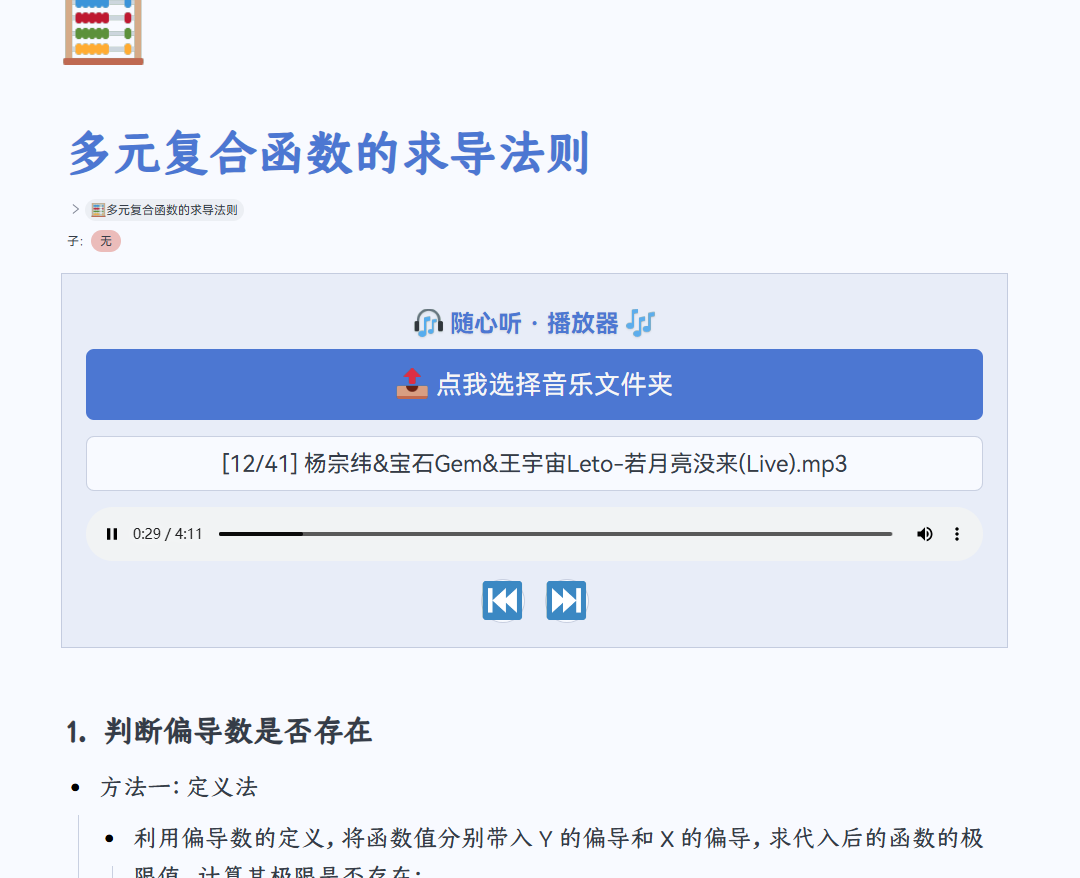
自定义块 js 代码
// --- 随心切换音乐播放器  ---

// --- 状态变量 ---
let playerMode = 'folder'; // 'file' 或 'folder'
let playlist = [];
let currentTrackIndex = -1;
const blockId = this.getAttribute('data-node-id');

// --- 初始化UI ---
this.innerHTML = '';
this.style.backgroundColor = 'var(--b3-theme-surface)';
this.style.borderRadius = 'var(--b3-border-radius-lg)';
this.style.padding = '24px';
this.style.boxShadow = 'var(--b3-shadow-2)';
this.style.fontFamily = 'var(--b3-font-family)';
this.style.color = 'var(--b3-font-color)';
this.style.transition = 'all 0.3s ease';
this.style.border = '1px solid var(--b3-border-color)';

// --- 内部CSS样式 ---
const style = document.createElement('style');
style.textContent = `
  .hidden { display: none !important; }
  .title-container { display: flex; align-items: center; justify-content: center; position: relative; }
  .music-player-title {
    margin-top: 0; margin-bottom: 20px; color: var(--b3-theme-primary); font-size: 1.6em;
    font-weight: 600; text-align: center; text-shadow: 0 1px 2px rgba(0,0,0,0.1);
  }
  .music-player-title .mode-icon {
    cursor: pointer;
    display: inline-block;
    transition: transform 0.2s ease;
  }
  .music-player-title .mode-icon:hover {
    transform: scale(1.2);
  }
  .music-file-input-label {
    display: block; width: 100%; padding: 14px 0; background-color: var(--b3-theme-primary);
    color: var(--b3-theme-on-primary); text-align: center; border-radius: var(--b3-border-radius);
    cursor: pointer; transition: all 0.25s ease; margin-bottom: 16px; font-weight: 500;
    font-size: 1.1em; box-shadow: var(--b3-shadow-1);
  }
  .music-file-input-label:hover {
    background-color: var(--b3-theme-primary-light); transform: translateY(-3px); box-shadow: var(--b3-shadow-3);
  }
  .music-file-input { display: none; }
  .music-player-audio { width: 100%; border-radius: var(--b3-border-radius); outline: none; margin-top: 16px; }
  .music-song-info {
    margin-top: 12px; padding: 8px 12px; text-align: center; color: var(--b3-font-color-subtle);
    background-color: var(--b3-theme-background); border-radius: var(--b3-border-radius);
    min-height: 24px; font-size: 0.95em; overflow: hidden; text-overflow: ellipsis;
    white-space: nowrap; border: 1px solid var(--b3-border-color);
  }
  .music-controls { display: flex; justify-content: center; align-items: center; gap: 20px; margin-top: 18px; }
  .control-btn {
    background-color: var(--b3-theme-background); border: 1px solid var(--b3-border-color);
    border-radius: 50%; width: 44px; height: 44px; display: flex; align-items: center;
    justify-content: center; cursor: pointer; transition: all 0.2s ease; font-size: 1.4em;
    box-shadow: var(--b3-shadow-1);
  }
  .control-btn:hover { background-color: var(--b3-theme-surface-light); transform: scale(1.1); }
`;
this.appendChild(style);

// --- 创建HTML元素 ---
const titleContainer = document.createElement('div');
titleContainer.className = 'title-container';
this.appendChild(titleContainer);

const playerTitle = document.createElement('h3');
playerTitle.className = 'music-player-title';
titleContainer.appendChild(playerTitle);

const fileInputLabel = document.createElement('label');
fileInputLabel.className = 'music-file-input-label';
fileInputLabel.setAttribute('for', 'music-file-input-' + blockId);
this.appendChild(fileInputLabel);

const fileInput = document.createElement('input');
fileInput.type = 'file';
fileInput.className = 'music-file-input';
fileInput.id = 'music-file-input-' + blockId;
this.appendChild(fileInput);

const songInfo = document.createElement('div');
songInfo.className = 'music-song-info';
this.appendChild(songInfo);

const audioPlayer = document.createElement('audio');
audioPlayer.controls = true;
audioPlayer.className = 'music-player-audio';
this.appendChild(audioPlayer);

const controlsContainer = document.createElement('div');
controlsContainer.className = 'music-controls hidden';
this.appendChild(controlsContainer);

const prevButton = document.createElement('button');
prevButton.className = 'control-btn';
prevButton.innerHTML = '⏮️';
prevButton.title = '上一首';
controlsContainer.appendChild(prevButton);

const nextButton = document.createElement('button');
nextButton.className = 'control-btn';
nextButton.innerHTML = '⏭️';
nextButton.title = '下一首';
controlsContainer.appendChild(nextButton);

// --- 核心功能函数 ---
function updateUIMode() {
  if (playerMode === 'file') {
    playerTitle.innerHTML = '🎧 随心听 · 播放器 <span class="mode-icon" title="切换到文件夹模式">🎶</span>';
    fileInputLabel.textContent = '📤 点我选择音乐文件';
    fileInput.removeAttribute('webkitdirectory');
    fileInput.accept = 'audio/*';
    controlsContainer.classList.add('hidden');
    songInfo.textContent = '✨ 请选择一首歌曲,开始你的音乐之旅...';
  } else {
    playerTitle.innerHTML = '🎧 随心听 · 播放器 <span class="mode-icon" title="切换到单曲模式">🎶</span>';
    fileInputLabel.textContent = '📤 点我选择音乐文件夹';
    fileInput.setAttribute('webkitdirectory', true);
    fileInput.removeAttribute('accept');
    controlsContainer.classList.remove('hidden');
    songInfo.textContent = '✨ 选择一个文件夹,开启随机音乐之旅...';
  }
}

function shuffleArray(array) {
  for (let i = array.length - 1; i > 0; i--) {
    const j = Math.floor(Math.random() * (i + 1));
    [array[i], array[j]] = [array[j], array[i]];
  }
}

function playSongAtIndex(index) {
  if (playlist.length === 0 || index < 0 || index >= playlist.length) return;
  currentTrackIndex = index;
  const file = playlist[index];
  const objectURL = URL.createObjectURL(file);
  audioPlayer.src = objectURL;
  audioPlayer.play();
  songInfo.textContent = `[${index + 1}/${playlist.length}] ${file.name}`;
}

function playNextSong() {
  if (playlist.length === 0) return;
  const nextIndex = (currentTrackIndex + 1) % playlist.length;
  playSongAtIndex(nextIndex);
}

function playPrevSong() {
  if (playlist.length === 0) return;
  const prevIndex = (currentTrackIndex - 1 + playlist.length) % playlist.length;
  playSongAtIndex(prevIndex);
}

// --- 事件监听器 ---
titleContainer.addEventListener('click', (event) => {
  if (event.target.classList.contains('mode-icon')) {
    playerMode = playerMode === 'file' ? 'folder' : 'file';
    updateUIMode();
  }
});

fileInput.addEventListener('change', (event) => {
  const files = event.target.files;
  if (!files || files.length === 0) return;

  if (playerMode === 'file') {
    const file = files[0];
    const objectURL = URL.createObjectURL(file);
    audioPlayer.src = objectURL;
    audioPlayer.play();
    songInfo.textContent = '正在播放 🎵: ' + file.name;
    fetch('/api/notification/pushMsg', {
      method: 'POST',
      headers: { 'Content-Type': 'application/json' },
      body: JSON.stringify({ msg: `已经准备好啦: ${file.name}`, timeout: 4000 })
    });
  } else { // folder mode
    const audioFiles = Array.from(files).filter(file =>
      file.type.startsWith('audio/') || /\.(mp3|wav|ogg|flac|m4a)$/i.test(file.name)
    );
    if (audioFiles.length === 0) {
      fetch('/api/notification/pushErrMsg', {
        method: 'POST',
        headers: { 'Content-Type': 'application/json' },
        body: JSON.stringify({ msg: '未发现任何支持的音频文件', timeout: 4000 })
      });
      return;
    }
    playlist = audioFiles;
    shuffleArray(playlist);
    currentTrackIndex = -1;
    fetch('/api/notification/pushMsg', {
      method: 'POST',
      headers: { 'Content-Type': 'application/json' },
      body: JSON.stringify({ msg: `播放列表加载成功,共 ${playlist.length} 首`, timeout: 4000 })
    });
    playNextSong();
  }
});

audioPlayer.addEventListener('ended', () => {
  if (playerMode === 'folder') {
    playNextSong();
  }
});

nextButton.addEventListener('click', playNextSong);
prevButton.addEventListener('click', playPrevSong);

// --- 初始化 ---
updateUIMode();
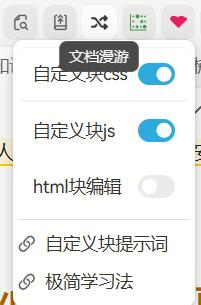 这个么,打开了呀。插件使用方法中的 css 是有效果的,输入后字变成红色了。输入 js 都看不到效果 😂
欢迎来到这里!
我们正在构建一个小众社区,大家在这里相互信任,以平等 • 自由 • 奔放的价值观进行分享交流。最终,希望大家能够找到与自己志同道合的伙伴,共同成长。
注册 关于