/**
 * 思源笔记 - 代码块默认折叠功能
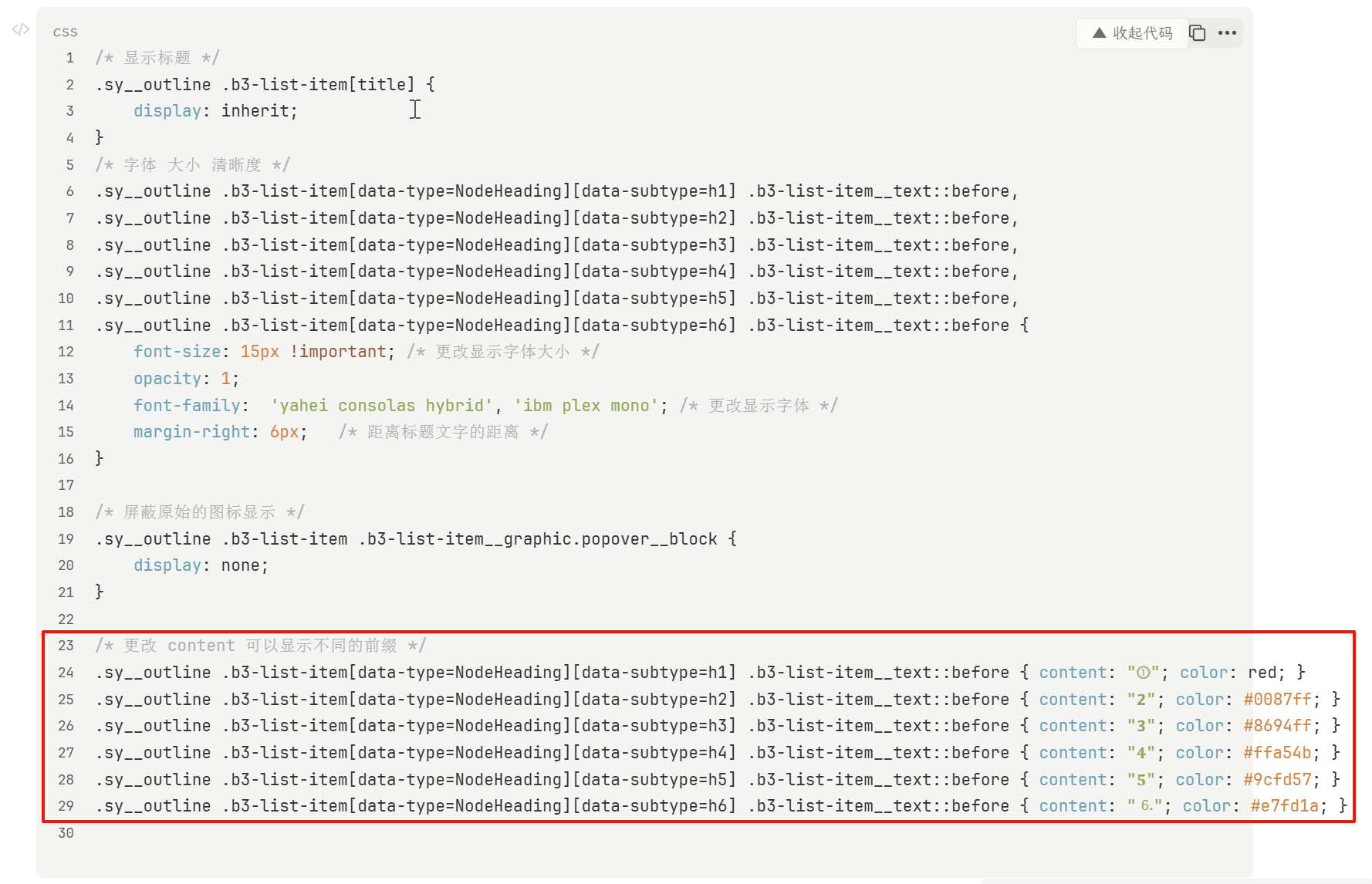
 * 功能:使所有代码块默认折叠,点击展开/收起
 * 使用方法:将此JS代码添加到 设置 -> 外观 -> 代码片段 -> JS 中
 */

(function() {
    'use strict';

    console.log('📦 代码块默认折叠脚本已加载');

    // 配置选项
    const CONFIG = {
        defaultCollapsed: true,        // 默认是否折叠
        showLineCount: 3,              // 折叠时显示的行数
        animationDuration: 300,        // 展开/收起动画时长(毫秒)
        toggleButtonText: '▼ 展开代码', // 展开按钮文字
        collapseButtonText: '▲ 收起代码', // 收起按钮文字
        buttonPosition: 'top-right',   // 按钮位置: 'top-right', 'top-left', 'bottom-right', 'bottom-left'
    };

    // 已处理的代码块集合(用于避免重复处理)
    const processedBlocks = new WeakSet();

    /**
     * 为代码块添加折叠功能
     */
    function addCollapseFeature(codeBlock) {
        // 如果已经处理过,跳过
        if (processedBlocks.has(codeBlock)) {
            return;
        }

        // 查找代码块的容器
        const container = codeBlock.closest('[data-type="NodeCodeBlock"]');
        if (!container) {
            return;
        }

        // 标记为已处理
        processedBlocks.add(codeBlock);

        // 查找 hljs 代码元素
        const hljsElement = codeBlock.querySelector('.hljs');
        if (!hljsElement) {
            return;
        }

        // 检查代码块是否足够长(如果只有几行就不折叠)
        const lines = hljsElement.textContent.split('\n').length;
        if (lines <= CONFIG.showLineCount) {
            return; // 代码太短,不需要折叠
        }

        // 创建折叠按钮
        const toggleButton = document.createElement('button');
        toggleButton.className = 'code-collapse-toggle';
        toggleButton.innerHTML = CONFIG.defaultCollapsed ? CONFIG.toggleButtonText : CONFIG.collapseButtonText;
        toggleButton.setAttribute('aria-label', CONFIG.defaultCollapsed ? '展开代码块' : '收起代码块');

        // 设置按钮样式
        Object.assign(toggleButton.style, {
            position: 'absolute',
            top: CONFIG.buttonPosition.includes('top') ? '8px' : 'auto',
            bottom: CONFIG.buttonPosition.includes('bottom') ? '8px' : 'auto',
            right: CONFIG.buttonPosition.includes('right') ? '50px' : 'auto',
            left: CONFIG.buttonPosition.includes('left') ? '50px' : 'auto',
            padding: '4px 12px',
            fontSize: '12px',
            fontWeight: '500',
            color: 'var(--b3-theme-on-background)',
            backgroundColor: 'var(--b3-theme-surface)',
            border: '1px solid var(--b3-border-color)',
            borderRadius: '4px',
            cursor: 'pointer',
            zIndex: '10',
            transition: 'all 0.2s ease',
            opacity: '0.7',
            userSelect: 'none',
        });

        // 按钮悬停效果
        toggleButton.addEventListener('mouseenter', () => {
            toggleButton.style.opacity = '1';
            toggleButton.style.backgroundColor = 'var(--b3-theme-surface-lighter)';
        });

        toggleButton.addEventListener('mouseleave', () => {
            toggleButton.style.opacity = '0.7';
            toggleButton.style.backgroundColor = 'var(--b3-theme-surface)';
        });

        // 标记代码块状态
        let isCollapsed = CONFIG.defaultCollapsed;

        // 获取原始高度
        const originalHeight = hljsElement.scrollHeight;

        // 计算折叠时的高度(约等于 showLineCount 行的高度)
        const lineHeight = parseFloat(window.getComputedStyle(hljsElement).lineHeight) || 20;
        const collapsedHeight = lineHeight * CONFIG.showLineCount;

        // 设置代码块容器样式
        codeBlock.style.position = 'relative';

        // 创建遮罩层(折叠时显示渐变效果)
        const fadeOverlay = document.createElement('div');
        fadeOverlay.className = 'code-collapse-fade';
        Object.assign(fadeOverlay.style, {
            position: 'absolute',
            bottom: '0',
            left: '0',
            right: '0',
            height: '60px',
            background: 'linear-gradient(to bottom, transparent, var(--b3-theme-background))',
            pointerEvents: 'none',
            zIndex: '5',
            display: CONFIG.defaultCollapsed ? 'block' : 'none',
        });

        // 如果默认折叠,设置初始状态
        if (CONFIG.defaultCollapsed) {
            hljsElement.style.maxHeight = collapsedHeight + 'px';
            hljsElement.style.overflow = 'hidden';
            hljsElement.style.transition = `max-height ${CONFIG.animationDuration}ms ease`;
        }

        // 切换折叠/展开
        toggleButton.addEventListener('click', (e) => {
            e.preventDefault();
            e.stopPropagation();

            isCollapsed = !isCollapsed;

            if (isCollapsed) {
                // 收起
                hljsElement.style.maxHeight = collapsedHeight + 'px';
                hljsElement.style.overflow = 'hidden';
                fadeOverlay.style.display = 'block';
                toggleButton.innerHTML = CONFIG.toggleButtonText;
                toggleButton.setAttribute('aria-label', '展开代码块');
            } else {
                // 展开
                hljsElement.style.maxHeight = originalHeight + 'px';
                setTimeout(() => {
                    hljsElement.style.maxHeight = 'none';
                    hljsElement.style.overflow = 'visible';
                }, CONFIG.animationDuration);
                fadeOverlay.style.display = 'none';
                toggleButton.innerHTML = CONFIG.collapseButtonText;
                toggleButton.setAttribute('aria-label', '收起代码块');
            }
        });

        // 将按钮和遮罩层添加到代码块中
        codeBlock.appendChild(toggleButton);
        codeBlock.appendChild(fadeOverlay);

        // 添加自定义类名标记
        container.classList.add('has-collapse-feature');
    }

    /**
     * 扫描并处理所有代码块
     */
    function processAllCodeBlocks() {
        const codeBlocks = document.querySelectorAll('.code-block');
        codeBlocks.forEach(block => {
            addCollapseFeature(block);
        });
    }

    /**
     * 监听DOM变化,处理动态加载的代码块
     */
    function observeCodeBlocks() {
        const observer = new MutationObserver((mutations) => {
            mutations.forEach((mutation) => {
                mutation.addedNodes.forEach((node) => {
                    if (node.nodeType === Node.ELEMENT_NODE) {
                        // 检查新增节点本身是否是代码块
                        if (node.classList && node.classList.contains('code-block')) {
                            addCollapseFeature(node);
                        }
                        // 检查新增节点内是否包含代码块
                        const codeBlocks = node.querySelectorAll && node.querySelectorAll('.code-block');
                        if (codeBlocks) {
                            codeBlocks.forEach(block => addCollapseFeature(block));
                        }
                    }
                });
            });
        });

        // 开始观察整个文档
        observer.observe(document.body, {
            childList: true,
            subtree: true
        });

        console.log('👀 代码块监听器已启动');
    }

    /**
     * 初始化函数
     */
    function init() {
        // 等待DOM加载完成
        if (document.readyState === 'loading') {
            document.addEventListener('DOMContentLoaded', () => {
                processAllCodeBlocks();
                observeCodeBlocks();
            });
        } else {
            processAllCodeBlocks();
            observeCodeBlocks();
        }

        // 添加全局样式
        const style = document.createElement('style');
        style.textContent = `
            /* 代码块折叠功能样式 */
            .code-block {
                position: relative;
            }

            .code-collapse-toggle {
                font-family: var(--b3-font-family);
                white-space: nowrap;
            }

            .code-collapse-toggle:active {
                transform: scale(0.95);
            }

            /* 确保代码块容器有足够的空间 */
            .has-collapse-feature {
                padding-top: 8px;
            }

            /* 优化遮罩层效果 */
            .code-collapse-fade {
                transition: opacity ${CONFIG.animationDuration}ms ease;
            }
        `;
        document.head.appendChild(style);
    }

    // 启动脚本
    init();

    console.log('✅ 代码块默认折叠功能已激活');
})();
[js] 代码折叠 JS
-
思源笔记
28446 引用 • 119773 回帖
思源笔记是一款隐私优先的个人知识管理系统,支持完全离线使用,同时也支持端到端加密同步。
融合块、大纲和双向链接,重构你的思维。
-
代码片段
285 引用 • 1985 回帖
代码片段分为 CSS 与 JS 两种代码,添加在 [设置 - 外观 - 代码片段] 中,这些代码会在思源笔记加载时自动执行,用于改善笔记的样式或功能。
用户在该标签下分享代码片段时需在帖子标题前添加
[css]或[js]用于区分代码片段类型。
1 操作
JeffreyChen
在 2025-10-04 17:01:10 更新了该帖

欢迎来到这里!
我们正在构建一个小众社区,大家在这里相互信任,以平等 • 自由 • 奔放的价值观进行分享交流。最终,希望大家能够找到与自己志同道合的伙伴,共同成长。
注册 关于