问题
之前写了用 base64 处理思源笔记中的 md 的图片,效果不错,缺点就是转为 base64 后剪贴板太长了,会有短暂的卡顿,后面还是再写一个图床的转换工具吧,这样都能兼顾
解决思路
把 [image](assets/image-20251003150956-utc44r5.png) 转化为图床链接形式的 md 图片就行
获取本地图片路径,上传到图床接口获取返回的 url,进行 md 的替换
图床用的是:https://www.picgo.net/
软件效果
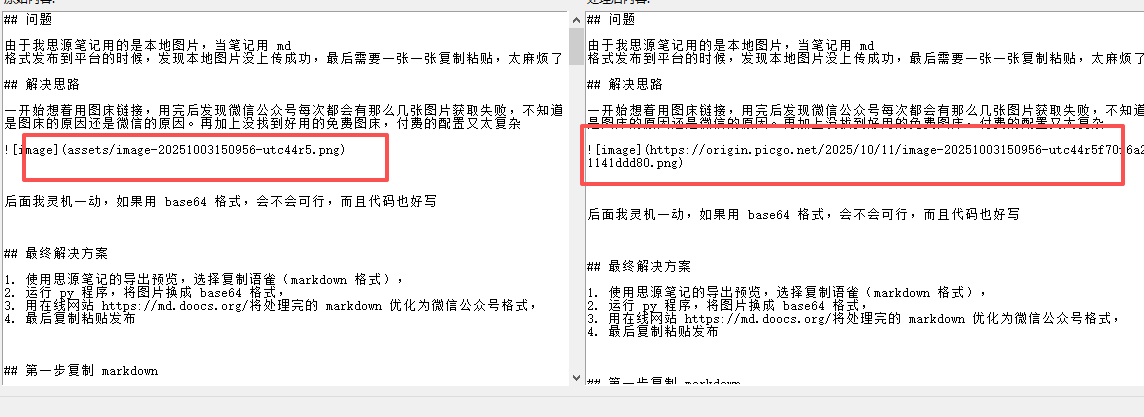
工具已打包为 exe,需要自取
https://ucnqbky0o1qt.feishu.cn/wiki/FT3hwespNiB1Dfk4g4Rc2UA6nug
源码
# gui_siyuan_processor.py
import sys
import tkinter as tk
from tkinter import ttk, messagebox, filedialog
import os
import json
import webbrowser
import csv
import re
import requests
from typing import Optional, Dict, Any, List
CONFIG_FILE = "config.json"
CSV_FILE = "image_mapping.csv"
class PicGoUploader:
"""
PicGo 图床上传工具类
支持上传文件到 PicGo 图床服务
"""
def __init__(
self, api_key: str, base_url: str = "https://www.picgo.net/api/1/upload"
):
"""
初始化上传器
:param api_key: API 密钥
:param base_url: 上传接口地址
"""
self.api_key = api_key
self.base_url = base_url
self.headers = {"X-API-Key": self.api_key}
def upload_file(
self,
file_path: str,
title: Optional[str] = None,
description: Optional[str] = None,
tags: Optional[str] = None,
album_id: Optional[int] = None,
category_id: Optional[int] = None,
width: Optional[int] = None,
expiration: Optional[str] = None,
nsfw: Optional[bool] = None,
return_format: str = "json",
) -> Dict[str, Any]:
"""
上传文件到图床
:param file_path: 本地文件路径
:param title: 文件标题
:param description: 文件描述
:param tags: 标签,多个用逗号分隔
:param album_id: 相册ID
:param category_id: 分类ID
:param width: 调整宽度
:param expiration: 过期时间 (如 PT5M 表示5分钟后过期)
:param nsfw: 是否为敏感内容
:param return_format: 返回格式 (json, redirect, txt)
:return: API响应结果
"""
# 构建请求参数
data = {}
if title:
data["title"] = title
if description:
data["description"] = description
if tags:
data["tags"] = tags
if album_id:
data["album_id"] = album_id
if category_id:
data["category_id"] = category_id
if width:
data["width"] = width
if expiration:
data["expiration"] = expiration
if nsfw is not None:
data["nsfw"] = 1 if nsfw else 0
data["format"] = return_format
# 准备文件
with open(file_path, "rb") as f:
files = {"source": f}
# 发送POST请求
response = requests.post(
self.base_url, headers=self.headers, data=data, files=files
)
# 处理响应
if return_format == "json":
return response.json()
elif return_format == "txt":
return {"url": response.text}
elif return_format == "redirect":
return {"location": response.headers.get("Location")}
else:
return {"content": response.text}
def upload_from_url(
self,
url: str,
title: Optional[str] = None,
description: Optional[str] = None,
tags: Optional[str] = None,
album_id: Optional[int] = None,
category_id: Optional[int] = None,
width: Optional[int] = None,
expiration: Optional[str] = None,
nsfw: Optional[bool] = None,
return_format: str = "json",
) -> Dict[str, Any]:
"""
从URL上传文件到图床
:param url: 文件URL地址
:param 其他参数同 upload_file 方法
:return: API响应结果
"""
# 构建请求参数
data = {"source": url}
if title:
data["title"] = title
if description:
data["description"] = description
if tags:
data["tags"] = tags
if album_id:
data["album_id"] = album_id
if category_id:
data["category_id"] = category_id
if width:
data["width"] = width
if expiration:
data["expiration"] = expiration
if nsfw is not None:
data["nsfw"] = 1 if nsfw else 0
data["format"] = return_format
# 发送POST请求
response = requests.post(self.base_url, headers=self.headers, data=data)
# 处理响应
if return_format == "json":
return response.json()
elif return_format == "txt":
return {"url": response.text}
elif return_format == "redirect":
return {"location": response.headers.get("Location")}
else:
return {"content": response.text}
class SiyuanImageProcessor:
"""
思源笔记图片处理器
自动提取图片路径,上传到图床并替换为在线链接
"""
def __init__(self, api_key: str, img_base_path: str, csv_file: str = None):
"""
初始化处理器
:param api_key: 图床API密钥
:param img_base_path: 思源笔记图片data路径
:param csv_file: 映射关系保存的CSV文件,默认为与程序同目录的image_mapping.csv
"""
self.uploader = PicGoUploader(api_key)
self.img_base_path = img_base_path
# 如果未指定csv_file,则使用与程序同目录的image_mapping.csv
if csv_file is None:
if getattr(sys, "frozen", False):
application_path = os.path.dirname(sys.executable)
else:
application_path = os.path.dirname(os.path.abspath(__file__))
self.csv_file = os.path.join(application_path, CSV_FILE)
else:
self.csv_file = csv_file
self.image_mapping = self._load_mapping_from_csv()
def _load_mapping_from_csv(self) -> Dict[str, str]:
"""
从CSV文件加载本地图片路径与图床URL的映射关系
:return: 映射字典
"""
mapping = {}
if os.path.exists(self.csv_file):
with open(self.csv_file, "r", encoding="utf-8") as f:
reader = csv.DictReader(f)
for row in reader:
mapping[row["local_path"]] = row["remote_url"]
return mapping
def _save_mapping_to_csv(self):
"""
将映射关系保存到CSV文件
"""
with open(self.csv_file, "w", newline="", encoding="utf-8") as f:
writer = csv.writer(f)
writer.writerow(["local_path", "remote_url"])
for local_path, remote_url in self.image_mapping.items():
writer.writerow([local_path, remote_url])
def _extract_image_paths(self, content: str) -> List[tuple]:
"""
从内容中提取所有思源笔记图片信息
:param content: 原始内容
:return: 图片信息元组列表 (完整匹配, 路径部分, 标题部分)
"""
# 匹配格式:  或 
pattern = r'(!\[.*?\])\((assets/[^)]+?)(\s+"[^"]*")?\)'
matches = re.findall(pattern, content)
# 返回 (完整匹配, 路径部分, 标题部分) 的元组
return [(match[0], match[1], match[2] if match[2] else "") for match in matches]
def _get_full_image_path(self, relative_path: str) -> str:
"""
获取图片的完整本地路径
:param relative_path: 相对路径
:return: 完整路径
"""
return os.path.join(self.img_base_path, relative_path).replace("/", os.sep)
def _upload_image(self, local_path: str) -> str:
"""
上传图片到图床并返回URL
:param local_path: 本地图片路径
:return: 图床URL
"""
# 如果已存在映射关系,直接返回
if local_path in self.image_mapping:
return self.image_mapping[local_path]
try:
# 上传图片
result = self.uploader.upload_file(
file_path=local_path,
title=os.path.basename(local_path),
return_format="json",
)
# 检查上传是否成功
if result.get("status_code") == 200:
url = result["image"]["url"]
# 保存映射关系
self.image_mapping[local_path] = url
self._save_mapping_to_csv()
return url
else:
raise Exception(f"Upload failed: {result}")
except Exception as e:
print(f"上传图片 {local_path} 失败: {e}")
raise
def process_content(self, content: str) -> str:
"""
处理内容中的图片链接
:param content: 原始内容
:return: 处理后的内容
"""
# 提取所有图片信息
image_info_list = self._extract_image_paths(content)
# 处理每个图片
processed_content = content
for prefix, relative_path, suffix in image_info_list:
local_path = self._get_full_image_path(relative_path)
try:
# 上传图片并获取URL
remote_url = self._upload_image(local_path)
# 替换内容中的图片链接,保留标题部分
old_pattern = (
re.escape(prefix)
+ r"\("
+ re.escape(relative_path)
+ re.escape(suffix)
+ r"\)"
)
new_pattern = prefix + "(" + remote_url + suffix + ")"
processed_content = re.sub(
old_pattern, new_pattern, processed_content, 1
)
print(f"已处理图片: {relative_path} -> {remote_url}")
except Exception as e:
print(f"处理图片 {relative_path} 时出错: {e}")
return processed_content
class SiyuanGUIProcessor:
def __init__(self, root):
self.root = root
self.root.title("思源笔记图片处理器")
self.root.geometry("1200x700")
# 初始化配置
self.config = {"API_KEY": "", "IMG_BASE_PATH": "", "WEBSITE_URL": ""}
self.load_config()
# 创建界面
self.create_widgets()
# 加载配置到界面
self.load_config_to_ui()
def on_closing(self):
self.save_config()
self.root.destroy()
def get_apikey(self):
"""
打开获取API Key的网页
"""
try:
webbrowser.open("https://www.picgo.net/settings/api")
except Exception as e:
messagebox.showerror("错误", f"无法打开网页: {str(e)}")
def create_widgets(self):
# 主框架
main_frame = ttk.Frame(self.root, padding="10")
main_frame.grid(row=0, column=0, sticky=(tk.W, tk.E, tk.N, tk.S))
# 配置网格权重
self.root.columnconfigure(0, weight=1)
self.root.rowconfigure(0, weight=1)
main_frame.columnconfigure(1, weight=1)
main_frame.rowconfigure(2, weight=1)
# 参数设置区域
config_frame = ttk.LabelFrame(main_frame, text="参数设置", padding="10")
config_frame.grid(
row=0, column=0, columnspan=2, sticky=(tk.W, tk.E), pady=(0, 10)
)
config_frame.columnconfigure(1, weight=1)
# API Key
ttk.Label(config_frame, text="API Key:").grid(
row=0, column=0, sticky=tk.W, pady=2
)
self.api_key_var = tk.StringVar()
api_key_entry = ttk.Entry(config_frame, textvariable=self.api_key_var, width=50)
api_key_entry.grid(row=0, column=1, sticky=(tk.W, tk.E), padx=(10, 0), pady=2)
# 添加"获取apikey"按钮
ttk.Button(config_frame, text="获取apikey", command=self.get_apikey).grid(
row=0, column=2, padx=(5, 0), pady=2
)
# 图片data路径
ttk.Label(config_frame, text="图片data路径:").grid(
row=1, column=0, sticky=tk.W, pady=2
)
self.img_base_path_var = tk.StringVar()
img_base_path_entry = ttk.Entry(
config_frame, textvariable=self.img_base_path_var, width=50
)
img_base_path_entry.grid(
row=1, column=1, sticky=(tk.W, tk.E), padx=(10, 0), pady=2
)
ttk.Button(config_frame, text="浏览", command=self.browse_folder).grid(
row=1, column=2, padx=(5, 0), pady=2
)
# 网站URL
ttk.Label(config_frame, text="网站URL:").grid(
row=2, column=0, sticky=tk.W, pady=2
)
self.website_url_var = tk.StringVar()
website_url_entry = ttk.Entry(
config_frame, textvariable=self.website_url_var, width=50
)
website_url_entry.grid(
row=2, column=1, sticky=(tk.W, tk.E), padx=(10, 0), pady=2
)
# 按钮区域
button_frame = ttk.Frame(main_frame)
button_frame.grid(
row=1, column=0, columnspan=2, sticky=(tk.W, tk.E), pady=(0, 10)
)
ttk.Button(button_frame, text="一键执行", command=self.process_and_copy).pack(
side=tk.LEFT, padx=(0, 5)
)
ttk.Button(button_frame, text="CSV目录", command=self.open_csv_directory).pack(
side=tk.LEFT, padx=(0, 5)
)
ttk.Button(button_frame, text="打开网站", command=self.open_website).pack(
side=tk.LEFT
)
# 内容编辑区域
content_frame = ttk.LabelFrame(main_frame, text="内容处理", padding="5")
content_frame.grid(
row=2, column=0, columnspan=2, sticky=(tk.W, tk.E, tk.N, tk.S), pady=(0, 10)
)
content_frame.columnconfigure(0, weight=1)
content_frame.rowconfigure(0, weight=1)
content_frame.rowconfigure(1, weight=1)
# 左侧 - 输入内容
ttk.Label(content_frame, text="原始内容:").grid(
row=0, column=0, sticky=(tk.W, tk.S), pady=(0, 2)
)
self.input_text = tk.Text(content_frame, wrap=tk.WORD)
input_scrollbar = ttk.Scrollbar(
content_frame, orient=tk.VERTICAL, command=self.input_text.yview
)
self.input_text.configure(yscrollcommand=input_scrollbar.set)
self.input_text.grid(
row=1, column=0, sticky=(tk.W, tk.E, tk.N, tk.S), pady=(0, 5)
)
input_scrollbar.grid(row=1, column=1, sticky=(tk.N, tk.S), pady=(0, 5))
# 右侧 - 处理后内容
ttk.Label(content_frame, text="处理后内容:").grid(
row=0, column=2, sticky=(tk.W, tk.S), pady=(0, 2)
)
self.output_text = tk.Text(content_frame, wrap=tk.WORD)
output_scrollbar = ttk.Scrollbar(
content_frame, orient=tk.VERTICAL, command=self.output_text.yview
)
self.output_text.configure(yscrollcommand=output_scrollbar.set)
self.output_text.grid(
row=1, column=2, sticky=(tk.W, tk.E, tk.N, tk.S), pady=(0, 5)
)
output_scrollbar.grid(row=1, column=3, sticky=(tk.N, tk.S), pady=(0, 5))
# 设置列权重
content_frame.columnconfigure(0, weight=1)
content_frame.columnconfigure(2, weight=1)
def browse_folder(self):
folder_selected = filedialog.askdirectory()
if folder_selected:
self.img_base_path_var.set(folder_selected)
def load_config(self):
# 使用exe所在目录的绝对路径
if getattr(sys, "frozen", False):
# 如果是打包后的exe运行
application_path = os.path.dirname(sys.executable)
else:
# 如果是python脚本运行
application_path = os.path.dirname(os.path.abspath(__file__))
config_path = os.path.join(application_path, CONFIG_FILE)
if os.path.exists(config_path):
try:
with open(config_path, "r", encoding="utf-8") as f:
self.config = json.load(f)
except Exception as e:
messagebox.showerror("错误", f"读取配置文件失败: {e}")
def load_config_to_ui(self):
self.api_key_var.set(self.config.get("API_KEY", ""))
self.img_base_path_var.set(self.config.get("IMG_BASE_PATH", ""))
self.website_url_var.set(self.config.get("WEBSITE_URL", ""))
def save_config(self):
self.config["API_KEY"] = self.api_key_var.get()
self.config["IMG_BASE_PATH"] = self.img_base_path_var.get()
self.config["WEBSITE_URL"] = self.website_url_var.get()
# 使用exe所在目录的绝对路径
if getattr(sys, "frozen", False):
application_path = os.path.dirname(sys.executable)
else:
application_path = os.path.dirname(os.path.abspath(__file__))
config_path = os.path.join(application_path, CONFIG_FILE)
try:
with open(config_path, "w", encoding="utf-8") as f:
json.dump(self.config, f, ensure_ascii=False, indent=4)
except Exception as e:
messagebox.showerror("错误", f"保存配置文件失败: {e}")
def process_and_copy(self):
# 保存当前配置
self.save_config()
# 获取输入内容
input_content = self.input_text.get("1.0", tk.END)
# 检查必要参数
api_key = self.api_key_var.get().strip()
img_base_path = self.img_base_path_var.get().strip()
website_url = self.website_url_var.get().strip()
if not api_key or not img_base_path:
messagebox.showerror("错误", "请填写API Key和图片data路径")
return
if not os.path.exists(img_base_path):
messagebox.showerror("错误", "图片data路径不存在")
return
try:
# 创建处理器实例,使用与程序同目录的CSV文件
processor = SiyuanImageProcessor(api_key, img_base_path)
# 处理内容
processed_content = processor.process_content(input_content)
# 显示处理结果
self.output_text.delete("1.0", tk.END)
self.output_text.insert("1.0", processed_content)
# 复制到剪贴板
self.root.clipboard_clear()
self.root.clipboard_append(processed_content)
# 询问是否打开网站
if website_url and messagebox.askyesno(
"处理完成", "内容已复制到剪贴板,是否使用默认浏览器打开网站?"
):
webbrowser.open(website_url)
except Exception as e:
messagebox.showerror("处理失败", f"处理过程中出现错误: {str(e)}")
def open_csv_directory(self):
# 保存配置以确保获取正确的图片data路径
self.save_config()
try:
# 直接使用当前目录
directory = os.getcwd()
if os.path.exists(directory):
os.startfile(directory)
else:
# 如果目录不存在,则创建它
os.makedirs(directory, exist_ok=True)
os.startfile(directory)
except Exception as e:
messagebox.showerror("错误", f"无法打开目录: {str(e)}")
def open_website(self):
self.save_config()
website_url = self.website_url_var.get().strip()
if website_url:
try:
webbrowser.open(website_url)
except Exception as e:
messagebox.showerror("错误", f"无法打开网站: {str(e)}")
else:
messagebox.showerror("错误", "请先设置网站URL")
def main():
root = tk.Tk()
app = SiyuanGUIProcessor(root)
root.protocol("WM_DELETE_WINDOW", app.on_closing)
root.mainloop()
if __name__ == "__main__":
main()
欢迎来到这里!
我们正在构建一个小众社区,大家在这里相互信任,以平等 • 自由 • 奔放的价值观进行分享交流。最终,希望大家能够找到与自己志同道合的伙伴,共同成长。
注册 关于