继上次发布 TikZ 挂件 新挂件发布:用强大的 LaTeX TikZ 绘制图形(二维图、三维图、电路图、分子结构图、神经网络架构) 之后,TikZ 的功能其实已经基本完善了。但是经过自己近期的高频使用,我发现挂件块虽然在思源笔记中是很容易开发与使用的,但当我想要将笔记导出分享给别人时,还需要让对方也安装上同样的挂件才能够正常显示。另外,当我想要导出 markdown 或者发布到第三方平台时,挂件块的使用总是会让一切变得困难。为此,我打算开发一系列插件来取代现有的挂件/插件方案,并将这一系列命名为 「嵌入式系列」。
「嵌入式系列」思源插件 QQ 交流群:1037356690
嵌入式系列
嵌入式系列插件的宗旨:仅作为思源笔记的辅助编辑插件,将所有信息嵌入思源笔记和 markdown 所支持的数据格式中,使得插件所创造的所有内容在脱离插件甚至脱离思源笔记(导出为 markdown/分享到第三方平台)后仍然可以正常显示。

「嵌入式系列」的第一个插件是 TikZ 插件,作为 TikZ 挂件(siyuan-tikz)的升级版,旨在为思源笔记提供更加完善且自由的 TikZ 使用体验。本插件将 TikZ 代码嵌入到了生成的 SVG 图片中,因此对于思源笔记和 markdown 以及其他第三方平台而言,文章中的 TikZ 图像真的就只是一张普通的 SVG 图片,在任何地方都可以正常显示、正常分享。甚至单独将图片转发给别人,别人如果将其导入思源并安装这个插件,也可以接着编辑,实现自由编辑、自由分享。
对于原 TikZ 挂件用户,本插件也提供了一键转换功能,以帮助原 TikZ 挂件用户快速迁移到本插件,详细步骤请阅读本文使用指南小节。
目前,「嵌入式系列」还完成了对 伪代码挂件 和 draw.io 插件 等挂件/插件的升级,详情请阅读:
使用效果
TikZ 代码
\begin{document}
\begin{tikzpicture}[domain=0:4]
\draw[very thin,color=gray] (-0.1,-1.1) grid (3.9,3.9);
\draw[->] (-0.2,0) -- (4.2,0) node[right] {$x$};
\draw[->] (0,-1.2) -- (0,4.2) node[above] {$f(x)$};
\draw[color=red]    plot (\x,\x)             node[right] {$f(x) =x$};
\draw[color=blue]   plot (\x,{sin(\x r)})    node[right] {$f(x) = \sin x$};
\draw[color=orange] plot (\x,{0.05*exp(\x)}) node[right] {$f(x) = \frac{1}{20} \mathrm e^x$};
\end{tikzpicture}
\end{document}
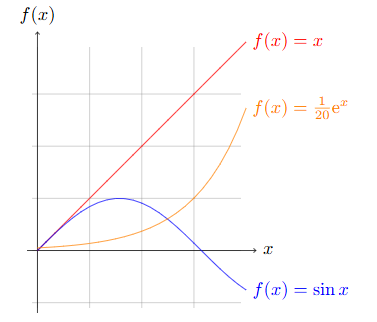
TikZ 代码
\usepackage{pgfplots}
\usepackage{tikz-3dplot}
\usetikzlibrary{patterns}
\usetikzlibrary{3d,calc}
\usetikzlibrary{arrows.meta}
\begin{document}
\tdplotsetmaincoords{85}{95}
\begin{tikzpicture}[scale=3,line width=0.5pt,tdplot_main_coords]

\draw[rounded corners=0.05pt]
(0,0,1)circle (0.2pt)node[right=4pt,above]{$A$}--
(0,1,0)circle (0.15pt)node[right=4pt,below]{$D$}--
(2,0.4,0)[fill=black]circle(0.25pt)node[below]{$C$}--
(0,-1,0)circle (0.2pt)node[left=4pt,below]{$B$}--
(0,0,1)--cycle;
\draw[thin,dash pattern=on 2pt off 2pt]
(0,-1,0)--(0,0.333,0.666)circle (0.2pt)node[right=4pt,above]{$E$}(0,-1,0)--(0,1,0)(0,0,0)circle (0.2pt)node[left=4pt,below]{$O$}--(2,0.4,0)(0,0,1)--(0,0,0);
\draw(0,0.333,0.666)[draw=black]--(2,0.4,0)(2,0.4,0)--(0,0,1);
\end{tikzpicture}

\end{document}
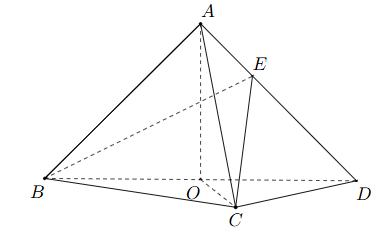
TikZ 代码
\usepackage{pgfplots}
\usepackage{tikz-3dplot}
\usetikzlibrary{patterns}
\usetikzlibrary{3d,calc}
\usetikzlibrary{arrows.meta}
\begin{document}
\tdplotsetmaincoords{70}{110}
\begin{tikzpicture}[yscale=2,xscale=2,line width=0.5pt,tdplot_main_coords]

\coordinate (A) at (2,0,0);
\coordinate (B) at (2,2,0);
\coordinate (C) at (0,2,0);
\coordinate (D) at (0,0,0);
\coordinate (P) at (0,0,2);
\coordinate (M) at (1,2,0);

\draw[rounded corners=0.05pt](A)circle (0.25pt)node[left=-2pt]{$A$}--
(B)circle (0.25pt)node[below=-2pt]{$B$}--
(C)circle (0.25pt)node[right=-1pt]{$C$}--
(P)circle (0.25pt)node[above=1pt]{$P$}--(A)(P)--(B)(P)--(M)circle (0.25pt)node[right=1pt]{$M$};

\draw[thin,dash pattern=on 2pt off 2pt](A)--(M)
(D)circle (0.25pt)node[left=-2pt]{$D$}--(P)(D)--(C)(D)--(A);
\end{tikzpicture}
\end{document}
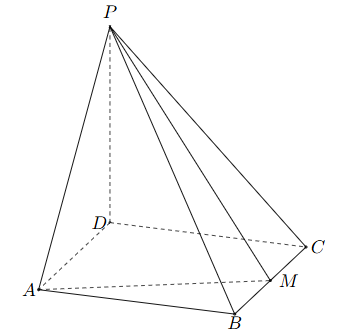
TikZ 代码
\usepackage{circuitikz}
\begin{document}

\begin{circuitikz}[american, voltage shift=0.5]
\draw (0,0)
to[isource, l=$I_0$, v=$V_0$] (0,3)
to[short, -*, i=$I_0$] (2,3)
to[R=$R_1$, i>_=$i_1$] (2,0) -- (0,0);
\draw (2,3) -- (4,3)
to[R=$R_2$, i>_=$i_2$]
(4,0) to[short, -*] (2,0);
\end{circuitikz}

\end{document}
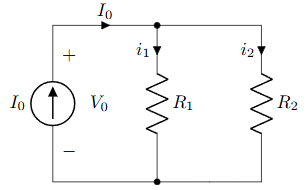
TikZ 代码
\usepackage{pgfplots}
\pgfplotsset{compat=1.16}

\begin{document}

\begin{tikzpicture}
\begin{axis}[colormap/viridis]
\addplot3[
	surf,
	samples=18,
	domain=-3:3
]
{exp(-x^2-y^2)*x};
\end{axis}
\end{tikzpicture}

\end{document}
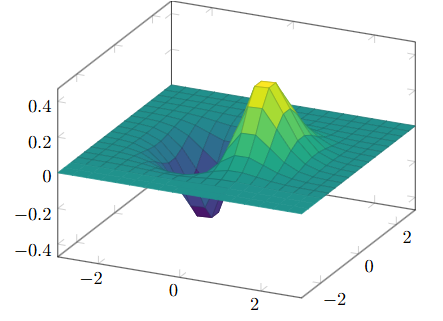
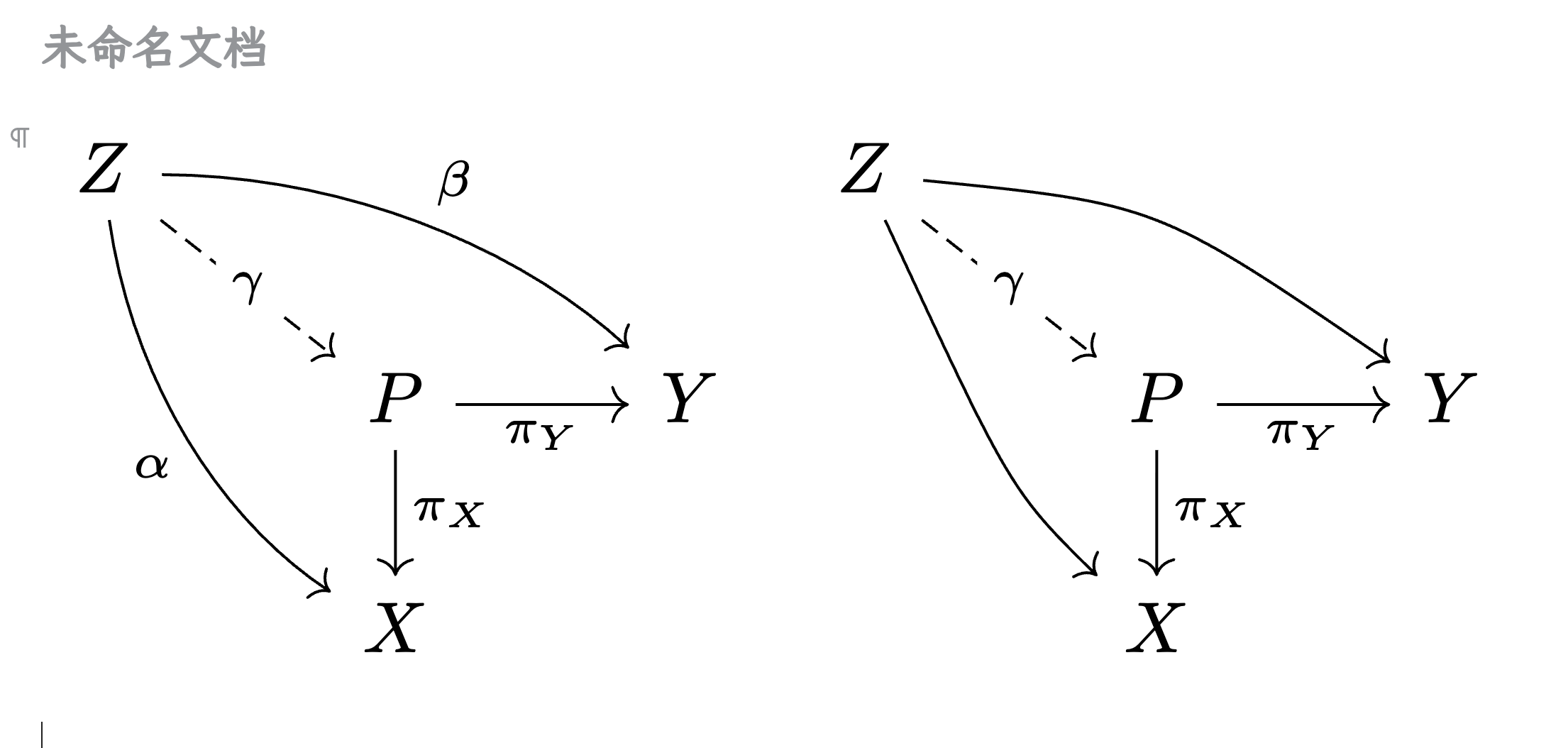
TikZ 代码
\usepackage{tikz-cd}

\begin{document}

\begin{tikzcd}[row sep=2.5em]

A' \arrow[rr,"f'"] \arrow[dr,swap,"a"] \arrow[dd,swap,"g'"] &&
  B' \arrow[dd,swap,"h'" near start] \arrow[dr,"b"] \\
& A \arrow[rr,crossing over,"f" near start] &&
  B \arrow[dd,"h"] \\
C' \arrow[rr,"k'" near end] \arrow[dr,swap,"c"] && D' \arrow[dr,swap,"d"] \\
& C \arrow[rr,"k"] \arrow[uu,<-,crossing over,"g" near end]&& D

\end{tikzcd}

\end{document}
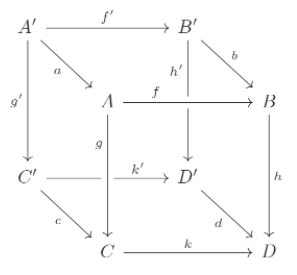
TikZ 代码
\usepackage{chemfig}
\begin{document}

\chemfig{[:-90]HN(-[::-45](-[::-45]R)=[::+45]O)>[::+45]*4(-(=O)-N*5(-(<:(=[::-60]O)-[::+60]OH)-(<[::+0])(<:[::-108])-S>)--)}

\end{document}
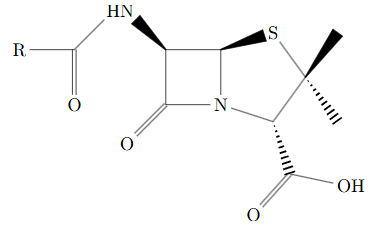
TikZ 代码
\usepackage{chemfig}
\begin{document}

\definesubmol\fragment1{

    (-[:#1,0.85,,,draw=none]
    -[::126]-[::-54](=_#(2pt,2pt)[::180])
    -[::-70](-[::-56.2,1.07]=^#(2pt,2pt)[::180,1.07])
    -[::110,0.6](-[::-148,0.60](=^[::180,0.35])-[::-18,1.1])
    -[::50,1.1](-[::18,0.60]=_[::180,0.35])
    -[::50,0.6]
    -[::110])
    }

\chemfig{
!\fragment{18}
!\fragment{90}
!\fragment{162}
!\fragment{234}
!\fragment{306}
}

\end{document}
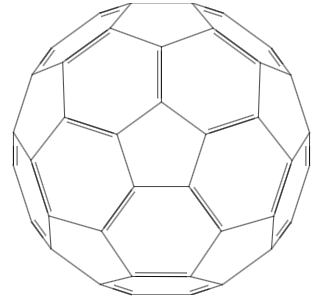
TikZ 代码
\usepackage{amsmath, amsfonts,times}
\usetikzlibrary{arrows.meta}
\begin{document}
\begin{tikzpicture}
\definecolor{emb_color}{RGB}{252,224,225}
\definecolor{multi_head_attention_color}{RGB}{252,226,187}
\definecolor{add_norm_color}{RGB}{242,243,193}
\definecolor{ff_color}{RGB}{194,232,247}
\definecolor{softmax_color}{RGB}{203,231,207}
\definecolor{linear_color}{RGB}{220,223,240}
\definecolor{gray_bbox_color}{RGB}{243,243,244}
\draw[fill=gray_bbox_color, line width=0.046875cm, rounded corners=0.300000cm] (-0.975000, 6.455000) -- (2.725000, 6.455000) -- (2.725000, 1.305000) -- (-0.975000, 1.305000) -- cycle;
\draw[fill=gray_bbox_color, line width=0.046875cm, rounded corners=0.300000cm] (3.775000, 9.405000) -- (7.475000, 9.405000) -- (7.475000, 1.305000) -- (3.775000, 1.305000) -- cycle;
\draw[line width=0.046875cm, fill=emb_color, rounded corners=0.100000cm] (0.000000, 0.000000) -- (2.500000, 0.000000) -- (2.500000, -0.900000) -- (0.000000, -0.900000) -- cycle;
\node[text width=2.500000cm, align=center] at (1.250000,-0.450000) {Input \vspace{-0.05cm} \linebreak Embedding};
\draw[line width=0.046875cm, fill=emb_color, rounded corners=0.100000cm] (4.000000, 0.000000) -- (6.500000, 0.000000) -- (6.500000, -0.900000) -- (4.000000, -0.900000) -- cycle;
\node[text width=2.500000cm, align=center] at (5.250000,-0.450000) {Output \vspace{-0.05cm} \linebreak Embedding};
\draw[line width=0.046875cm, fill=add_norm_color, rounded corners=0.100000cm] (0.000000, 3.680000) -- (2.500000, 3.680000) -- (2.500000, 3.180000) -- (0.000000, 3.180000) -- cycle;
\node[text width=2.500000cm, align=center] at (1.250000,3.430000) {Add \& Norm};
\draw[line width=0.046875cm, fill=multi_head_attention_color, rounded corners=0.100000cm] (0.000000, 3.030000) -- (2.500000, 3.030000) -- (2.500000, 2.130000) -- (0.000000, 2.130000) -- cycle;
\node[text width=2.500000cm, align=center] at (1.250000,2.580000) {Multi-Head \vspace{-0.05cm} \linebreak Attention};
\draw[line width=0.046875cm] (1.250000, 3.030000) -- (1.250000, 3.180000);
\draw[line width=0.046875cm, fill=add_norm_color, rounded corners=0.100000cm] (4.000000, 6.630000) -- (6.500000, 6.630000) -- (6.500000, 6.130000) -- (4.000000, 6.130000) -- cycle;
\node[text width=2.500000cm, align=center] at (5.250000,6.380000) {Add \& Norm};
\draw[line width=0.046875cm, fill=multi_head_attention_color, rounded corners=0.100000cm] (4.000000, 5.980000) -- (6.500000, 5.980000) -- (6.500000, 5.080000) -- (4.000000, 5.080000) -- cycle;
\node[text width=2.500000cm, align=center] at (5.250000,5.530000) {Multi-Head \vspace{-0.05cm} \linebreak Attention};
\draw[line width=0.046875cm] (5.250000, 5.980000) -- (5.250000, 6.130000);
\draw[line width=0.046875cm, fill=add_norm_color, rounded corners=0.100000cm] (4.000000, 4.080000) -- (6.500000, 4.080000) -- (6.500000, 3.580000) -- (4.000000, 3.580000) -- cycle;
\node[text width=2.500000cm, align=center] at (5.250000,3.830000) {Add \& Norm};
\draw[line width=0.046875cm, fill=multi_head_attention_color, rounded corners=0.100000cm] (4.000000, 3.430000) -- (6.500000, 3.430000) -- (6.500000, 2.130000) -- (4.000000, 2.130000) -- cycle;
\node[text width=2.500000cm, align=center] at (5.250000,2.780000) {Masked \vspace{-0.05cm} \linebreak Multi-Head \vspace{-0.05cm} \linebreak Attention};
\draw[line width=0.046875cm] (5.250000, 3.430000) -- (5.250000, 3.580000);
\draw[line width=0.046875cm, fill=add_norm_color, rounded corners=0.100000cm] (0.000000, 6.230000) -- (2.500000, 6.230000) -- (2.500000, 5.730000) -- (0.000000, 5.730000) -- cycle;
\node[text width=2.500000cm, align=center] at (1.250000,5.980000) {Add \& Norm};
\draw[line width=0.046875cm, fill=ff_color, rounded corners=0.100000cm] (0.000000, 5.580000) -- (2.500000, 5.580000) -- (2.500000, 4.680000) -- (0.000000, 4.680000) -- cycle;
\node[text width=2.500000cm, align=center] at (1.250000,5.130000) {Feed \vspace{-0.05cm} \linebreak Forward};
\draw[line width=0.046875cm] (1.250000, 5.580000) -- (1.250000, 5.730000);
\draw[line width=0.046875cm, fill=add_norm_color, rounded corners=0.100000cm] (4.000000, 9.180000) -- (6.500000, 9.180000) -- (6.500000, 8.680000) -- (4.000000, 8.680000) -- cycle;
\node[text width=2.500000cm, align=center] at (5.250000,8.930000) {Add \& Norm};
\draw[line width=0.046875cm, fill=ff_color, rounded corners=0.100000cm] (4.000000, 8.530000) -- (6.500000, 8.530000) -- (6.500000, 7.630000) -- (4.000000, 7.630000) -- cycle;
\node[text width=2.500000cm, align=center] at (5.250000,8.080000) {Feed \vspace{-0.05cm} \linebreak Forward};
\draw[line width=0.046875cm] (5.250000, 8.530000) -- (5.250000, 8.680000);
\draw[line width=0.046875cm, fill=linear_color, rounded corners=0.100000cm] (4.000000, 10.280000) -- (6.500000, 10.280000) -- (6.500000, 9.780000) -- (4.000000, 9.780000) -- cycle;
\node[text width=2.500000cm, align=center] at (5.250000,10.030000) {Linear};
\draw[line width=0.046875cm, fill=softmax_color, rounded corners=0.100000cm] (4.000000, 11.380000) -- (6.500000, 11.380000) -- (6.500000, 10.880000) -- (4.000000, 10.880000) -- cycle;
\node[text width=2.500000cm, align=center] at (5.250000,11.130000) {Softmax};
\draw[line width=0.046875cm] (1.250000, 0.600000) circle (0.200000);
\draw[line width=0.046875cm] (1.410000, 0.600000) -- (1.090000, 0.600000);
\draw[line width=0.046875cm] (1.250000, 0.760000) -- (1.250000, 0.440000);
\draw[line width=0.046875cm] (5.250000, 0.600000) circle (0.200000);
\draw[line width=0.046875cm] (5.410000, 0.600000) -- (5.090000, 0.600000);
\draw[line width=0.046875cm] (5.250000, 0.760000) -- (5.250000, 0.440000);
\draw[line width=0.046875cm] (0.350000, 0.600000) circle (0.400000);
\draw[line width=0.046875cm] (-0.030000, 0.600000) -- (-0.014490, 0.629156) -- (0.001020, 0.657833) -- (0.016531, 0.685561) -- (0.032041, 0.711884) -- (0.047551, 0.736369) -- (0.063061, 0.758616) -- (0.078571, 0.778258) -- (0.094082, 0.794973) -- (0.109592, 0.808486) -- (0.125102, 0.818576) -- (0.140612, 0.825077) -- (0.156122, 0.827883) -- (0.171633, 0.826946) -- (0.187143, 0.822284) -- (0.202653, 0.813971) -- (0.218163, 0.802145) -- (0.233673, 0.786999) -- (0.249184, 0.768783) -- (0.264694, 0.747796) -- (0.280204, 0.724382) -- (0.295714, 0.698925) -- (0.311224, 0.671845) -- (0.326735, 0.643584) -- (0.342245, 0.614608) -- (0.357755, 0.585392) -- (0.373265, 0.556416) -- (0.388776, 0.528155) -- (0.404286, 0.501075) -- (0.419796, 0.475618) -- (0.435306, 0.452204) -- (0.450816, 0.431217) -- (0.466327, 0.413001) -- (0.481837, 0.397855) -- (0.497347, 0.386029) -- (0.512857, 0.377716) -- (0.528367, 0.373054) -- (0.543878, 0.372117) -- (0.559388, 0.374923) -- (0.574898, 0.381424) -- (0.590408, 0.391514) -- (0.605918, 0.405027) -- (0.621429, 0.421742) -- (0.636939, 0.441384) -- (0.652449, 0.463631) -- (0.667959, 0.488116) -- (0.683469, 0.514439) -- (0.698980, 0.542167) -- (0.714490, 0.570844) -- (0.730000, 0.600000);
\draw[line width=0.046875cm] (6.150000, 0.600000) circle (0.400000);
\draw[line width=0.046875cm] (5.770000, 0.600000) -- (5.785510, 0.629156) -- (5.801020, 0.657833) -- (5.816531, 0.685561) -- (5.832041, 0.711884) -- (5.847551, 0.736369) -- (5.863061, 0.758616) -- (5.878571, 0.778258) -- (5.894082, 0.794973) -- (5.909592, 0.808486) -- (5.925102, 0.818576) -- (5.940612, 0.825077) -- (5.956122, 0.827883) -- (5.971633, 0.826946) -- (5.987143, 0.822284) -- (6.002653, 0.813971) -- (6.018163, 0.802145) -- (6.033673, 0.786999) -- (6.049184, 0.768783) -- (6.064694, 0.747796) -- (6.080204, 0.724382) -- (6.095714, 0.698925) -- (6.111224, 0.671845) -- (6.126735, 0.643584) -- (6.142245, 0.614608) -- (6.157755, 0.585392) -- (6.173265, 0.556416) -- (6.188776, 0.528155) -- (6.204286, 0.501075) -- (6.219796, 0.475618) -- (6.235306, 0.452204) -- (6.250816, 0.431217) -- (6.266327, 0.413001) -- (6.281837, 0.397855) -- (6.297347, 0.386029) -- (6.312857, 0.377716) -- (6.328367, 0.373054) -- (6.343878, 0.372117) -- (6.359388, 0.374923) -- (6.374898, 0.381424) -- (6.390408, 0.391514) -- (6.405918, 0.405027) -- (6.421429, 0.421742) -- (6.436939, 0.441384) -- (6.452449, 0.463631) -- (6.467959, 0.488116) -- (6.483469, 0.514439) -- (6.498980, 0.542167) -- (6.514490, 0.570844) -- (6.530000, 0.600000);
\draw[line width=0.046875cm, -latex] (1.250000, 3.680000) -- (1.250000, 4.680000);
\draw[line width=0.046875cm, -latex] (5.250000, 6.630000) -- (5.250000, 7.630000);
\draw[line width=0.046875cm, -latex] (5.250000, 9.180000) -- (5.250000, 9.780000);
\draw[line width=0.046875cm, -latex] (5.250000, 10.280000) -- (5.250000, 10.880000);
\draw[line width=0.046875cm, -latex] (1.250000, 0.000000) -- (1.250000, 0.400000);
\draw[line width=0.046875cm, -latex] (1.250000, 0.800000) -- (1.250000, 2.130000);
\draw[line width=0.046875cm, -latex] (5.250000, 0.800000) -- (5.250000, 2.130000);
\draw[line width=0.046875cm, -latex] (5.250000, 0.000000) -- (5.250000, 0.400000);
\draw[line width=0.046875cm] (0.750000, 0.600000) -- (1.050000, 0.600000);
\draw[line width=0.046875cm] (5.450000, 0.600000) -- (5.750000, 0.600000);
\draw[-latex, line width=0.046875cm, rounded corners=0.200000cm] (1.250000, 4.080000) -- (-0.750000, 4.080000) -- (-0.750000, 5.980000) -- (0.000000, 5.980000);
\draw[-latex, line width=0.046875cm, rounded corners=0.200000cm] (1.250000, 1.530000) -- (-0.750000, 1.530000) -- (-0.750000, 3.430000) -- (0.000000, 3.430000);
\draw[-latex, line width=0.046875cm, rounded corners=0.200000cm] (5.250000, 1.530000) -- (7.250000, 1.530000) -- (7.250000, 3.830000) -- (6.500000, 3.830000);
\draw[-latex, line width=0.046875cm, rounded corners=0.200000cm] (5.250000, 4.480000) -- (7.250000, 4.480000) -- (7.250000, 6.380000) -- (6.500000, 6.380000);
\draw[-latex, line width=0.046875cm, rounded corners=0.200000cm] (5.250000, 7.030000) -- (7.250000, 7.030000) -- (7.250000, 8.930000) -- (6.500000, 8.930000);
\draw[-latex, line width=0.046875cm, rounded corners=0.200000cm] (1.250000, 1.730000) -- (0.312500, 1.730000) -- (0.312500, 2.130000);
\draw[-latex, line width=0.046875cm, rounded corners=0.200000cm] (1.250000, 1.730000) -- (2.187500, 1.730000) -- (2.187500, 2.130000);
\draw[-latex, line width=0.046875cm, rounded corners=0.200000cm] (5.250000, 1.730000) -- (4.312500, 1.730000) -- (4.312500, 2.130000);
\draw[-latex, line width=0.046875cm, rounded corners=0.200000cm] (5.250000, 1.730000) -- (6.187500, 1.730000) -- (6.187500, 2.130000);
\draw[-latex, line width=0.046875cm, rounded corners=0.200000cm] (1.250000, 6.230000) -- (1.250000, 7.230000) -- (3.250000, 7.230000) -- (3.250000, 4.680000) -- (4.312500, 4.680000) -- (4.312500, 5.080000);
\draw[-latex, line width=0.046875cm, rounded corners=0.200000cm] (1.250000, 6.230000) -- (1.250000, 7.230000) -- (3.250000, 7.230000) -- (3.250000, 4.680000) -- (5.250000, 4.680000) -- (5.250000, 5.080000);
\draw[-latex, line width=0.046875cm, rounded corners=0.200000cm] (5.250000, 4.080000) -- (5.250000, 4.680000) -- (6.187500, 4.680000) -- (6.187500, 5.080000);
\draw[line width=0.046875cm, -latex] (1.250000, -1.500000) -- (1.250000, -0.900000);
\draw[line width=0.046875cm, -latex] (5.250000, -1.500000) -- (5.250000, -0.900000);
\draw[line width=0.046875cm, -latex] (5.250000, 11.380000) -- (5.250000, 11.980000);
\node[text width=2.500000cm, anchor=north, align=center] at (1.250000,-1.500000) {Inputs};
\node[text width=2.500000cm, anchor=north, align=center] at (5.250000,-1.500000) {Outputs \vspace{-0.05cm} \linebreak (shifted right)};
\node[text width=2.500000cm, anchor=south, align=center] at (5.250000,11.980000) {Output \vspace{-0.05cm} \linebreak Probabilities};
\node[anchor=east] at (-1.175000,3.880000) {$N\times$};
\node[anchor=west] at (7.675000,5.355000) {$N\times$};
\node[text width=2.000000cm, anchor=east] at (0.250000,0.600000) {Positional \vspace{-0.05cm} \linebreak Encoding};
\node[text width=2.000000cm, anchor=west] at (6.750000,0.600000) {Positional \vspace{-0.05cm} \linebreak Encoding};
\end{tikzpicture}
\end{document}
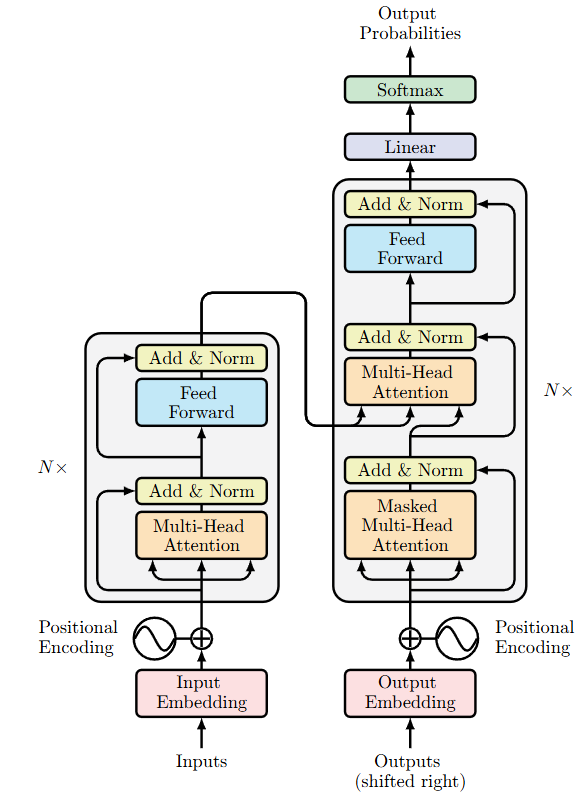
TikZ 代码
\usepackage{tikz}
\usetikzlibrary{fpu}
\usetikzlibrary{math}
\begin{document}
\begin{tikzpicture}
    \tikzmath{
        function paint_nodes(\radius,\gapy,\posx,\num){
            \gapy = \gapy+\radius*2;
            \starty = \gapy*(\num-1)/2;
            for \i in {0,...,\num-1}{
                \drawy = \starty - \i*\gapy;
                {
                    \filldraw[line width = 0.5pt,fill = white] (\posx,\drawy) circle (\radius);
                };
            };
        };
        function paint_lines(\radius,\gapy,\posx,\num,\nextposx,\nextnum){
            \gapy = \gapy+\radius*2;
            \starty = \gapy*(\num-1)/2;
            \startyy = \gapy*(\nextnum-1)/2;
            for \i in {0,...,\num-1}{
                \drawy = \starty - \i*\gapy;
                for \j in {0,...,\nextnum-1}{
                    \drawyy = \startyy - \j*\gapy;
                    {
                        \draw (\posx,\drawy) -- (\nextposx,\drawyy);
                    };
                };
            };
        };
        function paint_x_lines(\radius,\gapy,\posx,\num,\ifright,\len){
            \gapy = \gapy+\radius*2;
            \starty = \gapy*(\num-1)/2;
            for \i in {0,...,\num-1}{
                \drawy = \starty - \i*\gapy;
                if \ifright == 1 then{
                    {
                        \draw[-latex] (\posx,\drawy) -- (\posx+\len,\drawy);
                    };
                }else{
                    {
                        \draw[-latex] (\posx,\drawy)--(\posx-\len,\drawy);
                    };
                };
            };
        };
        function paint_net(\x0,\x1,\x2,\x3){
            \gapx = 2;
            \radius = 0.3;
            \gapy = 0.2;
            paint_lines(\radius,\gapy,0*\gapx,\x0,1*\gapx,\x1);
            paint_lines(\radius,\gapy,1*\gapx,\x1,2*\gapx,\x2);
            paint_lines(\radius,\gapy,2*\gapx,\x2,3*\gapx,\x3);
            paint_x_lines(\radius,\gapy,3*\gapx,\x3,1,1.8);
            paint_x_lines(\radius,\gapy,0*\gapx-1,\x0,1,1);
            paint_nodes(\radius,\gapy,1*\gapx,\x1);
            paint_nodes(\radius,\gapy,2*\gapx,\x2);
            paint_nodes(\radius,\gapy,3*\gapx,\x3);
        };
        paint_net(7,9,10,5);
    }
    \node[scale = 0.9] at (0,-4.2) {Feature};
    \node[scale = 0.9] at (2,-4.2) {Input layer};
    \node[scale = 0.9] at (4,-4.2) {Hide layer};
    \node[scale = 0.9] at (6,-4.2) {Output layer};

\end{tikzpicture}
\end{document}
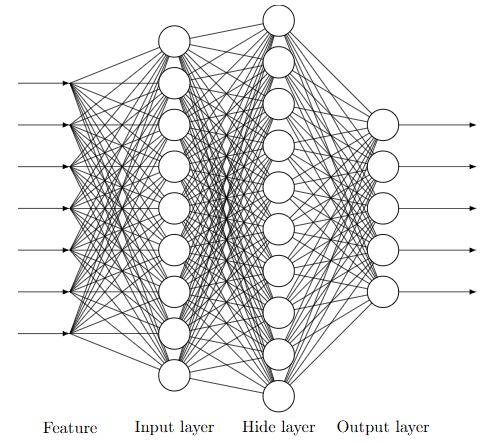
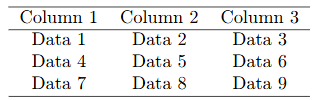
TikZ 代码
\tikz \node {
  \begin{tabular}{ccc}
  \hline
  Column 1 & Column 2 & Column 3 \\
  \hline
  Data 1 & Data 2 & Data 3 \\
  Data 4 & Data 5 & Data 6 \\
  Data 7 & Data 8 & Data 9 \\
  \hline
  \end{tabular}
};
TikZ 代码
\usetikzlibrary{arrows.meta}

% 定义绘制K线的命令: \candle{横坐标}{开盘价}{收盘价}{最高价}{最低价}
\newcommand{\candle}[5]{
    \edef\xpos{#1}%
    \edef\open{#2}%
    \edef\close{#3}%
    \edef\high{#4}%
    \edef\low{#5}%
    \ifdim#3 pt > #2 pt
        \edef\color{red}
    \else
        \edef\color{green!70!black}
    \fi
    \draw[\color, thick] (\xpos,\low) -- (\xpos,\high);
    \draw[\color, fill=\color] (\xpos-0.4,\open) rectangle (\xpos+0.4,\close);
}

% 定义箭头命令:\arrow{方向}{横坐标}{价格}{文字}{颜色}
\newcommand{\arrow}[5]{%
    \def\dir{#1}%
    \def\x{#2}%
    \def\y{#3}%
    \def\labeltext{#4}%
    \def\arrowcolor{#5}%
    \def\thick{very thick}
    %
    \ifnum\pdfstrcmp{\dir}{down}=0
        \draw[<-, \arrowcolor, \thick] (\x,\y) -- (\x,\y+0.7)
            node[above, text=\arrowcolor] {\labeltext};
    \else\ifnum\pdfstrcmp{\dir}{up}=0
        \draw[<-, \arrowcolor, \thick] (\x,\y) -- (\x,\y-0.7)
            node[below, text=\arrowcolor] {\labeltext};
    \else\ifnum\pdfstrcmp{\dir}{right}=0
        \draw[<-, \arrowcolor, \thick] (\x,\y) -- (\x-0.7,\y)
            node[left, text=\arrowcolor] {\labeltext};
    \else\ifnum\pdfstrcmp{\dir}{left}=0
        \draw[<-, \arrowcolor, \thick] (\x,\y) -- (\x+0.7,\y)
            node[right, text=\arrowcolor] {\labeltext};
    \fi\fi\fi\fi
}

% 定义曲线命令:\curve{颜色}{宽度}{点列表}
\newcommand{\curve}[3]{
    \draw[#1, line width=#2, smooth] plot coordinates {#3};
}
% 定义折线命令:\lines{颜色}{宽度}{点列表}
\newcommand{\lines}[3]{
    \draw[#1, line width=#2] plot coordinates {#3};
}

% 定义半透明矩形命令:\orect{颜色}{不透明度}{左上角坐标}{右下角坐标}
\newcommand{\orect}[4]{
    \fill[#1, fill opacity=#2] #3 rectangle #4;
}

\begin{document}
\begin{tikzpicture}[x=0.5cm, y=0.5cm]
    \candle{1}{4.00}{5.00}{6.00}{3.60}
    \candle{2}{6.00}{6.20}{5.50}{7.20}
    \candle{3}{4.00}{6.00}{6.20}{3.00}
    \candle{4}{6.00}{7.00}{8.00}{5.00}
    \candle{5}{6.10}{9.00}{9.20}{6.10}
    \candle{6}{9.50}{9.20}{10.00}{8.90}
    \candle{7}{8.90}{9.50}{10.60}{8.80}
    \candle{8}{10.40}{9.00}{10.80}{8.20}
    \candle{9}{8.90}{9.80}{11.20}{8.30}
    \candle{10}{8.70}{8.40}{9.10}{8.30}
    \candle{11}{8.50}{9.70}{9.90}{8.50}
    \candle{12}{9.70}{10.40}{11.00}{9.00}
    \candle{13}{10.90}{9.60}{11.00}{9.50}
    \candle{14}{9.80}{8.40}{10.80}{8.00}
    \candle{15}{8.30}{9.70}{10.80}{7.60}
    \candle{16}{9.70}{10.30}{11.00}{9.30}
    \candle{17}{11.00}{14.00}{16.00}{10.00}
    \candle{18}{14.40}{13.80}{15.00}{12.80}
    \candle{19}{13.90}{11.80}{14.30}{11.10}
    \candle{20}{12.60}{14.00}{14.20}{11.80}
    \candle{21}{14.00}{16.00}{18.00}{13.90}
    \candle{22}{16.20}{16.90}{17.80}{15.50}
    \candle{23}{17.20}{16.40}{18.40}{14.80}
    \candle{24}{17.00}{16.20}{18.40}{15.80}
    \candle{25}{16.50}{13.00}{16.50}{11.00}
    \candle{26}{13.00}{12.00}{13.40}{11.80}
    \candle{27}{11.60}{12.50}{13.20}{11.20}

    \lines{black}{1.5pt}{(3,3.00) (24,18.40)}

    \arrow{right}{2.8}{3.00}{起点}{blue}
    \arrow{left}{24.2}{18.40}{终点}{blue}

    \orect{orange}{0.2}{(5,8.50)}{(16,10.50)}
    \arrow{right}{4.8}{10.00}{线段中枢}{blue}
\end{tikzpicture}
\end{document}
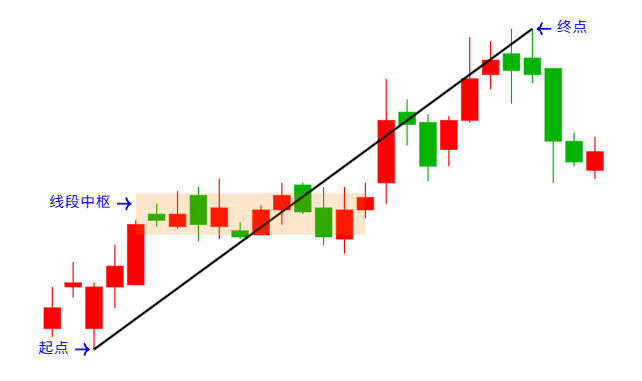
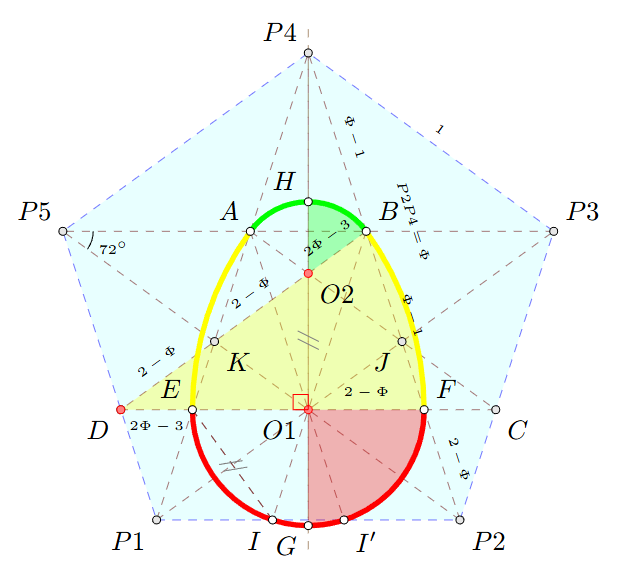
TikZ 代码
\documentclass{standalone}

% 引入tkz-euclide宏包
\usepackage{tkz-euclide}

\begin{document}

% 绘制环境(可以使用任何有效TikZ参数)
\begin{tikzpicture}
  % 定义单位圆半径(长度可任意)
  \edef\r{2cm}
  % 定义基础点(尽可能少)
  \tkzDefPoints{0/-2/M, 0/2/N}
  % 计算其它点
  % 定义垂直平分线并求垂足
  \tkzDefLine[mediator](M,N) \tkzGetPoints{x}{x'}
  \tkzInterLL(M,N)(x,x') \tkzGetPoint{O}
  % 确定正五边形连长
  \tkzInterLC[R](x',x)(O,\r) \tkzGetPoints{b}{a}
  % 定义正五边形,求得五个顶点
  \tkzDefRegPolygon[side,sides=5,name=P](a,b)
  % 求对角线交点
  \tkzInterLL(P1,P4)(P3,P5) \tkzGetPoint{A}
  \tkzInterLL(P2,P4)(P3,P5) \tkzGetPoint{B}
  % 求边线上的交点
  \tkzInterLC[with nodes](P2,P3)(A,P4,P3) \tkzGetPoints{C}{c}
  \tkzInterLC[with nodes](P1,P5)(B,P4,P5) \tkzGetPoints{d}{D}
  % 求各直线交点
  \tkzInterLL(C,D)(M,N) \tkzGetPoint{O1}
  \tkzInterLL(C,D)(P1,P4) \tkzGetPoint{E}
  \tkzInterLL(C,D)(P2,P4) \tkzGetPoint{F}
  \tkzInterLL(B,D)(A,C) \tkzGetPoint{O2}
  \tkzInterLL(P2,P5)(B,D) \tkzGetPoint{K}
  \tkzInterLL(P1,P3)(A,C) \tkzGetPoint{J}
  % 求欧氏蛋与底边交点
  \tkzInterLC(P1,P2)(O1,F) \tkzGetPoints{I}{I'}
  % 求欧氏蛋顶点
  \tkzInterLC(M,N)(O1,F) \tkzGetPoints{G}{g}
  \tkzInterLC(M,N)(O2,A) \tkzGetPoints{h}{H}

  % 绘制
  % 绘制基础正五边形和需要线段
  \tkzDrawPolygon[dashed,fill=cyan!30,draw=blue,fill opacity=0.3](P1,P2,P3,P4,P5)
  \tkzDrawSegments[dashed, red!40!black](P1,P4 P1,P3 P2,P4 P2,P5 P3,P5 P4,O E,I)
  \tkzDrawSegments[dashed, red!40!black](A,C B,D C,D E,I A,I' B,I)

  % 绘制纵轴
  \tkzDrawLine[dashed, add = 0.05 and 0.05, color = orange!40!black](G,P4)

  % 绘制欧氏蛋
  \tkzFillSector[fill=red,fill opacity=0.3](O1,G)(F)
  \tkzDrawArc[line width=2pt,draw=red](O1,G)(F)
  \tkzFillSector[fill=yellow,fill opacity=0.3](D,F)(B)
  \tkzDrawArc[line width=2pt,draw=yellow](D,F)(B)
  \tkzFillSector[fill=green,fill opacity=0.3](O2,B)(H)
  \tkzDrawArc[line width=2pt,draw=green](O2,B)(H)
  \tkzDrawArc[line width=2pt,draw=green](O2,H)(A)
  \tkzDrawArc[line width=2pt,draw=yellow](C,A)(E)
  \tkzDrawArc[line width=2pt,draw=red](O1,E)(G)

  % 绘制点
  \tkzSetUpPoint[size = 3]
  \tkzDrawPoints(P1,P2,P3,P4,P5,C,D,J,K)
  \tkzSetUpPoint[fill = red!50, color = red]
  \tkzDrawPoints(O1,O2,D)
  \tkzSetUpPoint[fill = white, color = black]
  \tkzDrawPoints(H,B,F,G,E,A,I,I')

  % 标记
  % 标记相等线段
  \tkzMarkSegments[color=gray,pos=0.5,mark=s||](E,I O1,O2)
  % 标记角
  \tkzMarkAngle[size=0.4](P2,P5,P3)
  \tkzMarkRightAngle[red,size=0.2](P4,O1,D)

  % 标注各点名称
  \tkzLabelPoints[above left](P4,P5,H,A,E)
  \tkzLabelPoints[above right](B,P3,F)
  \tkzLabelPoints[below left](D,P1,G,O1,J,I)
  \tkzLabelPoints[below right](P2,C,K,O2,I')

  % 标注角度
  \tkzLabelAngle[pos=0.7,font=\tiny](P2,P5,P3){$72^\circ$}

  % 标注线段长度
  \tkzLabelSegment[above,sloped,midway,font=\tiny](P3,P4){$1$}
  \tkzLabelSegment[above,sloped,midway,shift={(-20pt,12pt)},font=\tiny](P2,P4){$P2P4=\Phi$}
  \tkzLabelSegment[above,sloped,midway,font=\tiny](B,P4){$\Phi-1$}
  \tkzLabelSegment[above,sloped,midway,font=\tiny](F,B){$\Phi-1$}
  \tkzLabelSegment[above,sloped,midway,font=\tiny](F,P2){$2-\Phi$}
  \tkzLabelSegment[above,sloped,midway,font=\tiny](F,O1){$2-\Phi$}
  \tkzLabelSegment[above,sloped,midway,font=\tiny](D,K){$2-\Phi$}
  \tkzLabelSegment[above,sloped,midway,font=\tiny](K,O2){$2-\Phi$}
  \tkzLabelSegment[above,sloped,midway,font=\tiny](O2,B){$2\Phi-3$}
  \tkzLabelSegment[below,sloped,midway,font=\tiny](D,E){$2\Phi-3$}
\end{tikzpicture}

\end{document}
功能
- 无网络离线使用
- CodeMirror 编辑器(语法高亮、代码自动补全、错误提示)
- 支持一段 TikZ 代码中同时绘制多张 TikZ 图像
- 中文支持 (这个功能应该是目前全网唯一的,obsidian 的 TikZ 插件也不支持,因为底层库 TikZJax 就不支持,我是自己魔改了底层库才实现的)
如有更多需求/建议欢迎在 GitHub 仓库中提 issue 或在思源笔记社区中发帖
支持的包:
- tikz-cd
- tikz-3dplot
- circuitikz
- chemfig
- pgfplots
- array
- tkz-euclide
如发现代码无法正常渲染为图形,大概率是缺少一些包,欢迎在 GitHub 仓库中提 issue 或在思源笔记社区中发帖请求添加更多包的支持
使用指南
创建 TikZ 图像: 在编辑器中输入 /tikz 命令即可创建新 TikZ 图像。
编辑 TikZ 图像: 点击图像右上角的菜单按钮,当图像被识别为合法的 TikZ 图像时,菜单中会显示 编辑TikZ 的选项,点击即可打开编辑器。
从 TikZ 挂件迁移: 点击 TikZ 挂件块左侧的菜单按钮,会显示 转换为嵌入式TikZ 的选项,点击即可将 TikZ 挂件块转换为 TikZ 图像。
 quiver/package at master · varkor/quiver
欢迎来到这里!
我们正在构建一个小众社区,大家在这里相互信任,以平等 • 自由 • 奔放的价值观进行分享交流。最终,希望大家能够找到与自己志同道合的伙伴,共同成长。
注册 关于