需求:
- 选择指定数据库 ID
- 选择数据库指定视图
- 只提取该视图,筛选后的内容
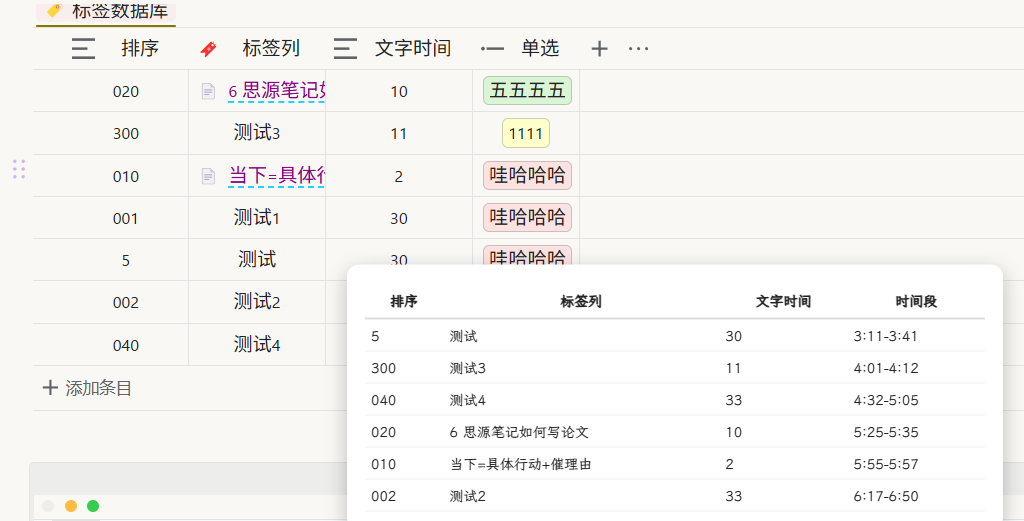
- 按照该视图的排序方式,弹出弹窗表格进行排序(就是视图怎么筛选、怎么排的,弹出表格就是什么样)
- 弹出指定时间段列,根据:现在时间、文字时间、间隔时间 20 分钟,进行计算时间段(主要想要这个)
比如:现在时间 8:00- 测试 1,文字时间 30,时间段 8:00-8:30
- 测试 2,文字时间 15,时间段:8:50-9:05(加上了间隔时间 20、测试 1 文字时间 30)
- 测试 3,文字时间 20,时间段:9:25-9:45(加上了间隔时间 20、测试 2 文字时间 15)
- ......
我现在已经实现大部分功能,可以读取弹出,但总是列与列对不上
由于是读取整个数据库的内容,再进行排序,出错问题很大
本意是直接想要读取,数据库本身的排序、筛选
下面是我用 AI 跑的,有问题,请参考
/*
【注意事项】
- 排序为【字符串排序】,不是数字排序
- 仅读取:主键列 / 文本列 / 单选列
- 不读取多选列
- 时间段:第一行不加20分钟,其余行才加
- 双击表格任意位置关闭
*/

setTimeout(() => {
  if (typeof openAny === 'undefined' || !openAny?.invoke) {
    console.error('openAny API 未找到,确保在正确环境下运行');
    return;
  }

  openAny.invoke(({ onProtyleLoad }) => {
    onProtyleLoad(protyle => {
      if (protyle?.querySelector('[data-type="StressThreshold"]')) return;

      const anchor = protyle.querySelector('.protyle-breadcrumb [data-type="exit-focus"]');
      if (!anchor) return;

      anchor.insertAdjacentHTML(
        'afterend',
        `<button data-type="StressThreshold"
          class="block__icon fn__flex-center"
          style="font-size:18px; user-select:none;">✅</button>`
      );

      const btn = protyle.querySelector('[data-type="StressThreshold"]');
      if (!btn) return;

      /* ================= 配置区 ================= */
      const config = {
        blockId: '20251214023356-0f1cxwc', // 数据库块ID
        sortByColumn: '排序',              // 主键列(字符串排序)
        sortOrder: 'desc',                 // asc / desc
        maxRows: 6,                       // 最多显示行数
        startTimeStr: 'now',              // now 或 H:M
        extraMinutes: 20,                 // 行间额外分钟(第一行不加)
        headers: ['排序', 'DO', '预计分钟', '时间段']
      };
      /* ========================================== */

      let clickTimer = null;
      const CLICK_DELAY = 260;

      btn.addEventListener('click', () => {
        if (clickTimer) return; // 防止连续点击乱触发
        clickTimer = setTimeout(() => {
          showPopup(config).catch(e => {
            console.error('显示弹窗出错:', e);
          });
          clickTimer = null;
        }, CLICK_DELAY);
      });

      btn.addEventListener('dblclick', () => {
        if (clickTimer) {
          clearTimeout(clickTimer);
          clickTimer = null;
        }
        try {
          openAny.press && openAny.press('Alt+3');
        } catch (e) {
          console.warn('openAny.press 调用失败:', e);
        }
        try {
          openAny.click && openAny.click('[data-id="20251109153938-zrdgcag"]');
        } catch (e) {
          console.warn('openAny.click 调用失败:', e);
        }
      });

      async function showPopup(config) {
        const isMobile = window.innerWidth <= 768;

        function toMinutes(t) {
          if (t === 'now') {
            const d = new Date();
            return d.getHours() * 60 + d.getMinutes();
          }
          const [h, m] = t.split(':').map(Number);
          return h * 60 + m;
        }

        function toHM(m) {
          return `${Math.floor(m / 60)}:${String(m % 60).padStart(2, '0')}`;
        }

        async function loadDB(id) {
          try {
            const r = await fetch('/api/query/sql', {
              method: 'POST',
              headers: { 'Content-Type': 'application/json' },
              body: JSON.stringify({ stmt: `SELECT markdown FROM blocks WHERE id='${id}'` })
            });
            const j = await r.json();
            if (!j.data || j.data.length === 0) return null;
            const markdown = j.data[0]?.markdown || '';
            const avId = markdown.match(/data-av-id="([^"]+)"/)?.[1];
            if (!avId) return null;

            const r2 = await fetch('/api/file/getFile', {
              method: 'POST',
              headers: { 'Content-Type': 'application/json' },
              body: JSON.stringify({ path: `/data/storage/av/${avId}.json` })
            });
            return await r2.json();
          } catch (e) {
            console.error('loadDB 异常:', e);
            return null;
          }
        }

        const parseVal = v => {
          if (!v) return '';
          if (v.block?.content) return String(v.block.content);
          if (v.text?.content) return String(v.text.content);
          if (v.mSelect?.[0]) return String(v.mSelect[0].content);
          return '';
        };

        const buildRows = av => {
          if (!av || !av.keyValues || !Array.isArray(av.keyValues)) return [];
          const allCols = av.keyValues.map(k => k.key?.name || '');
          const len = av.keyValues[0]?.values?.length || 0;

          const fullRows = [];
          for (let i = 0; i < len; i++) {
            const row = {};
            allCols.forEach((col, idx) => {
              row[col] = parseVal(av.keyValues[idx]?.values?.[i]);
            });
            fullRows.push(row);
          }

          return fullRows.map(r => {
            const filtered = {};
            config.headers.forEach(h => {
              filtered[h] = r[h] || '';
            });
            return filtered;
          });
        };

        function process(rows) {
          rows.sort((a, b) => {
            const x = a[config.sortByColumn] || '';
            const y = b[config.sortByColumn] || '';
            return config.sortOrder === 'asc' ? x.localeCompare(y) : y.localeCompare(x);
          });

          let currentStart = toMinutes(config.startTimeStr);

          return rows.slice(0, config.maxRows).map((row, index) => {
            if (index > 0) currentStart += config.extraMinutes;

            const duration = Number(row['预计分钟']) || 0;
            const start = currentStart;
            const end = start + duration;

            row['时间段'] = `${toHM(start)}-${toHM(end)}`;
            currentStart = end;

            return row;
          });
        }

        function render(data) {
          const box = document.createElement('div');
          box.style.cssText = `
            position:fixed;top:50%;left:50%;
            transform:translate(-50%,-50%);
            background:#fff;z-index:999999;
            border-radius:${isMobile ? 10 : 12}px;
            padding:${isMobile ? 12 : 18}px;
            max-height:80vh;overflow:auto;
            width:${isMobile ? '90vw' : '620px'};
            box-shadow:0 6px 20px rgba(0,0,0,.25);
          `;

          box.ondblclick = () => box.remove();

          const table = document.createElement('table');
          table.style.width = '100%';
          table.style.borderCollapse = 'collapse';

          table.innerHTML = `
            <thead>
              <tr>${config.headers.map(h =>
                `<th style="border-bottom:2px solid #ddd;padding:8px">${h}</th>`).join('')}
              </tr>
            </thead>
            <tbody>
              ${data.map(r =>
                `<tr>${config.headers.map(h =>
                  `<td style="border-bottom:1px solid #eee;padding:6px">${r[h] || ''}</td>`).join('')}
                </tr>`).join('')}
            </tbody>
          `;

          box.appendChild(table);
          document.body.appendChild(box);
        }

        const av = await loadDB(config.blockId);
        if (!av) {
          console.error('数据库数据为空或加载失败');
          return;
        }

        render(process(buildRows(av)));
      }
    });
  });
}, 1400);
欢迎来到这里!
我们正在构建一个小众社区,大家在这里相互信任,以平等 • 自由 • 奔放的价值观进行分享交流。最终,希望大家能够找到与自己志同道合的伙伴,共同成长。
注册 关于