功能演示
演示基于 QYL 主题,暗黑模式下的赤霞配色。
type 支持:'note', 'tip', 'important', 'warning', 'caution'
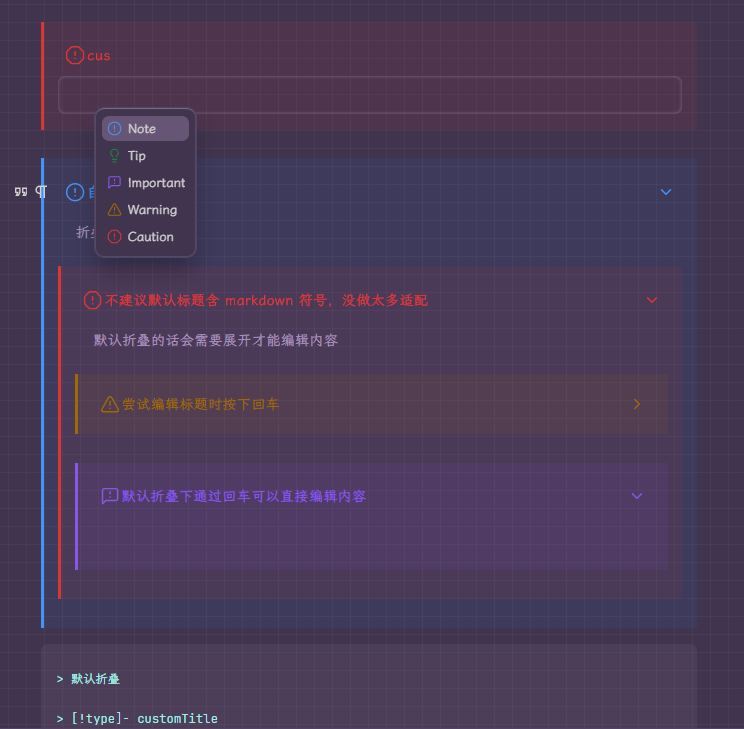
直接输入文本渲染为 callout

自定义标题

折叠支持
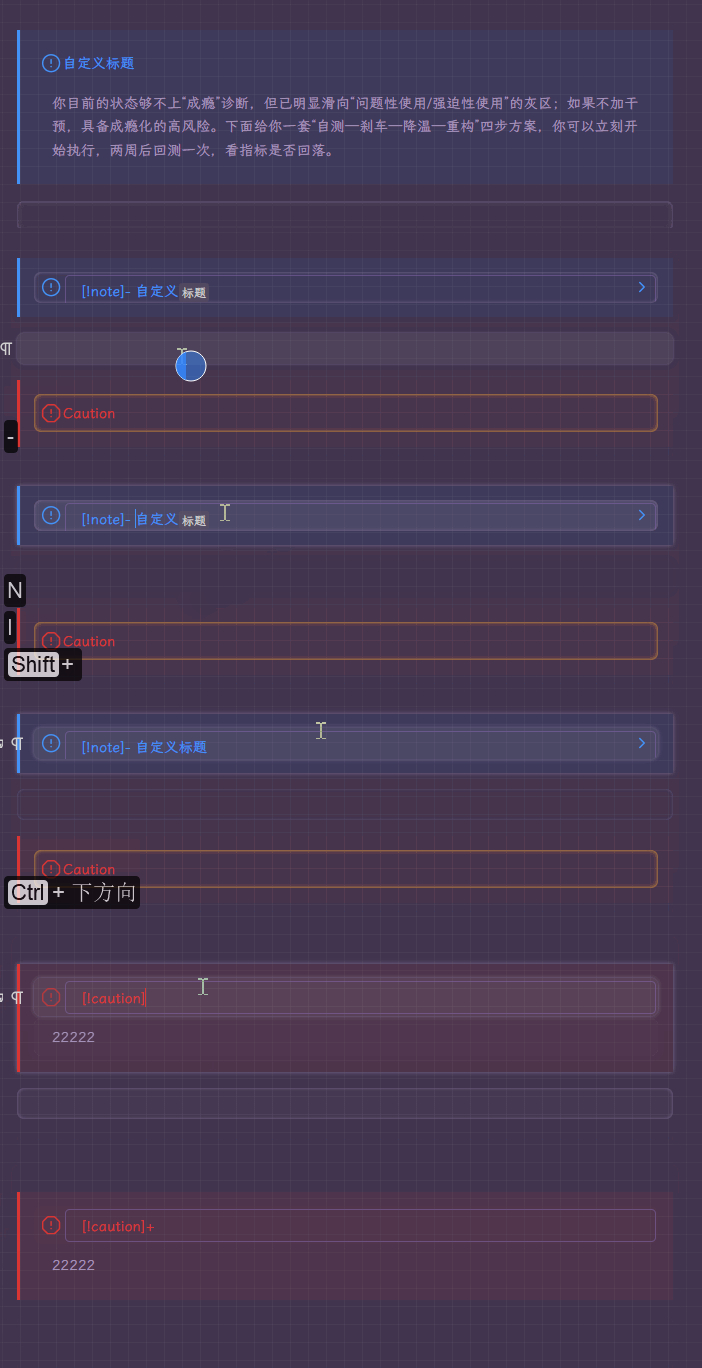
利用补全快速输入 callout
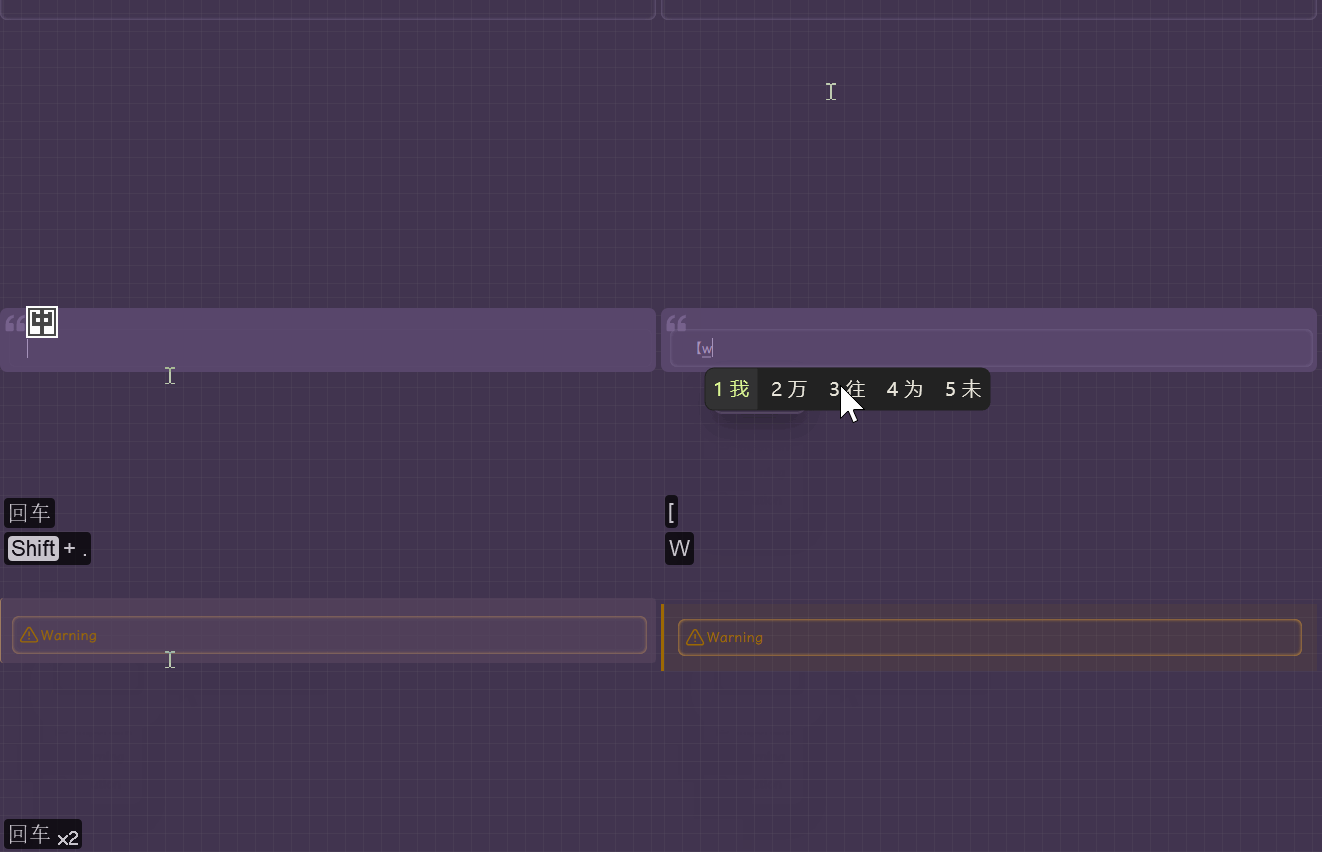
点选 icon 切换类型

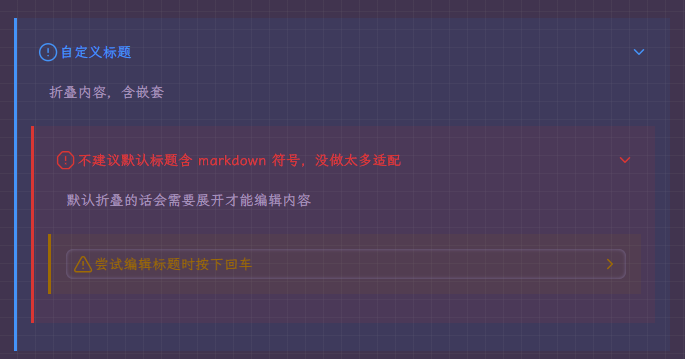
嵌套
使用方式
代码
需要贴入 css 和 js 代码。
CSS
/* --- Callout Snippet (v19.5 - CSS Only / Nesting Fix) --- */

/* --- Base Callout Styles --- */
.bq[data-callout-type]:not([data-callout-type="default"]) {
  padding: 1em !important;
  border-radius: 0;
  margin-top: 1em !important;
  margin-bottom: 1em !important;
  background-color: var(--callout-bg-color) !important;
  border-left: 0.25em solid var(--callout-color) !important;
}
.bq[data-callout-type]:not([data-callout-type="default"])::before {
  display: none !important;
}

/* --- Title Paragraph Block --- */
.bq[data-callout-type] > div[data-type="NodeParagraph"]:first-of-type {
  position: relative;
  margin: 0;
  padding-left: 2.25em;
  min-height: 1.6em;
}

/* --- Icon Hover Effect (可点击提示) --- */
/* 鼠标悬停时图标变淡,提示可点击 */
.bq[data-callout-type]:not([data-callout-foldable]) > div[data-type="NodeParagraph"]:first-of-type:hover::before {
  opacity: 0.7;
  transition: opacity 0.2s ease-in-out;
}

/* --- Icon Rendering --- */
.bq[data-callout-type] > div[data-type="NodeParagraph"]:first-of-type::before {
  content: '';
  position: absolute;
  left: 0.5em;
  top: 50%;
  transform: translateY(-50%);
  width: 1.375em;
  height: 1.375em;
  background-color: var(--callout-color);
  mask-repeat: no-repeat;
  mask-size: cover;
}


/* --- Hiding and Showing Text --- */
/* 1. Default State (Non-Editing) */
.bq:not(.is-editing-title) > div > div[contenteditable="true"][data-callout-title-text] {
  color: transparent !important;
  white-space: nowrap;
}
.bq:not(.is-editing-title) > div > div[contenteditable="true"][data-callout-title-text]::after {
  content: attr(data-callout-title-text);
  position: absolute;
  left: 2em;
  top: 50%;
  transform: translateY(-50%);
  width: 100%;
  max-width: 90%;
  color: var(--callout-color);
  pointer-events: none;
  white-space: nowrap;
  overflow: hidden;
  text-overflow: ellipsis;
}
/* 2. Editing State */
.bq.is-editing-title > div[data-type="NodeParagraph"]:first-of-type > div[contenteditable="true"] {
  color: var(--callout-color);
}
.bq.is-editing-title > div > div[contenteditable="true"]::after {
  display: none;
}
.bq.is-editing-title > div[data-type="NodeParagraph"]:first-of-type > div[contenteditable="true"] {
  outline: 0.125em solid var(--b3-theme-primary-light);
  border-radius: 4px;
}


/* --- Foldable Callout Styles --- */

/* 1. Override Siyuan's default fold style on the block */
.bq[data-callout-type][fold="1"] {
  height: auto !important;
  overflow: visible !important;
  padding-bottom: 1em !important;
  opacity: 1!important;
}

/* 2. Hide all content EXCEPT the title paragraph when folded */
.bq[data-callout-type][fold="1"] > *:not(:first-child) {
  display: none;
}

.protyle-wysiwyg .bq[data-callout-foldable="true"][fold="1"] > div[data-node-id] {
  display: none;
}
/* We also need to explicitly show the first child (the title) again, because the above rule is very strong. */
.protyle-wysiwyg .bq[data-callout-foldable="true"][fold="1"] > div[data-node-id]:first-child {
  display: block;
}

/* 3. Add the chevron/arrow indicator */
.bq[data-callout-foldable="true"] > div[data-type="NodeParagraph"]:first-of-type::after {
  content: '';
  position: absolute;
  right: 0.5em;
  top: 50%;
  width: 1.25em;
  height: 1.25em;
  background-color: var(--callout-color);
  mask-image: url("data:image/svg+xml;base64,PHN2ZyB4bWxucz0iaHR0cDovL3d3dy53My5vcmcvMjAwMC9zdmciIHdpZHRoPSIyNCIgaGVpZ2h0PSIyNCIgdmlld0JveD0iMCAwIDI0IDI0IiBmaWxsPSJub25lIiBzdHJva2U9ImN1cnJlbnRDb2xvciIgc3Ryb2tlLXdpZHRoPSIyIiBzdHJva2UtbGluZWNhcD0icm91bmQiIHN0cm9rZS1saW5lam9pbj0icm91bmQiIGNsYXNzPSJsdWNpZGUgbHVjaWRlLWNoZXZyb24tcmlnaHQiPjxwYXRoIGQ9Im05IDE4IDYtNi02LTYiLz48L3N2Zz4=");
  mask-repeat: no-repeat;
  mask-size: contain;
  transform: translateY(-50%) rotate(0deg);
  transition: transform 0.2s ease-in-out;
}

/* 4. Rotate the chevron when the callout is expanded */
.bq[data-callout-foldable="true"]:not([fold="1"]) > div[data-type="NodeParagraph"]:first-of-type::after {
  transform: translateY(-50%) rotate(90deg);
}

/* 5. Hide Siyuan's default fold handle */
.bq[data-callout-foldable="true"] .protyle-action--fold {
  display: none !important;
}


/* --- Specific Callout Types (Unchanged) --- */
/* Note */
.bq[data-callout-type="note"] { --callout-color: #4493f8; --callout-bg-color: #1f71eb16; }
.bq[data-callout-type="note"] > div:first-of-type::before { mask-image: url("data:image/svg+xml;base64,PHN2ZyB4bWxucz0iaHR0cDovL3d3dy53My5vcmcvMjAwMC9zdmciIHdpZHRoPSIyOCIgaGVpZ2h0PSIyOCIgdmlld0JveD0iMCAwIDI0IDI0IiBmaWxsPSJub25lIiBzdHJva2U9ImN1cnJlbnRDb2xvciIgc3Ryb2tlLXdpZHRoPSIxLjcxNDI4NTcxNDI4NTcxNDIiIHN0cm9rZS1saW5lY2FwPSJyb3VuZCIgc3Ryb2tlLWxpbmVqb2luPSJyb3VuZCIgY2xhc3M9Imx1Y2lkZSBsdWNpZGUtY2lyY2xlLWFsZXJ0Ij48Y2lyY2xlIGN4PSIxMiIgY3k9IjEyIiByPSIxMCIvPjxsaW5lIHgxPSIxMiIgeDI9IjEyIiB5MT0iOCIgeTI9IjEyIi8+PGxpbmUgeDE9IjEyIiB4Mj0iMTIuMDEiIHkxPSIxNiIgeTI9IjE2Ii8+PC9zdmc+"); }
/* Tip */
.bq[data-callout-type="tip"] { --callout-color: #238636; --callout-bg-color: #23863615; }
.bq[data-callout-type="tip"] > div:first-of-type::before { mask-image: url("data:image/svg+xml;base64,PHN2ZyB4bWxucz0iaHR0cDovL3d3dy53My5vcmcvMjAwMC9zdmciIHdpZHRoPSIyOCIgaGVpZ2h0PSIyOCIgdmlld0JveD0iMCAwIDI0IDI0IiBmaWxsPSJub25lIiBzdHJva2U9ImN1cnJlbnRDb2xvciIgc3Ryb2tlLXdpZHRoPSIxLjcxNDI4NTcxNDI4NTcxNDIiIHN0cm9rZS1saW5lY2FwPSJyb3VuZCIgc3Ryb2tlLWxpbmVqb2luPSJyb3VuZCIgY2xhc3M9Imx1Y2lkZSBsdWNpZGUtbGlnaHRidWxiIj48cGF0aCBkPSJNMTUgMTRjLjItMSAuNy0xLjcgMS41LTIuNSAxLS45IDEuNS0yLjIgMS41LTMuNUE2IDYgMCAwIDAgNiA4YzAgMSAuMiAyLjIgMS41IDMuNS43LjcgMS4zIDEuNSAxLjUgMi41Ii8+PHBhdGggZD0iTTkgMThoNiIvPjxwYXRoIGQ9Ik0xMCAyMmg0Ii8+PC9zdmc+"); }
/* Important */
.bq[data-callout-type="important"] { --callout-color: #8957e5; --callout-bg-color: #8957e515; }
.bq[data-callout-type="important"] > div:first-of-type::before { mask-image: url("data:image/svg+xml;base64,PHN2ZyB4bWxucz0iaHR0cDovL3d3dy53My5vcmcvMjAwMC9zdmciIHdpZHRoPSIyOCIgaGVpZ2h0PSIyOCIgdmlld0JveD0iMCAwIDI0IDI0IiBmaWxsPSJub25lIiBzdHJva2U9ImN1cnJlbnRDb2xvciIgc3Ryb2tlLXdpZHRoPSIxLjcxNDI4NTcxNDI4NTcxNDIiIHN0cm9rZS1saW5lY2FwPSJyb3VuZCIgc3Ryb2tlLWxpbmVqb2luPSJyb3VuZCIgY2xhc3M9Imx1Y2lkZSBsdWNpZGUtbWVzc2FnZS1zcXVhcmUtd2FybmluZyI+PHBhdGggZD0iTTIxIDE1YTIgMiAwIDAgMS0yIDJIN2wtNCA0VjVhMiAyIDAgMCAxIDItMmgxNGEyIDIgMCAwIDEgMiAyeiIvPjxwYXRoIGQ9Ik0xMiA3djIiLz48cGF0aCBkPSJNMTIgMTNoLjAxIi8+PC9zdmc+"); }
/* Warning */
.bq[data-callout-type="warning"] { --callout-color: #9e6a03; --callout-bg-color: #9e6a0315; }
.bq[data-callout-type="warning"] > div:first-of-type::before { mask-image: url("data:image/svg+xml;base64,PHN2ZyB4bWxucz0iaHR0cDovL3d3dy53My5vcmcvMjAwMC9zdmciIHdpZHRoPSIyOCIgaGVpZ2h0PSIyOCIgdmlld0JveD0iMCAwIDI0IDI0IiBmaWxsPSJub25lIiBzdHJva2U9ImN1cnJlbnRDb2xvciIgc3Ryb2tlLXdpZHRoPSIxLjcxNDI4NTcxNDI4NTcxNDIiIHN0cm9rZS1saW5lY2FwPSJyb3VuZCIgc3Ryb2tlLWxpbmVqb2luPSJyb3VuZCIgY2xhc3M9Imx1Y2lkZSBsdWNpZGUtdHJpYW5nbGUtYWxlcnQiPjxwYXRoIGQ9Im0yMS43MyAxOC04LTE0YTIgMiAwIDAgMC0zLjQ4IDBsLTggMTRBMiAyIDAgMCAwIDQgMjFoMTZhMiAyIDAgMCAwIDEuNzMtMyIvPjxwYXRoIGQ9Ik0xMiA5djQiLz48cGF0aCBkPSJNMTIgMTdoLjAxIi8+PC9zdmc+"); }
/* Caution */
.bq[data-callout-type="caution"] { --callout-color: #da3633; --callout-bg-color: #da363315; }
.bq[data-callout-type="caution"] > div:first-of-type::before { mask-image: url("data:image/svg+xml;base64,PHN2ZyB4bWxucz0iaHR0cDovL3d3dy53My5vcmcvMjAwMC9zdmciIHdpZHRoPSIyOCIgaGVpZ2h0PSIyOCIgdmlld0JveD0iMCAwIDI0IDI0IiBmaWxsPSJub25lIiBzdHJva2U9ImN1cnJlbnRDb2xvciIgc3Ryb2tlLXdpZHRoPSIxLjcxNDI4NTcxNDI4NTcxNDIiIHN0cm9rZS1saW5lY2FwPSJyb3VuZCIgc3Ryb2tlLWxpbmVqb2luPSJyb3VuZCIgY2xhc3M9Imx1Y2lkZSBsdWNpZGUtb2N0YWdvbi1hbGVydCI+PHBhdGggZD0iTTEyIDE2aC4wMSIvPjxwYXRoIGQ9Ik0xMiA4djQiLz48cGF0aCBkPSJNMTUuMzEyIDJhMiAyIDAgMCAxIDEuNDE0LjU4Nmw0LjY4OCA0LjY4OEEyIDIgMCAwIDEgMjIgOC42ODh2Ni42MjRhMiAyIDAgMCAxLS41ODYgMS40MTRsLTQuNjg4IDQuNjg4YTIgMiAwIDAgMS0xLjQxNC41ODZIOC42ODhhMiAyIDAgMCAxLTEuNDE0LS41ODZsLTQuNjg4LTQuNjg4QTIgMiAwIDAgMSAyIDE1LjMxMlY4LjY4OGEyIDIgMCAwIDEgLjU4Ni0xLjQxNGw0LjY4OC00LjY4OEEyIDIgMCAwIDEgOC42ODggMnoiLz48L3N2Zz4="); }


/* --- Virtual Block Ref Border Fix --- */
/* 移除 callout 标题中非标题文本内容的 virtual-block-ref 的 border-bottom */
.bq[data-callout-type] div[data-callout-title="true"] span[data-type="virtual-block-ref"] {
    border-bottom: none !important;
}

/* --- 标题内部块样式残留处理 --- */
/* 1. 重置标题内部所有 span 元素的默认样式,避免残留格式影响 */
.bq[data-callout-type] div[data-callout-title="true"] span {
    font-weight: normal !important;
    font-style: normal !important;
    text-decoration: none !important;
    background: none !important;
    color: inherit !important;
    border: none !important;
    padding: 0 !important;
    margin: 0 !important;
    border-radius: 0 !important;
    box-shadow: none !important;
}

/* 2. 处理空的 span 标签,避免显示异常 */
.bq[data-callout-type] div[data-callout-title="true"] span:empty {
    display: none !important;
}

/* 3. 处理只包含空白字符的 span 标签 */
.bq[data-callout-type] div[data-callout-title="true"] span:not(:empty) {
    display: inline !important;
}

/* 4. 特殊处理:确保代码格式在非编辑状态下不显示特殊样式 */
.bq:not(.is-editing-title) div[data-callout-title="true"] span[data-type="code"] {
    background: none !important;
    color: inherit !important;
    font-family: inherit !important;
    font-size: inherit !important;
    padding: 0 !important;
    border: none !important;
    border-radius: 0 !important;
}

/* 5. 特殊处理:确保粗体格式在非编辑状态下不显示特殊样式 */
.bq:not(.is-editing-title) div[data-callout-title="true"] span[data-type="strong"] {
    font-weight: normal !important;
}

/* 6. 特殊处理:确保斜体格式在非编辑状态下不显示特殊样式 */
.bq:not(.is-editing-title) div[data-callout-title="true"] span[data-type="em"] {
    font-style: normal !important;
}

/* 7. 特殊处理:确保删除线格式在非编辑状态下不显示特殊样式 */
.bq:not(.is-editing-title) div[data-callout-title="true"] span[data-type="del"] {
    text-decoration: none !important;
}

/* 8. 特殊处理:确保下划线格式在非编辑状态下不显示特殊样式 */
.bq:not(.is-editing-title) div[data-callout-title="true"] span[data-type="u"] {
    text-decoration: none !important;
}

/* 9. 特殊处理:确保高亮格式在非编辑状态下不显示特殊样式 */
.bq:not(.is-editing-title) div[data-callout-title="true"] span[data-type="mark"] {
    background: none !important;
    color: inherit !important;
}

/* 10. 编辑状态下恢复正常的 markdown 样式 */
.bq.is-editing-title div[data-callout-title="true"] span[data-type="code"] {
    background: var(--b3-theme-surface-lighter) !important;
    color: var(--b3-theme-on-surface) !important;
    font-family: var(--b3-font-family-code) !important;
    padding: 0.125em 0.25em !important;
    border-radius: 0.25em !important;
}

.bq.is-editing-title div[data-callout-title="true"] span[data-type="strong"] {
    font-weight: bold !important;
}

.bq.is-editing-title div[data-callout-title="true"] span[data-type="em"] {
    font-style: italic !important;
}

.bq.is-editing-title div[data-callout-title="true"] span[data-type="del"] {
    text-decoration: line-through !important;
}

.bq.is-editing-title div[data-callout-title="true"] span[data-type="u"] {
    text-decoration: underline !important;
}

.bq.is-editing-title div[data-callout-title="true"] span[data-type="mark"] {
    background: var(--b3-theme-warning) !important;
    color: var(--b3-theme-on-warning) !important;
}

/* --- Callout Completion Menu (v23.0) --- */
#callout-completion-menu {
  z-index: 1000; /* 确保在顶层 */
  width: auto;
  height: auto;
  min-width: auto;
  min-height: auto;
}

/* --- Callout Type Picker Menu --- */
#callout-type-picker-menu {
  z-index: 1001; /* 比补全菜单更高一层 */
  width: auto;
  height: auto;
  min-width: auto;
  min-height: auto;
}

.callout-completion-item-icon {
  position: relative;
  width: 1.375em;
  height: 1.375em;
  /* 继承思源列表项的 flex 布局, 无需额外定位 */
}

/* 复用 callout 的颜色变量 */
.callout-completion-item-icon[data-callout-type="note"] { --callout-color: #4493f8; }
.callout-completion-item-icon[data-callout-type="tip"] { --callout-color: #238636; }
.callout-completion-item-icon[data-callout-type="important"] { --callout-color: #8957e5; }
.callout-completion-item-icon[data-callout-type="warning"] { --callout-color: #9e6a03; }
.callout-completion-item-icon[data-callout-type="caution"] { --callout-color: #da3633; }

/* 统一渲染图标 */
.callout-completion-item-icon::before {
  content: '';
  position: absolute;
  left: 0;
  top: 0;
  width: 100%;
  height: 100%;
  background-color: var(--callout-color); /* 使用从父元素继承的颜色 */
  mask-repeat: no-repeat;
  mask-size: contain;
  mask-position: center;
}

/* 复用 callout 的图标 SVG */
.callout-completion-item-icon[data-callout-type="note"]::before { mask-image: url("data:image/svg+xml;base64,PHN2ZyB4bWxucz0iaHR0cDovL3d3dy53My5vcmcvMjAwMC9zdmciIHdpZHRoPSIyOCIgaGVpZ2h0PSIyOCIgdmlld0JveD0iMCAwIDI0IDI0IiBmaWxsPSJub25lIiBzdHJva2U9ImN1cnJlbnRDb2xvciIgc3Ryb2tlLXdpZHRoPSIxLjcxNDI4NTcxNDI4NTcxNDIiIHN0cm9rZS1saW5lY2FwPSJyb3VuZCIgc3Ryb2tlLWxpbmVqb2luPSJyb3VuZCIgY2xhc3M9Imx1Y2lkZSBsdWNpZGUtY2lyY2xlLWFsZXJ0Ij48Y2lyY2xlIGN4PSIxMiIgY3k9IjEyIiByPSIxMCIvPjxsaW5lIHgxPSIxMiIgeDI9IjEyIiB5MT0iOCIgeTI9IjEyIi8+PGxpbmUgeDE9IjEyIiB4Mj0iMTIuMDEiIHkxPSIxNiIgeTI9IjE2Ii8+PC9zdmc+"); }
.callout-completion-item-icon[data-callout-type="tip"]::before { mask-image: url("data:image/svg+xml;base64,PHN2ZyB4bWxucz0iaHR0cDovL3d3dy53My5vcmcvMjAwMC9zdmciIHdpZHRoPSIyOCIgaGVpZ2h0PSIyOCIgdmlld0JveD0iMCAwIDI0IDI0IiBmaWxsPSJub25lIiBzdHJva2U9ImN1cnJlbnRDb2xvciIgc3Ryb2tlLXdpZHRoPSIxLjcxNDI4NTcxNDI4NTcxNDIiIHN0cm9rZS1saW5lY2FwPSJyb3VuZCIgc3Ryb2tlLWxpbmVqb2luPSJyb3VuZCIgY2xhc3M9Imx1Y2lkZSBsdWNpZGUtbGlnaHRidWxiIj48cGF0aCBkPSJNMTUgMTRjLjItMSAuNy0xLjcgMS41LTIuNSAxLS45IDEuNS0yLjIgMS41LTMuNUE2IDYgMCAwIDAgNiA4YzAgMSAuMiAyLjIgMS41IDMuNS43LjcgMS4zIDEuNSAxLjUgMi41Ii8+PHBhdGggZD0iTTkgMThoNiIvPjxwYXRoIGQ9Ik0xMCAyMmg0Ii8+PC9zdmc+"); }
.callout-completion-item-icon[data-callout-type="important"]::before { mask-image: url("data:image/svg+xml;base64,PHN2ZyB4bWxucz0iaHR0cDovL3d3dy53My5vcmcvMjAwMC9zdmciIHdpZHRoPSIyOCIgaGVpZ2h0PSIyOCIgdmlld0JveD0iMCAwIDI0IDI0IiBmaWxsPSJub25lIiBzdHJva2U9ImN1cnJlbnRDb2xvciIgc3Ryb2tlLXdpZHRoPSIxLjcxNDI4NTcxNDI4NTcxNDIiIHN0cm9rZS1saW5lY2FwPSJyb3VuZCIgc3Ryb2tlLWxpbmVqb2luPSJyb3VuZCIgY2xhc3M9Imx1Y2lkZSBsdWNpZGUtbWVzc2FnZS1zcXVhcmUtd2FybmluZyI+PHBhdGggZD0iTTIxIDE1YTIgMiAwIDAgMS0yIDJIN2wtNCA0VjVhMiAyIDAgMCAxIDItMmgxNGEyIDIgMCAwIDEgMiAyeiIvPjxwYXRoIGQ9Ik0xMiA3djIiLz48cGF0aCBkPSJNMTIgMTNoLjAxIi8+PC9zdmc+"); }
.callout-completion-item-icon[data-callout-type="warning"]::before { mask-image: url("data:image/svg+xml;base64,PHN2ZyB4bWxucz0iaHR0cDovL3d3dy53My5vcmcvMjAwMC9zdmciIHdpZHRoPSIyOCIgaGVpZ2h0PSIyOCIgdmlld0JveD0iMCAwIDI0IDI0IiBmaWxsPSJub25lIiBzdHJva2U9ImN1cnJlbnRDb2xvciIgc3Ryb2tlLXdpZHRoPSIxLjcxNDI4NTcxNDI4NTcxNDIiIHN0cm9rZS1saW5lY2FwPSJyb3VuZCIgc3Ryb2tlLWxpbmVqb2luPSJyb3VuZCIgY2xhc3M9Imx1Y2lkZSBsdWNpZGUtdHJpYW5nbGUtYWxlcnQiPjxwYXRoIGQ9Im0yMS43MyAxOC04LTE0YTIgMiAwIDAgMC0zLjQ4IDBsLTggMTRBMiAyIDAgMCAwIDQgMjFoMTZhMiAyIDAgMCAwIDEuNzMtMyIvPjxwYXRoIGQ9Ik0xMiA5djQiLz48cGF0aCBkPSJNMTIgMTdoLjAxIi8+PC9zdmc+"); }
.callout-completion-item-icon[data-callout-type="caution"]::before { mask-image: url("data:image/svg+xml;base64,PHN2ZyB4bWxucz0iaHR0cDovL3d3dy53My5vcmcvMjAwMC9zdmciIHdpZHRoPSIyOCIgaGVpZ2h0PSIyOCIgdmlld0JveD0iMCAwIDI0IDI0IiBmaWxsPSJub25lIiBzdHJva2U9ImN1cnJlbnRDb2xvciIgc3Ryb2tlLXdpZHRoPSIxLjcxNDI4NTcxNDI4NTcxNDIiIHN0cm9rZS1saW5lY2FwPSJyb3VuZCIgc3Ryb2tlLWxpbmVqb2luPSJyb3VuZCIgY2xhc3M9Imx1Y2lkZSBsdWNpZGUtb2N0YWdvbi1hbGVydCI+PHBhdGggZD0iTTEyIDE2aC4wMSIvPjxwYXRoIGQ9Ik0xMiA4djQiLz48cGF0aCBkPSJNMTUuMzEyIDJhMiAyIDAgMCAxIDEuNDE0LjU4Nmw0LjY4OCA0LjY4OEEyIDIgMCAwIDEgMjIgOC42ODh2Ni42MjRhMiAyIDAgMCAxLS41ODYgMS40MTRsLTQuNjg4IDQuNjg4YTIgMiAwIDAgMS0xLjQxNC41ODZIOC42ODhhMiAyIDAgMCAxLTEuNDE0LS41ODZsLTQuNjg4LTQuNjg4QTIgMiAwIDAgMSAyIDE1LjMxMlY4LjY4OGEyIDIgMCAwIDEgLjU4Ni0xLjQxNGw0LjY4OC00LjY4OEEyIDIgMCAwIDEgOC42ODggMnoiLz48L3N2Zz4="); }
JS
// ============================================================================
// Callout 增强脚本 - 使用闭包和统一日志管理
// ============================================================================
(function() {
'use strict';
// --- DEBUG 配置 ---
const DEBUG = false; // 设置为 true 启用日志,false 禁用日志
/**
* @description 自定义日志方法,支持通过 DEBUG 标志统一控制
* @param {...any} args - 日志参数
*/
function log(...args) {
if (DEBUG) {
console.log(...args);
}
}
/**
* @description 自定义错误日志方法,始终输出(即使 DEBUG 为 false)
* @param {...any} args - 错误日志参数
*/
function logError(...args) {
console.error(...args);
}
// 脚本加载日志
log("脚本文件开始加载!(v28.3 - Unified Log Management)");
// --- 全局常量 ---
/**
* @description 定义所有可用的 Callout 类型及其在菜单中显示的标签。
* 这是补全菜单的数据源。
*/
const CALLOUT_COMPLETION_ITEMS = [
{ type: 'note', label: 'Note' },
{ type: 'tip', label: 'Tip' },
{ type: 'important', label: 'Important' },
{ type: 'warning', label: 'Warning' },
{ type: 'caution', label: 'Caution' },
];
// --- 类型选择菜单管理器模块 ---
/**
* @description 点击 callout icon 时显示的类型切换菜单管理器。
* 允许用户通过点击图标来切换不同的 callout 类型。
*/
const typePickerMenu = {
// --- 状态属性 ---
element: null, // 菜单根 DOM 元素
items: [], // 缓存所有菜单项的 DOM 元素
isVisible: false, // 菜单是否可见
activeBlock: null, // 当前触发菜单的块元素
highlightedIndex: -1, // 当前高亮的菜单项索引
/**
* @description 初始化类型选择菜单
*/
initializeMenu(protyleElement) {
const menu = document.createElement('div');
menu.id = 'callout-type-picker-menu';
menu.className = 'protyle-hint b3-list b3-list--background hint--menu fn__none';
this.items = CALLOUT_COMPLETION_ITEMS.map((item, index) => {
const button = document.createElement('button');
button.className = 'b3-list-item b3-list-item--two';
button.dataset.index = index;
button.dataset.calloutType = item.type;
button.innerHTML = `<div class="b3-list-item__first"><span class="b3-list-item__graphic callout-completion-item-icon" data-callout-type="${item.type}"></span><span class="b3-list-item__text">${item.label}</span></div>`;
button.addEventListener('mousedown', (e) => {
e.preventDefault();
e.stopPropagation();
log('[TypePicker] 点击菜单项:', item.type, item.label);
this.applyType(item);
});
menu.appendChild(button);
return button;
});
protyleElement.appendChild(menu);
this.element = menu;
},
/**
* @description 显示类型选择菜单
*/
show(block, clickEvent) {
const protyleElement = block.closest('.protyle');
if (!protyleElement) {
this.hide();
return;
}
if (!this.element || !protyleElement.contains(this.element)) {
this.initializeMenu(protyleElement);
}
this.activeBlock = block;
this.highlightedIndex = 0;
this.isVisible = true;
// 显示所有菜单项
this.items.forEach((button, index) => {
button.style.display = '';
button.classList.toggle('b3-list-item--focus', index === 0);
});
requestAnimationFrame(() => {
if (this.isVisible) {
this.positionMenu(clickEvent);
this.element.classList.remove('fn__none');
}
});
},
/**
* @description 隐藏菜单
*/
hide() {
if (!this.isVisible) return;
this.isVisible = false;
if (this.element) {
this.element.classList.add('fn__none');
}
this.activeBlock = null;
},
/**
* @description 定位菜单到图标附近
*/
positionMenu(clickEvent) {
if (!this.element || !this.activeBlock) return;
const protyleElement = this.activeBlock.closest('.protyle');
if (!protyleElement) return;
const protyleRect = protyleElement.getBoundingClientRect();
const titleParagraph = this.activeBlock.querySelector(':scope > div[data-type="NodeParagraph"]:first-of-type');
if (titleParagraph) {
const paragraphRect = titleParagraph.getBoundingClientRect();
// 定位到图标右侧
let top = paragraphRect.top - protyleRect.top + protyleElement.scrollTop;
let left = paragraphRect.left - protyleRect.left + protyleElement.scrollLeft + 40; // 图标宽度 + 间距
this.element.style.top = `${top}px`;
this.element.style.left = `${left}px`;
}
},
/**
* @description 应用选中的类型(复用公共的块更新函数)
*/
applyType(selectedItem) {
log('[TypePicker] applyType 开始执行', { selectedItem, activeBlock: this.activeBlock });
if (!selectedItem || !this.activeBlock) {
log('[TypePicker] applyType 提前退出:', { hasSelectedItem: !!selectedItem, hasActiveBlock: !!this.activeBlock });
return;
}
const blockContentDiv = this.activeBlock.querySelector(':scope > div[data-type="NodeParagraph"]:first-of-type > div[contenteditable="true"]');
log('[TypePicker] blockContentDiv 查找结果:', blockContentDiv);
if (!blockContentDiv) {
log('[TypePicker] blockContentDiv 未找到,退出');
this.hide();
return;
}
const currentText = blockContentDiv.textContent;
log('[TypePicker] 当前文本内容:', currentText);
// 类型转换正则:匹配并替换类型,但保留折叠标记和自定义标题
// 匹配格式: [!type]+/- customTitle
const typeChangeRegex = /^\[!([a-zA-Z]+)\]([+-])?(?:\s*(.*))?$/i;
const match = currentText.match(typeChangeRegex);
log('[TypePicker] 正则匹配结果:', match);
let newText;
if (match) {
const foldSpecifier = match[2] || '';
const customTitle = match[3]?.trim() || '';
log('[TypePicker] 匹配成功 - foldSpecifier:', foldSpecifier, 'customTitle:', customTitle);
if (customTitle) {
// 保留自定义标题
newText = `[!${selectedItem.type}]${foldSpecifier} ${customTitle}`;
} else {
// 使用新类型的默认标题
newText = `[!${selectedItem.type}]${foldSpecifier}`;
}
} else {
log('[TypePicker] 匹配失败,创建新 callout');
// 如果当前文本不是 callout 格式,创建新的 callout
newText = `[!${selectedItem.type}] ${selectedItem.label}`;
}
log('[TypePicker] 生成新文本:', newText);
log('[TypePicker] 即将调用 updateCalloutBlockText');
// 保存 activeBlock 引用,因为 hide() 会清空它
const blockToUpdate = this.activeBlock;
log('[TypePicker] 保存的 blockToUpdate:', blockToUpdate);
this.hide(); // 立即隐藏菜单
// 调用公共的更新函数
updateCalloutBlockText(blockToUpdate, newText, true);
log('[TypePicker] updateCalloutBlockText 调用完成');
},
/**
* @description 更新菜单项高亮
*/
updateHighlight() {
this.items.forEach((item, index) => {
item.classList.toggle('b3-list-item--focus', index === this.highlightedIndex);
if (index === this.highlightedIndex) {
item.scrollIntoView({ block: 'nearest' });
}
});
},
/**
* @description 键盘导航
*/
navigate(direction) {
if (!this.isVisible) return;
let newIndex = this.highlightedIndex + direction;
if (newIndex < 0) {
newIndex = this.items.length - 1;
} else if (newIndex >= this.items.length) {
newIndex = 0;
}
this.highlightedIndex = newIndex;
this.updateHighlight();
},
/**
* @description 应用当前高亮的项
*/
apply() {
if (!this.isVisible || this.highlightedIndex < 0 || this.highlightedIndex >= this.items.length) return;
const selectedItem = CALLOUT_COMPLETION_ITEMS[this.highlightedIndex];
this.applyType(selectedItem);
}
};
// --- 补全菜单管理器模块 ---
/**
* @description 这是一个单例对象,封装了所有与补全菜单相关的状态和行为。
* 包括菜单的创建、显示、隐藏、过滤、导航和选择应用。
*/
const completionManager = {
// --- 状态属性 ---
element: null, // 对菜单根 DOM 元素的引用
items: [], // 缓存所有菜单项的 DOM 元素,用于性能优化
isVisible: false, // 标志位,表示菜单当前是否可见
activeBlock: null, // 指向当前触发菜单的思源块元素
filteredItems: [], // 存储当前可见的菜单项数据和元素引用
highlightedIndex: -1, // 当前高亮显示的菜单项在其可见列表中的索引
// --- 正则表达式 ---
// 修复后的正则表达式:支持 [ 和 【,可选 !,捕获后续的字母数字作为筛选文本
triggerRegex: /^[\[【]!?([a-zA-Z0-9]*)/,
applyRegex: /^[\[【]!?([a-zA-Z0-9]*)/,
/**
* @description (性能优化核心)
* 首次需要显示菜单时,一次性创建所有菜单项的 DOM,并添加到指定的编辑器容器中。
* 后续不再重新创建,只做显示/隐藏切换。
* @param {HTMLElement} protyleElement - 当前活动的思源编辑器容器元素。
*/
initializeMenu(protyleElement) {
const menu = document.createElement('div');
menu.id = 'callout-completion-menu';
menu.className = 'protyle-hint b3-list b3-list--background hint--menu fn__none';
this.items = CALLOUT_COMPLETION_ITEMS.map((item, index) => {
const button = document.createElement('button');
button.className = 'b3-list-item b3-list-item--two';
button.dataset.originalIndex = index; // 存储原始索引,用于点击事件
button.dataset.calloutType = item.type;
button.innerHTML = `<div class="b3-list-item__first"><span class="b3-list-item__graphic callout-completion-item-icon" data-callout-type="${item.type}"></span><span class="b3-list-item__text">${item.label}</span></div>`;
// 为每个按钮绑定 mousedown 事件,用于鼠标点击选择
button.addEventListener('mousedown', (e) => {
e.preventDefault();
this.applyByIndex(parseInt(e.currentTarget.dataset.originalIndex, 10));
});
menu.appendChild(button);
return button;
});
protyleElement.appendChild(menu);
this.element = menu;
},
/**
* @description 菜单的核心入口函数。根据输入的文本决定是否显示、如何过滤菜单。
* (简化版,移除了有问题的宽松匹配逻辑)
*/
show(block) { // 不再需要 fullEditableText 参数
const titleDiv = block.querySelector(':scope > div[data-type="NodeParagraph"]:first-of-type > div[contenteditable="true"]');
if (!titleDiv) {
this.hide();
return;
}
const actualText = titleDiv.textContent || '';
const textToMatch = actualText.trimStart();
// 检查是否已经包含完整的 [!type] 字段(避免在调整标题时触发补全菜单)
const completeCalloutRegex = /^\[!([a-zA-Z]+)\]/;
if (completeCalloutRegex.test(textToMatch)) {
log(`[Menu Show] 检测到完整的 callout 字段 "${textToMatch}",不显示补全菜单`);
this.hide();
return;
}
const match = textToMatch.match(this.triggerRegex);
log(`[Menu Show] 文本: "${actualText}" -> 匹配:`, match);
if (!match) {
this.hide();
return;
}
// 如果匹配成功,则调用 processMatch
this.processMatch(block, match);
},
/**
* @description 处理正则匹配结果,执行菜单显示和筛选逻辑
* (修复了 filteredItems 重复添加的问题)
*/
processMatch(block, match) {
const protyleElement = block.closest('.protyle');
if (!protyleElement) { this.hide(); return; }
if (!this.element || !protyleElement.contains(this.element)) {
this.initializeMenu(protyleElement);
}
const filterText = match[1] ? match[1].toLowerCase().trim() : "";
log(`[Menu Filter] 筛选文本: "${filterText}"`);
const filteredData = [];
CALLOUT_COMPLETION_ITEMS.forEach((itemData, index) => {
const type = itemData.type.toLowerCase();
const label = itemData.label.toLowerCase();
let score = 0;
let isMatch = false;
if (filterText === '') {
isMatch = true;
score = 0;
} else {
if (type.startsWith(filterText) || label.startsWith(filterText)) {
isMatch = true;
score = 1000 - filterText.length;
}
else if (type.includes(filterText) || label.includes(filterText)) {
isMatch = true;
score = 500 - filterText.length;
}
}
if (isMatch) {
filteredData.push({ item: itemData, score, originalIndex: index });
}
});
filteredData.sort((a, b) => b.score - a.score);
log(`[Menu Filter] 筛选完成,匹配到 ${filteredData.length} 个项目`);
// --- 核心修复点 ---
// 1. 清空旧的 filteredItems
this.filteredItems = [];
// 2. 重新生成排序后的DOM按钮
const menuContainer = this.element;
menuContainer.innerHTML = ''; // 清空容器
if (filteredData.length === 0) {
this.hide();
return;
}
filteredData.forEach(f_data => {
const originalIndex = f_data.originalIndex;
const button = this.items[originalIndex];
if (button) {
// 将按钮添加到容器中 (实现排序)
menuContainer.appendChild(button);
// 将按钮和数据添加到 filteredItems 供导航使用
this.filteredItems.push({ item: f_data.item, element: button });
}
});
// 隐藏所有未被筛选到的按钮
this.items.forEach(button => {
const originalIndex = parseInt(button.dataset.originalIndex, 10);
const isVisible = filteredData.some(f_data => f_data.originalIndex === originalIndex);
button.style.display = isVisible ? '' : 'none';
});
this.activeBlock = block;
// 如果菜单刚打开或筛选结果变化,重置高亮
if (!this.isVisible || this.highlightedIndex >= this.filteredItems.length) {
this.highlightedIndex = 0;
}
this.isVisible = true;
this.updateHighlight();
requestAnimationFrame(() => {
if (this.isVisible) { // 再次检查,防止异步执行时菜单已关闭
this.positionMenu();
this.element.classList.remove('fn__none');
}
});
},
/**
* @description 通过鼠标点击事件触发补全。
* @param {number} originalIndex - 被点击项在 `CALLOUT_COMPLETION_ITEMS` 中的原始索引。
*/
applyByIndex(originalIndex) {
const selectedItem = CALLOUT_COMPLETION_ITEMS[originalIndex];
this.executeApply(selectedItem);
},
/**
* @description 通过键盘导航(回车/Tab)触发补全。
* @param {number} navIndex - 高亮项在 `filteredItems` 数组中的当前索引。
*/
apply(navIndex = this.highlightedIndex) {
if (!this.isVisible || navIndex < 0 || navIndex >= this.filteredItems.length) return;
const selectedItem = this.filteredItems[navIndex].item;
this.executeApply(selectedItem);
},
/**
* @description 执行补全的核心逻辑:更新块内容并请求思源后端保存(复用公共的块更新函数)
* @param {object} selectedItem - 最终被选中的 Callout 数据对象。
*/
executeApply(selectedItem) {
log('[Completion executeApply] 开始执行', { selectedItem, activeBlock: this.activeBlock });
if (!selectedItem || !this.activeBlock) {
log('[Completion executeApply] 提前退出:', { hasSelectedItem: !!selectedItem, hasActiveBlock: !!this.activeBlock });
return;
}
const blockContentDiv = this.activeBlock.querySelector(':scope > div[data-type="NodeParagraph"]:first-of-type > div[contenteditable="true"]');
log('[Completion executeApply] blockContentDiv:', blockContentDiv);
if (!blockContentDiv) {
log('[Completion executeApply] blockContentDiv 未找到,退出');
this.hide();
return;
}
const currentText = blockContentDiv.textContent;
// 修改:补全时只创建 [!type] 格式,不带 Label
const newText = currentText.replace(this.applyRegex, `[!${selectedItem.type}]`);
log('[Completion executeApply] 当前文本:', currentText, '-> 新文本:', newText);
// 保存 activeBlock 引用,因为 hide() 会清空它
const blockToUpdate = this.activeBlock;
log('[Completion executeApply] 保存的 blockToUpdate:', blockToUpdate);
this.hide(); // 立即隐藏菜单
// 调用公共的更新函数
updateCalloutBlockText(blockToUpdate, newText, true);
log('[Completion executeApply] updateCalloutBlockText 调用完成');
},
/** @description 隐藏菜单并重置状态。 */
hide() { if (!this.isVisible) return; this.isVisible = false; if (this.element) { this.element.classList.add('fn__none'); } this.activeBlock = null; },
/**
* @description 计算并设置菜单的位置,使其出现在光标右下方。
*/
positionMenu() {
if (!this.element || !this.activeBlock) return;
const selection = window.getSelection();
if (!selection || selection.rangeCount === 0) return;
const range = selection.getRangeAt(0);
const cursorRect = range.getBoundingClientRect();
// 检查光标位置是否有效
if (cursorRect.width === 0 && cursorRect.height === 0) return;
const protyleElement = this.activeBlock.closest('.protyle');
if (!protyleElement) return;
const protyleRect = protyleElement.getBoundingClientRect();
// 计算菜单位置(光标右下方)
const verticalOffset = protyleRect.height / 10; // 垂直间距
const horizontalOffset = 0; // 水平间距
let top = cursorRect.bottom - protyleRect.top + protyleElement.scrollTop + verticalOffset;
let left = cursorRect.left - protyleRect.left + protyleElement.scrollLeft + horizontalOffset;
this.element.style.top = `${top}px`;
this.element.style.left = `${left}px`;
},
/** @description 更新菜单项的UI,高亮显示当前选中的项。 */
updateHighlight() {
this.filteredItems.forEach((filteredItem, index) => {
filteredItem.element.classList.toggle('b3-list-item--focus', index === this.highlightedIndex);
if (index === this.highlightedIndex) {
filteredItem.element.scrollIntoView({ block: 'nearest' });
}
});
},
/** @description 处理键盘上下导航。 */
navigate(direction) { if (!this.isVisible) return; let newIndex = this.highlightedIndex + direction; if (newIndex < 0) { newIndex = this.filteredItems.length - 1; } else if (newIndex >= this.filteredItems.length) { newIndex = 0; } this.highlightedIndex = newIndex; this.updateHighlight(); },
};
// --- 核心渲染与辅助函数 ---
/** @description 防抖函数,用于延迟执行,避免高频触发。 */
function debounce(func, wait) { let timeout; let d = function(...a){const c=this;clearTimeout(timeout);timeout=setTimeout(()=>func.apply(c,a),wait)}; d.cancel=function(){clearTimeout(timeout)}; return d; }
/** @description 通过思源 API 发送事务,将块的 HTML 更新同步到后端。*/
async function updateBlock(blockElement, newHTML) {
log('[updateBlock] 函数开始执行', { blockElement, newHTML: newHTML?.substring(0, 100) + '...' });
if (!blockElement || !blockElement.dataset.nodeId) {
log('[updateBlock] 提前退出:缺少 blockElement 或 nodeId');
return;
}
const blockId = blockElement.dataset.nodeId;
const oldHTML = blockElement.outerHTML;
if (oldHTML === newHTML) {
log('[updateBlock] HTML 未改变,跳过更新');
return;
}
const protyleElement = blockElement.closest('.protyle');
if (!protyleElement || !protyleElement.dataset.id) {
log('[updateBlock] 提前退出:缺少 protyleElement 或其 id');
return;
}
const protyleId = protyleElement.dataset.id;
const payload = {
session: protyleId,
app: window.siyuan.config.system.id,
reqId: Date.now(),
transactions: [{
doOperations: [{ action: 'update', id: blockId, data: newHTML }],
undoOperations: [{ action: 'update', id: blockId, data: oldHTML }]
}]
};
log('[updateBlock] 准备发送事务:', { blockId, protyleId, payloadSize: JSON.stringify(payload).length });
try {
const response = await fetch('/api/transactions', {
method: 'POST',
headers: { 'Content-Type': 'application/json' },
body: JSON.stringify(payload)
});
log('[updateBlock] API 响应状态:', response.status, response.statusText);
const result = await response.json();
log('[updateBlock] API 响应结果:', result);
} catch (error) {
logError("[updateBlock] 发送事务失败:", error);
}
}
/**
* @description 通用的块文本更新和重渲染函数(补全菜单和类型选择菜单共享)
* @param {HTMLElement} blockToUpdate - 要更新的块元素
* @param {string} newText - 新的文本内容
* @param {boolean} moveCursorToEnd - 是否将光标移动到末尾
*/
async function updateCalloutBlockText(blockToUpdate, newText, moveCursorToEnd = true) {
log('[updateCalloutBlockText] 函数开始执行', { blockToUpdate, newText, moveCursorToEnd });
if (!blockToUpdate || !blockToUpdate.dataset.nodeId) {
log('[updateCalloutBlockText] 提前退出:', { hasBlockToUpdate: !!blockToUpdate, hasNodeId: !!blockToUpdate?.dataset?.nodeId });
return;
}
const blockId = blockToUpdate.dataset.nodeId;
const containerId = getElementContainerMixedId(blockToUpdate);
log('[updateCalloutBlockText] blockId:', blockId, 'containerId:', containerId);
const blockContentDiv = blockToUpdate.querySelector(':scope > div[data-type="NodeParagraph"]:first-of-type > div[contenteditable="true"]');
log('[updateCalloutBlockText] blockContentDiv:', blockContentDiv);
if (!blockContentDiv) {
log('[updateCalloutBlockText] blockContentDiv 未找到,退出');
return;
}
// 克隆块并修改内容
const clone = blockToUpdate.cloneNode(true);
const cloneContentDiv = clone.querySelector(':scope > div[data-type="NodeParagraph"]:first-of-type > div[contenteditable="true"]');
log('[updateCalloutBlockText] 修改前 cloneContentDiv.textContent:', cloneContentDiv.textContent);
cloneContentDiv.textContent = newText;
log('[updateCalloutBlockText] 修改后 cloneContentDiv.textContent:', cloneContentDiv.textContent);
// 异步更新块内容
log('[updateCalloutBlockText] 即将调用 updateBlock');
await updateBlock(blockToUpdate, clone.outerHTML);
log('[updateCalloutBlockText] updateBlock 调用完成');
// 更新成功后,手动触发一次渲染,确保样式立即生效
if (containerId && initializedContainers.has(containerId)) {
log('[updateCalloutBlockText] 触发防抖渲染器');
const contextualNodeId = createContextualNodeId(containerId, blockId);
potentialBqBlocks.get(containerId)?.add(contextualNodeId);
getDebouncedProcessor(containerId)?.(containerId);
} else {
log('[updateCalloutBlockText] 跳过防抖渲染器:', { containerId, hasContainer: initializedContainers.has(containerId) });
}
// 立即重新渲染块以应用 callout 样式
log('[updateCalloutBlockText] 设置 setTimeout 重新渲染');
setTimeout(() => {
const newBlock = document.querySelector(`[data-node-id="${blockId}"]`);
log('[updateCalloutBlockText] setTimeout 执行 - 找到新块:', newBlock);
if (newBlock) {
// 调用 evaluateBlockquote 重新渲染
log('[updateCalloutBlockText] 调用 evaluateBlockquote');
evaluateBlockquote(newBlock);
// 可选:将光标移动到新文本的末尾
if (moveCursorToEnd) {
const newTitleDiv = newBlock?.querySelector('[data-callout-title="true"]');
log('[updateCalloutBlockText] moveCursorToEnd - newTitleDiv:', newTitleDiv);
if (newTitleDiv) {
const range = document.createRange();
const sel = window.getSelection();
range.selectNodeContents(newTitleDiv);
range.collapse(false);
sel.removeAllRanges();
sel.addRange(range);
log('[updateCalloutBlockText] 光标已移动到末尾');
}
}
}
log('[updateCalloutBlockText] setTimeout 执行完成');
}, 100);
log('[updateCalloutBlockText] 函数执行结束');
}
/** @description 清除元素上的所有 Callout 相关样式和属性。*/
function clearCalloutStyles(element) { delete element.dataset.calloutType; delete element.dataset.calloutProcessed; delete element.dataset.calloutFoldable; element.removeAttribute('fold'); element.classList.remove('is-editing-title'); const titleDiv = element.querySelector(':scope > div[data-type="NodeParagraph"]:first-of-type > div[contenteditable="true"]'); if (titleDiv) { delete titleDiv.dataset.calloutTitleText; delete titleDiv.dataset.calloutTitle; } }
/** @description 创建一个唯一的上下文ID,结合容器ID和块ID。 */
function createContextualNodeId(mixedId, nodeId) { return `${mixedId}||${nodeId}`; }
/** @description 从上下文ID中解析出容器ID和块ID。 */
function parseContextualNodeId(contextualNodeId) { const parts = contextualNodeId.split('||'); if (parts.length === 2) return { mixedId: parts[0], nodeId: parts[1] }; return null; }
/** @description 从预览窗口的ID中解析出原始块ID和层级。 */
function parsePreviewMixedId(mixedId) { if (!mixedId || !mixedId.startsWith("preview_")) return null; const parts = mixedId.substring(8).split('_L'); if (parts.length === 2) return { oid: parts[0], level: parts[1] }; return null; }
/** @description 查找任意元素所属的顶层容器(主编辑器或预览窗口)的ID。 */
function getElementContainerMixedId(element) { const popoverEl = element.closest('.block__popover[data-oid][data-level]'); if (popoverEl?.dataset.oid && popoverEl?.dataset.level) return `preview_${popoverEl.dataset.oid}_L${popoverEl.dataset.level}`; const protyleEl = element.closest('.protyle[data-id]'); return protyleEl?.dataset.id || null; }
/** @description Callout 渲染引擎核心。读取块引用的标题文本,解析 `[!type]` 语法,并为块元素添加相应的 `data-` 属性,以便 CSS 进行样式渲染。*/
function evaluateBlockquote(bqElement) {
if (!bqElement?.dataset?.nodeId) return false;
if (bqElement.dataset.type !== 'NodeBlockquote') {
if (bqElement.dataset.calloutProcessed) clearCalloutStyles(bqElement);
return true;
}
const firstP = bqElement.querySelector(':scope > div[data-type="NodeParagraph"]:first-of-type');
const titleDiv = firstP?.querySelector(':scope > div[contenteditable="true"]');
if (!titleDiv) return false;
if (firstP.hasAttribute('fold')) {
bqElement.setAttribute('fold', firstP.getAttribute('fold'));
firstP.removeAttribute('fold');
}
const textContent = titleDiv.textContent?.trim() ?? '';
const match = textContent.match(/^\[!([a-zA-Z]+)\]([+-])?(?:\s*(.*))?$/i);
const validTypes = ['note', 'tip', 'important', 'warning', 'caution'];
if (match) {
const potentialType = match[1].toLowerCase();
const foldSpecifier = match[2];
let customTitle = match[3]?.trim();
// 只有有效的 callout type 才进行处理
if (validTypes.includes(potentialType)) {
const determinedCalloutType = potentialType;
if (!customTitle) {
customTitle = determinedCalloutType.charAt(0).toUpperCase() + determinedCalloutType.slice(1);
}
// 设置折叠属性
if (foldSpecifier) {
bqElement.dataset.calloutFoldable = "true";
if (foldSpecifier === '-') {
bqElement.setAttribute('fold', '1');
} else {
bqElement.removeAttribute('fold');
}
} else {
delete bqElement.dataset.calloutFoldable;
bqElement.removeAttribute('fold');
}
bqElement.dataset.calloutType = determinedCalloutType;
titleDiv.dataset.calloutTitle = 'true';
titleDiv.dataset.calloutTitleText = customTitle;
bqElement.dataset.calloutProcessed = 'true';
} else {
// 无效的 callout type,清除所有 callout 相关属性
if (bqElement.dataset.calloutProcessed) clearCalloutStyles(bqElement);
}
} else {
if (bqElement.dataset.calloutProcessed) clearCalloutStyles(bqElement);
}
return true;
}
// --- 状态管理与渲染调度 ---
const initializedContainers = new Set();
const potentialBqBlocks = new Map();
const processDebouncers = new Map();
let observer = null;
const PROCESSING_DEBOUNCE_WAIT = 150;
const MAIN_DOC_INIT_SCAN_DELAY = 0;
const PREVIEW_INIT_SCAN_DELAY = 50;
/** @description 处理指定容器中所有待渲染的块引用。 */
function processPotentialBqBlocksForContainer(mixedId) { if (!initializedContainers.has(mixedId)) return; const blockIds = potentialBqBlocks.get(mixedId); if (!blockIds || blockIds.size === 0) return; const idsToProcess = new Set(blockIds); blockIds.clear(); idsToProcess.forEach(contextualNodeId => { const parsed = parseContextualNodeId(contextualNodeId); if (!parsed) return; const blockElement = document.querySelector(`[data-node-id="${parsed.nodeId}"]`); if (blockElement && getElementContainerMixedId(blockElement) === mixedId) { if (!evaluateBlockquote(blockElement)) { potentialBqBlocks.get(mixedId)?.add(contextualNodeId); } } }); }
/** @description 为每个容器获取一个唯一的、带防抖的处理器实例。 */
function getDebouncedProcessor(mixedId) { if (!processDebouncers.has(mixedId)) { const debouncedFunc = debounce(processPotentialBqBlocksForContainer, PROCESSING_DEBOUNCE_WAIT); processDebouncers.set(mixedId, debouncedFunc); } return processDebouncers.get(mixedId); }
/** @description 对指定容器进行一次全量扫描,找出所有块引用并加入渲染队列。 */
function runScanForContainer(mixedId) { if (!initializedContainers.has(mixedId)) return; const potentialBlocks = potentialBqBlocks.get(mixedId); if (!potentialBlocks) return; let containerElement; if (mixedId.startsWith("preview_")) { const p = parsePreviewMixedId(mixedId); if(p) containerElement = document.querySelector(`.block__popover[data-oid="${p.oid}"][data-level="${p.level}"] .protyle`); } else { containerElement = document.querySelector(`.protyle[data-id="${mixedId}"]`); } if (containerElement) { const initialBlocks = containerElement.querySelectorAll(':scope div.bq[data-node-id]'); initialBlocks.forEach(bq => potentialBlocks.add(createContextualNodeId(mixedId, bq.dataset.nodeId))); if (potentialBlocks.size > 0) getDebouncedProcessor(mixedId)?.(mixedId); } }
/** @description 初始化一个新的容器(编辑器),为其创建状态跟踪并执行初次扫描。 */
function initializeContainer(mixedId) { if (initializedContainers.has(mixedId)) return; initializedContainers.add(mixedId); potentialBqBlocks.set(mixedId, new Set()); const delay = mixedId.startsWith("preview_") ? PREVIEW_INIT_SCAN_DELAY : MAIN_DOC_INIT_SCAN_DELAY; setTimeout(() => runScanForContainer(mixedId), delay); }
/** @description 当一个容器被关闭或卸载时,清理其相关的状态。 */
function cleanupContainer(mixedId) { if (!initializedContainers.has(mixedId)) return; initializedContainers.delete(mixedId); potentialBqBlocks.delete(mixedId); processDebouncers.get(mixedId)?.cancel(); processDebouncers.delete(mixedId); }
// --- 事件监听器设置 ---
/**
* @description 设置所有全局事件监听器,是连接用户交互和脚本逻辑的桥梁。
* (最终修复版:以 keydown 为主,input 为辅,解决 [ 后续输入事件丢失问题)
*/
function setupEventListeners() {
/** @description 处理折叠/展开 Callout 的逻辑。 */
function performFoldAction(calloutBlock, newFoldState) {
const titleDiv = calloutBlock.querySelector('[data-callout-title="true"]');
if (!titleDiv) return;
const currentText = titleDiv.textContent;
// 检查当前是否存在有效的 callout type
const validTypes = ['note', 'tip', 'important', 'warning', 'caution'];
const calloutTypeMatch = currentText.match(/^\[!([a-zA-Z]+)\]([+-])?/i);
if (!calloutTypeMatch) {
log('[performFoldAction] 未匹配到 callout 格式,跳过折叠操作');
return;
}
const currentType = calloutTypeMatch[1].toLowerCase();
if (!validTypes.includes(currentType)) {
log(`[performFoldAction] callout type "${currentType}" 不是有效类型,跳过折叠操作`);
return;
}
const newSymbol = (newFoldState === 'fold') ? '-' : '+';
let changed = false;
const newText = currentText.replace(/(\[!.*?)\]([+-])?/, (match, p1, p2) => {
if (p2 !== newSymbol) changed = true;
return `${p1}]${newSymbol}`;
});
if (changed) {
const clone = calloutBlock.cloneNode(true);
const titleDivInClone = clone.querySelector('[data-callout-title="true"]');
titleDivInClone.textContent = newText;
if (newFoldState === 'fold') {
clone.setAttribute('fold', '1');
} else {
clone.removeAttribute('fold');
}
updateBlock(calloutBlock, clone.outerHTML);
}
}
// 鼠标移动事件:为图标区域设置 cursor 样式
document.body.addEventListener('mousemove', function(event) {
const titleParagraph = event.target.closest('.bq[data-callout-type] > div[data-type="NodeParagraph"]:first-of-type');
if (!titleParagraph) return;
const rect = titleParagraph.getBoundingClientRect();
const fontSize = parseFloat(getComputedStyle(titleParagraph).fontSize);
const iconClickableWidth = 2.5 * fontSize;
const iconLeftEdge = rect.left;
const iconRightEdge = iconLeftEdge + iconClickableWidth;
// 检测鼠标是否在图标区域
if (event.clientX >= iconLeftEdge && event.clientX <= iconRightEdge) {
titleParagraph.style.cursor = 'pointer';
} else {
titleParagraph.style.cursor = '';
}
}, false);
// 点击事件:处理 Callout 图标点击、标题编辑状态、折叠图标点击、以及点击外部隐藏菜单。
document.body.addEventListener('click', function(event) {
// 隐藏补全菜单(如果点击在菜单外)
if (completionManager.isVisible && !completionManager.element.contains(event.target)) {
completionManager.hide();
}
// 隐藏类型选择菜单(如果点击在菜单外)
if (typePickerMenu.isVisible && !typePickerMenu.element.contains(event.target)) {
typePickerMenu.hide();
}
const titleParagraph = event.target.closest('.bq[data-callout-type] > div[data-type="NodeParagraph"]:first-of-type');
if (!titleParagraph) {
document.querySelectorAll('.bq.is-editing-title').forEach(bq => bq.classList.remove('is-editing-title'));
return;
}
const calloutBlock = titleParagraph.closest('.bq[data-callout-type]');
const rect = titleParagraph.getBoundingClientRect();
const fontSize = parseFloat(getComputedStyle(titleParagraph).fontSize);
// 检测是否点击了左侧的 callout icon 区域(before 伪元素)
// 图标位置:left: 0.5em, width: 1.375em,总共约 1.875em
// 为了更容易点击,我们扩大到 2.5em
const iconClickableWidth = 2.5 * fontSize;
const iconLeftEdge = rect.left;
const iconRightEdge = iconLeftEdge + iconClickableWidth;
if (event.clientX >= iconLeftEdge && event.clientX <= iconRightEdge) {
// 点击了图标区域,显示类型选择菜单
event.preventDefault();
event.stopPropagation();
log('[Type Picker] Icon clicked, showing menu');
typePickerMenu.show(calloutBlock, event);
return;
}
// 检测是否点击了右侧的折叠图标
if (calloutBlock.dataset.calloutFoldable) {
const chevronClickableWidth = 2.5 * fontSize;
if (event.clientX > rect.right - chevronClickableWidth) {
event.stopPropagation();
calloutBlock.classList.remove('is-editing-title');
const newFoldState = calloutBlock.hasAttribute('fold') ? 'expand' : 'fold';
performFoldAction(calloutBlock, newFoldState);
return;
}
}
// 点击了标题区域,进入编辑模式
const titleDiv = titleParagraph.querySelector('[data-callout-title="true"]');
if (titleDiv) {
document.querySelectorAll('.bq.is-editing-title').forEach(bq => {
if (bq !== calloutBlock) bq.classList.remove('is-editing-title');
});
calloutBlock.classList.add('is-editing-title');
event.stopPropagation();
}
}, true);
// --- 新的事件处理模型 ---
// 键盘按下事件:作为主要的触发和筛选器,处理所有即时响应的按键
document.body.addEventListener('keydown', function(event) {
log(`[Keydown Top] 按键: '${event.key}', 组合键: ctrl=${event.ctrlKey}, meta=${event.metaKey}, alt=${event.altKey}, shift=${event.shiftKey}`);
// 1. 类型选择菜单导航逻辑
if (typePickerMenu.isVisible) {
const navKeys = ['ArrowUp', 'ArrowDown', 'Enter', 'Tab', 'Escape'];
if (navKeys.includes(event.key)) {
event.preventDefault();
event.stopPropagation();
if (event.key === 'ArrowUp') { typePickerMenu.navigate(-1); }
else if (event.key === 'ArrowDown') { typePickerMenu.navigate(1); }
else if (event.key === 'Enter' || event.key === 'Tab') { typePickerMenu.apply(); }
else if (event.key === 'Escape') { typePickerMenu.hide(); }
return;
}
}
// 2. 补全菜单导航逻辑
if (completionManager.isVisible) {
const navKeys = ['ArrowUp', 'ArrowDown', 'Enter', 'Tab'];
if (navKeys.includes(event.key)) {
event.preventDefault();
event.stopPropagation();
if (event.key === 'ArrowUp') { completionManager.navigate(-1); }
else if (event.key === 'ArrowDown') { completionManager.navigate(1); }
else if (event.key === 'Enter' || event.key === 'Tab') { completionManager.apply(); }
return;
}
if (event.key === 'Escape') {
completionManager.hide();
return;
}
}
// 2. 检查按键是否会改变文本内容 (字母, 数字, 删除, [ )
const isCharKey = /^[a-zA-Z0-9]$/.test(event.key) && !event.ctrlKey && !event.metaKey;
const isTriggerKey = event.key === '[';
const isDeletionKey = event.key === 'Backspace' || event.key === 'Delete';
log(`[Keydown Check] 按键检查: isCharKey=${isCharKey}, isTriggerKey=${isTriggerKey}, isDeletionKey=${isDeletionKey}`);
if (isCharKey || isTriggerKey || isDeletionKey) {
log(`[Keydown Check] 按键需要处理文本内容`);
const selection = window.getSelection();
if (!selection || selection.rangeCount === 0) {
log(`[Keydown Check] 没有选择或选择为空`);
return;
}
const focusNode = selection.focusNode;
const block = focusNode?.parentElement?.closest('div.bq[data-node-id]');
const titleDiv = block?.querySelector(':scope > div[data-type="NodeParagraph"]:first-of-type > div[contenteditable="true"]');
log(`[Keydown Check] 焦点节点: ${focusNode?.nodeName}, 块元素: ${block ? 'found' : 'not found'}, 标题div: ${titleDiv ? 'found' : 'not found'}`);
if (titleDiv && titleDiv.contains(focusNode)) {
log(`[Keydown Check] 在标题div内,继续处理`);
// 特殊处理:如果是删除键且菜单可见,先检查删除后是否还应显示菜单
if (isDeletionKey && completionManager.isVisible) {
const currentText = (titleDiv.textContent || '').trimStart();
// 如果当前文本很短(只有 [ 或 【),删除后将不再匹配,立即隐藏菜单
if (currentText.length <= 1 || (currentText.length === 2 && currentText.match(/^[\[【]!$/))) {
log('[Keydown] 删除操作将清空触发字符,立即隐藏菜单');
completionManager.hide();
return;
}
}
// 核心逻辑:不直接调用 show(),而是安排一个极短的延迟后调用。
// 这给了浏览器足够的时间来处理按键并更新 DOM (textContent)。
// 这样我们就总能读到最新的文本内容。
setTimeout(() => {
// 再次检查光标是否还在原地,防止用户快速移动光标
const currentSelection = window.getSelection();
if (currentSelection && currentSelection.rangeCount > 0 && titleDiv.contains(currentSelection.focusNode)) {
log(`[Keydown Delayed] Key: '${event.key}' - 触发 show() 更新`);
completionManager.show(block);
}
}, 0); // 使用 0ms 延迟,将其推入下一个事件循环
}
}
// 3. 回车键展开折叠 callout 逻辑
if (event.key === 'Enter' && !event.ctrlKey && !event.metaKey && !event.altKey && !event.shiftKey) {
const selection = window.getSelection();
if (!selection || selection.rangeCount === 0) return;
const focusNode = selection.focusNode;
const titleDiv = (focusNode.nodeType === Node.TEXT_NODE ? focusNode.parentElement : focusNode)?.closest('[data-callout-title="true"]');
if (titleDiv) {
const calloutBlock = titleDiv.closest('.bq[data-callout-type]');
if (calloutBlock && calloutBlock.hasAttribute('fold') && calloutBlock.dataset.calloutFoldable === 'true') {
// 如果 callout 处于折叠状态,按回车键应该展开它
// event.preventDefault();
// event.stopPropagation();
log('[Enter Key] 检测到折叠的 callout,展开');
performFoldAction(calloutBlock, 'expand');
// calloutBlock.classList.add('is-editing-title');
return;
}
}
}
// 4. 折叠快捷键逻辑 (不变)
const isFoldShortcut = (event.ctrlKey || event.metaKey) && (event.key === 'ArrowUp' || event.key === 'ArrowDown');
if (isFoldShortcut) {
const selection = window.getSelection();
if (!selection || selection.rangeCount === 0) return;
const cursorNode = selection.focusNode;
if (!cursorNode) return;
const titleDiv = (cursorNode.nodeType === Node.TEXT_NODE ? cursorNode.parentElement : cursorNode)?.closest('[data-callout-title="true"]');
if (titleDiv) {
const calloutBlock = titleDiv.closest('.bq[data-callout-type]');
if (calloutBlock) {
event.preventDefault();
event.stopPropagation();
if (event.key === 'ArrowUp') {
performFoldAction(calloutBlock, 'fold');
} else if (event.key === 'ArrowDown') {
performFoldAction(calloutBlock, 'expand');
}
}
}
}
}, true);
// 输入事件:作为备用和兜底,处理 keydown 无法覆盖的场景(如粘贴、中文输入法)
// 为中文输入法组合事件添加防抖处理
let compositionDebounceTimer = null;
const COMPOSITION_DEBOUNCE_DELAY = 50; // 50ms 防抖延迟
document.body.addEventListener('input', (event) => {
log(`[Input Top] 输入事件触发, isComposing: ${event.isComposing}, inputType: ${event.inputType || 'unknown'}`);
// 检查事件是否由 composition event (输入法) 触发
// if (event.isComposing) {
// log(`[Input Top] 输入法组合中,跳过处理`);
// return; // 在输入法组合过程中,不进行处理
// }
const selection = window.getSelection();
if (!selection || !selection.rangeCount) {
log(`[Input Check] 没有选择或选择为空,隐藏菜单`);
return completionManager.hide();
}
const focusNode = selection.focusNode;
const focusElement = focusNode.nodeType === Node.TEXT_NODE ? focusNode.parentElement : focusNode;
if (!focusElement) {
log(`[Input Check] 没有焦点元素,隐藏菜单`);
return completionManager.hide();
}
const block = focusElement.closest('div.bq[data-node-id]');
if (!block) {
log(`[Input Check] 没有找到块元素,隐藏菜单`);
return completionManager.hide();
}
const titleDiv = block.querySelector('div[data-type="NodeParagraph"]:first-of-type > div[contenteditable="true"]');
log(`[Input Check] 焦点节点: ${focusNode?.nodeName}, 块元素: ${block ? 'found' : 'not found'}, 标题div: ${titleDiv ? 'found' : 'not found'}`);
if (titleDiv && titleDiv.contains(focusNode)) {
const currentText = (titleDiv.textContent || '').trimStart();
log(`[Input Event] 当前输入框内容: "${currentText}"`);
// 检查是否匹配触发正则表达式
const match = currentText.match(completionManager.triggerRegex);
log(`[Input Event] 正则匹配结果:`, match);
// 精确检测当前输入的是否为 【 字符(单独或带!)
const isChineseBracket = currentText === '【' || currentText === '【!' ||
currentText.endsWith('【') || currentText.endsWith('【!');
if (isChineseBracket && match) {
// 对于 【 输入且能匹配正则,使用防抖处理,等待输入法组合完成
log("[Input Fallback] 检测到 【 输入且匹配正则,使用防抖处理");
if (compositionDebounceTimer) {
clearTimeout(compositionDebounceTimer);
}
compositionDebounceTimer = setTimeout(() => {
log("[Input Fallback] 【 防抖延迟后调用 show() 更新");
completionManager.show(block);
}, COMPOSITION_DEBOUNCE_DELAY);
} else if (match) {
// 对于其他能匹配正则的输入,立即处理
log("[Input Fallback] 检测到匹配正则的输入,立即调用 show() 更新");
completionManager.show(block);
} else {
// 对于不匹配正则的输入,隐藏菜单
log("[Input Fallback] 输入不匹配正则,隐藏菜单");
completionManager.hide();
}
} else {
completionManager.hide();
}
});
}
// --- 启动与监控 ---
/** @description 设置 MutationObserver 来监控 DOM 变化,是脚本响应页面动态内容的核心。*/
function setupObserver() { if (observer) observer.disconnect(); const targetNode = document.body; if (!targetNode) { return; } const config = { childList: true, subtree: true, attributes: true, attributeFilter: ['data-loading', 'data-type', 'fold'], characterData: true }; const callback = (mutationsList) => { const containersToProcess = new Set(); for (const mutation of mutationsList) { let affectedBqElement = null; if (mutation.type === 'attributes') { if (mutation.target.matches && mutation.target.matches('.bq[data-node-id]')) { affectedBqElement = mutation.target; } else if (mutation.attributeName === 'data-loading' && mutation.target.matches?.('.protyle')) { const containerId = getElementContainerMixedId(mutation.target); if (containerId) { if (mutation.target.dataset.loading === 'finished') initializeContainer(containerId); else cleanupContainer(containerId); } continue; } } if (!affectedBqElement) { let target = mutation.target; affectedBqElement = (target.nodeType === 1) ? target.closest('div.bq[data-node-id]') : target.parentElement?.closest('div.bq[data-node-id]'); } if (affectedBqElement) { const containerId = getElementContainerMixedId(affectedBqElement); if (containerId && initializedContainers.has(containerId)) { const nodeId = affectedBqElement.dataset.nodeId; const contextualNodeId = createContextualNodeId(containerId, nodeId); if (!potentialBqBlocks.has(containerId)) { potentialBqBlocks.set(containerId, new Set()); } potentialBqBlocks.get(containerId).add(contextualNodeId); containersToProcess.add(containerId); } } } containersToProcess.forEach(id => getDebouncedProcessor(id)?.(id)); }; observer = new MutationObserver(callback); observer.observe(targetNode, config); }
/** @description 脚本的启动入口函数。*/
function startup() {
log(">>> [Startup v28.3] Initializing script");
initializedContainers.clear(); potentialBqBlocks.clear(); processDebouncers.clear();
if (observer) observer.disconnect();
document.querySelectorAll('.protyle[data-id][data-loading="finished"]').forEach(protyleEl => { initializeContainer(protyleEl.dataset.id); });
setupObserver();
setupEventListeners();
}
// --- 脚本执行 ---
if (document.readyState === 'loading') { document.addEventListener('DOMContentLoaded', startup); } else { startup(); }
})(); // 闭包结束
已知问题
补全时偶尔会因为同步渲染机制延迟(可能)的原因导致保存了补全前的部分内容
渲染偶尔会跟不上,按「F5」刷新一下即可。
基本都是 css 实现渲染,复制出的都是 markdown,不含 html,pdf 导出时不含样式
导出时携带样式是因为自定义的 html 吗?

欢迎来到这里!
我们正在构建一个小众社区,大家在这里相互信任,以平等 • 自由 • 奔放的价值观进行分享交流。最终,希望大家能够找到与自己志同道合的伙伴,共同成长。
注册 关于