2025-07-21: 修了bug,改成自定义任意颜色,怎么改成 hover 恢复原有颜色依旧没啥头绪
2025-08-18: 发现已经有更自定义、易用的实现了: [配色插件发布!](https://ld246.com/article/1684065818123) (未验证)
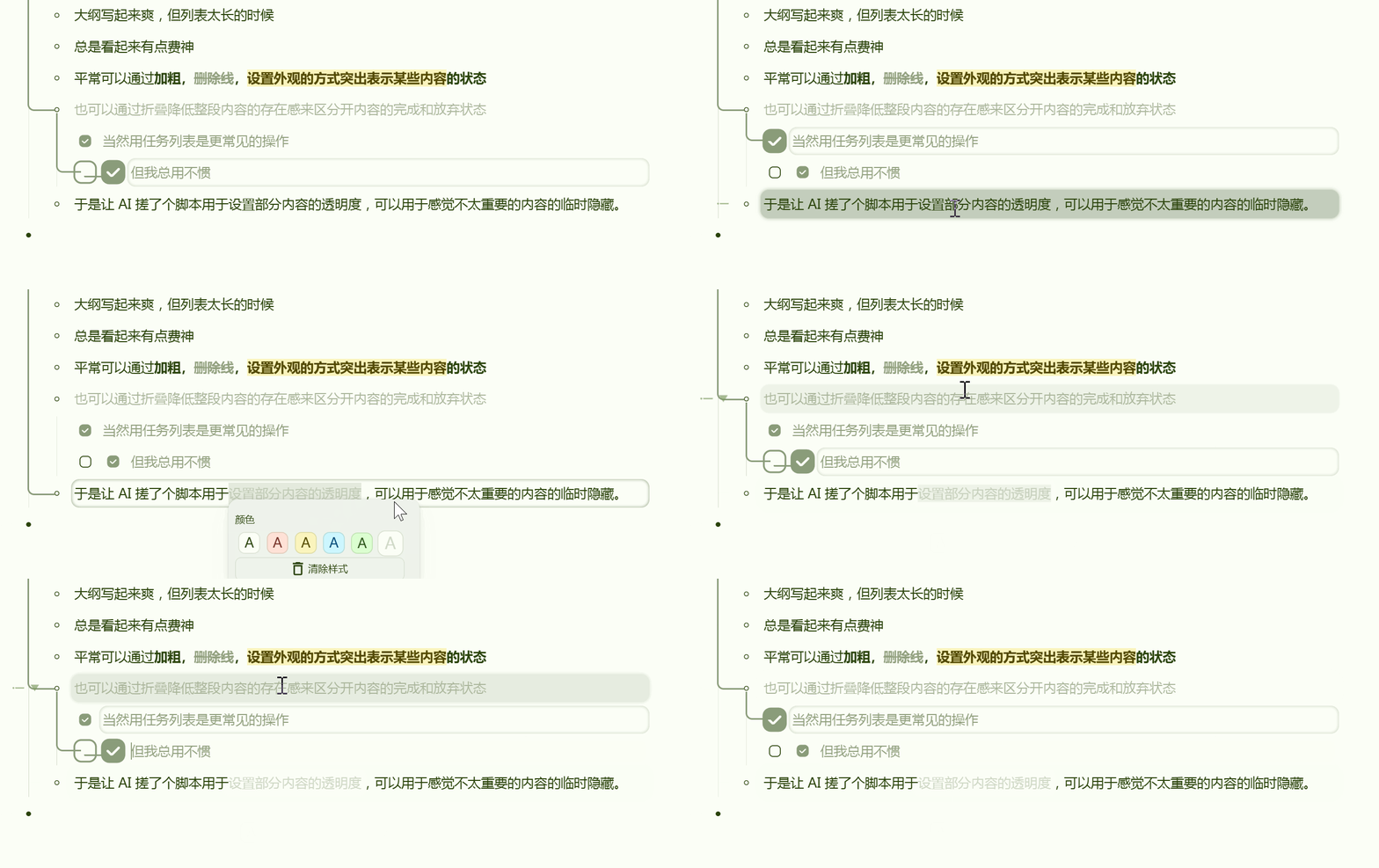
2025-09-05: 实现了 hover 将透明度取消设置,需要根据自己设置的样式进行修改
让 AI 写了个很莫名的片段
算是补充了一些样式折叠存在感太强和不支持部分内容折叠的生态位?
如果可以的话还想写个 hover 恢复原字体的效果,但是不太清楚咋弄。
/* 为所有带有透明度设置的元素添加hover动画效果 */
[style*="opacity:"],
[style*="rgba("] {
  /* 添加 添加过渡动画过渡效果 */
  transition: background-color 0.3s ease, color 0.3s ease, opacity 0.3s ease;
}

/* 行内元素hover效果 */
[style*="rgba(0, 0, 0, 0.2)"]:hover {
  background: transparent !important;
  color: inherit !important;
}

[style*="rgba(0, 0, 0, 0.2)"]:hover {
  &::before {
    opacity: 1 !important;
    transition: opacity 0.3s ease;
  }

  span[data-type="block-ref"],
  span[data-type="a"]{
    opacity: 1 !important;
    color: inherit !important;
    transition: opacity 0.3s ease, color 0.3s ease;
  }

  span[data-type="code"]{
    opacity: 1 !important;
    color: inherit !important;
    transition: opacity 0.3s ease, color 0.3s ease;
  }
}

/* 段落元素hover效果 */
div[style*="rgba(0, 0, 0, 0.2)"]:hover [contenteditable="true"] {
  span[data-type="block-ref"],
  span[data-type="a"]{
    opacity: 1 !important;
    color: inherit !important;
    transition: opacity 0.3s ease, color 0.3s ease;
  }

  span[data-type="code"]{
    opacity: 1 !important;
    color: inherit !important;
    transition: opacity 0.3s ease, color 0.3s ease;
  }
}
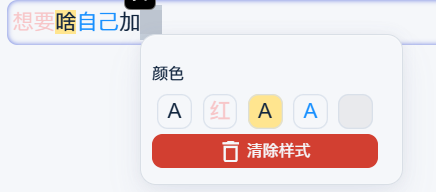
包括删除原有颜色和添加自定义颜色。
另附当前外观工具的简化 css 片段
/* 颜色工具简化 */
.protyle-font{
    /* 正数前三个 */
    div:nth-child(-n+3),
    /* 倒数第 2 到 17  */
    div:nth-last-child(n+2):nth-last-child(-n+17)
    {
        display: none!important;
    }

}
(function () {
  /******************* 配置区 ******************/
  const CUSTOM_COLORS = [
    { color: "rgba(255,0,0,0.2)", bgColor: "", text: "红", name: "浅红字" },
    { color: "", bgColor: "#ffe58f", text: "", name: "黄背景" },
    { color: "#1890ff"},
    { color: "rgba(0,0,0,0)", bgColor: "rgba(0,0,0,.05)", text: "A" },
  ];
  const REMOVE_N = 2;   // 区间起始(含)
  const REMOVE_M = 5;   // 区间结束(含)
  /********************************************/

  const CUSTOM_BTN_CLASS = "custom-color-btn";
  const VISIBILITY_MAP = new WeakMap(); // key: 面板节点, value: 上一次是否可见

  /* ---------- 工具函数 ---------- */
  function getColorId(cfg) {
    return cfg.color || cfg.bgColor || "";
  }

  function createBtn(cfg) {
    const id = getColorId(cfg);
    if (!id) return null;
    const btn = document.createElement("button");
    btn.className = `color__square ${CUSTOM_BTN_CLASS}`;
    btn.textContent = cfg.text || "A";
    btn.dataset.type = "style1";
    btn.dataset.colorId = id;
    btn.setAttribute("aria-label", cfg.name || id);
    const style = [];
    if (cfg.color) style.push(`color: ${cfg.color}`);
    if (cfg.bgColor) style.push(`background-color: ${cfg.bgColor}`);
    btn.style.cssText = style.join("; ");
    return btn;
  }

  /* ---------- 对单个面板执行“删区间 + 注入” ---------- */
  function handleOnePanel(panel) {
    const isVisible = !panel.classList.contains("fn__none");
    const wasVisible = VISIBILITY_MAP.get(panel);

    /* 仅当“刚刚变成可见”时处理一次 */
    if (isVisible && !wasVisible) {
      const allDivs = panel.querySelectorAll(".protyle-font > div");
      let heading = null;
      for (const d of allDivs) {
        if (d.textContent.trim() === "颜色" && d.nextElementSibling?.classList.contains("fn__hr--small")) {
          heading = d;
          break;
        }
      }
      if (!heading) return;
      const container = heading.nextElementSibling.nextElementSibling;
      if (!container || !container.classList.contains("fn__flex-wrap")) return;

      /* 删区间 [REMOVE_N, REMOVE_M] 内的原按钮 */
      const stockBtns = Array.from(container.querySelectorAll("button.color__square:not(.custom-color-btn)"));
      const start = REMOVE_N - 1;
      const end   = REMOVE_M - 1;
      for (let i = end; i >= start; i--) {
        if (stockBtns[i]) stockBtns[i].remove();
      }

      /* 清理旧自定义按钮 */
      container.querySelectorAll(`button.${CUSTOM_BTN_CLASS}[data-color-id]`)
               .forEach(b => b.remove());

      /* 插入最新自定义按钮 */
      CUSTOM_COLORS.forEach(cfg => {
        const btn = createBtn(cfg);
        if (btn) container.appendChild(btn);
      });
    }

    VISIBILITY_MAP.set(panel, isVisible);
  }

  /* ---------- 全局轮询:所有面板(含隐藏) ---------- */
  setInterval(() => {
    document.querySelectorAll('.protyle-util').forEach(handleOnePanel);
  }, 300);
})();

欢迎来到这里!
我们正在构建一个小众社区,大家在这里相互信任,以平等 • 自由 • 奔放的价值观进行分享交流。最终,希望大家能够找到与自己志同道合的伙伴,共同成长。
注册 关于